OCR vs Intelligent Document Processing: Key Differences, Benefits and Business Use Cases
⏱ 4 min read
Document Automation Guide
Choosing between OCR and IDP depends on how complex your documents are, what data you need from them and what the process must deliver.
Quick Answer
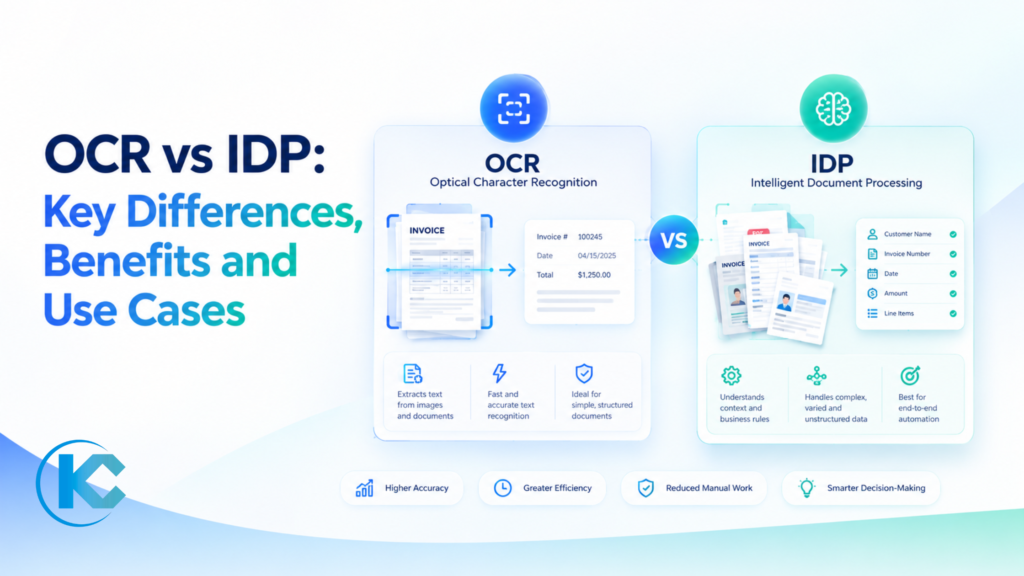
OCR converts text in images into digital text, while IDP interprets document content and turns it into usable business data. OCR suits digitization and searchable archives. IDP is better suited to workflows requiring field extraction, validation, exception handling and integration with CRM or ERP systems.
Author: Sanjeet Mahajan, Founder & CEO, Kizzy Consulting
Sanjeet Mahajan works on enterprise CRM architecture, AI solutions and business process automation.
Connect on LinkedIn.
What Is the Difference Between OCR and IDP?
Optical Character Recognition (OCR) is a text-recognition technology. It detects characters in scanned documents, photographs and image-based PDFs, then converts them into searchable or editable digital text. It helps businesses digitize paper records and make document content easier to find.
Intelligent Document Processing (IDP) uses OCR or similar document-reading technology as one part of a broader processing workflow. It can classify documents, identify relevant fields, interpret relationships between values, validate information and send structured results to business applications.
| Feature | OCR | IDP |
|---|---|---|
| Primary purpose | Recognize and convert text | Extract and process meaningful data |
| Technology | Text recognition and image processing | OCR plus AI, machine learning and language processing where appropriate |
| Document formats | Useful for clear scans and predictable layouts | Can handle structured, semi-structured and unstructured documents |
| Output | Searchable text or document files | Structured, validated fields for business systems |
| Automation | Primarily digitization and text capture | Can support end-to-end document workflows |
| Human review | May require proofreading and correction | Can route uncertain or failed extractions for review |
| Integration | Output usually needs manual entry or custom code | Can send validated fields to CRM, ERP and workflow tools |
The key distinction is not that OCR is always basic or that IDP is always accurate. Modern OCR can use AI techniques, and IDP performance depends on document quality, model configuration, validation rules and the data being extracted. IDP describes the wider workflow, not a guarantee of error-free processing.
How OCR and IDP Work, Step by Step
OCR typically turns document images into text. IDP builds on document capture by adding classification, contextual extraction, validation and workflow actions. The exact stages depend on the platform and business requirements.
- Capture the document: Ingest a scanned PDF, image, invoice, form or contract from an approved source.
- Recognize the content: Use OCR or another supported extraction method to identify text, tables and document structure.
- Classify the document: Where IDP is used, determine whether the file is an invoice, claim, contract, application or another document type.
- Extract required fields: Identify relevant information such as supplier name, invoice total, contract date, payment terms or customer details.
- Validate the results: Apply business rules, required-field checks and comparisons with trusted records. Route uncertain values to a person when necessary.
- Trigger the next action: Send approved data to a CRM, ERP, document management system or workflow application through a supported integration.
Example: OCR might recognize “$5,000” on an invoice. An IDP workflow can identify the value as the invoice total, associate it with the supplier, compare it against a purchase order and route a mismatch for review. The result is structured information that can support a business process.
How LLMs Changed Intelligent Document Processing
Earlier IDP tools often depended on templates and rules. Each new layout could require additional configuration, and a field that moved on the page could disrupt extraction. Large language models (LLMs) and vision-language models have expanded the ways document-processing systems can handle varied layouts and context.
- Context-aware document understanding: Vision-language models can interpret page images alongside text, helping process tables, checkboxes, stamps and handwriting in context rather than treating them only as isolated characters.
- More flexible field extraction: LLM-based extraction can use descriptions of required fields instead of relying entirely on fixed templates. A workflow can be configured for invoices, leases or claim forms with different layouts.
- Field-level confidence and validation: Extraction results can be assessed against confidence thresholds and business rules. Values that fail checks can be flagged rather than automatically accepted.
- Human review: Reviewers can focus on uncertain fields and exceptions. Their corrections can inform prompt updates, validation rules and evaluation test sets.
These capabilities can make document workflows more adaptable across structured, semi-structured and unstructured content. However, LLM-based extraction can still produce incorrect or incomplete results. Testing, validation and appropriate human oversight remain important, particularly for contracts, financial records and other high-impact documents.
Once documents are converted into structured data, that information can also support question answering across document collections through agentic RAG.
At Kizzy Consulting, document automation can be designed around the required fields, validation rules, review process and destination systems. The specific model and technology stack should be selected according to the solution’s requirements and confirmed implementation architecture.
Benefits and Business Use Cases
OCR and IDP solve different levels of document-processing complexity. OCR is useful when the main goal is to make text digitally accessible. IDP is more suitable when teams need consistent data extraction and repeatable actions across a document-driven workflow.
OCR Use Cases: Digitization and Searchable Records
- Document archiving: Convert scanned records into searchable digital files.
- Text retrieval: Find information in scanned letters, reports and historical documents.
- Basic form capture: Read clearly printed fields in predictable documents, with checks as needed.
- Accessibility: Make image-based text available to compatible search and assistive tools.
IDP Use Cases: AI Document Processing and Workflow Automation
- Invoice processing: Extract supplier details, invoice numbers, taxes and totals, then validate them against purchase orders.
- Insurance claims: Collect information across claim forms and supporting documents, flagging discrepancies for assessment.
- Contract analysis: Identify clauses, parties, dates and obligations for review by the appropriate team.
- Customer onboarding: Extract and validate submitted information before moving an application to the next stage.
- CRM and ERP data entry: Transfer approved document data into connected systems instead of relying on repeated manual entry.
For enterprise teams, the practical value of IDP comes from connecting extraction to the next business action. Kizzy Consulting’s AI document analysis agent is designed around document analysis and structured information extraction for business workflows.
Related Case Study
AI Contract Review for Real Estate: DocSense Case Study
We saw these document-processing challenges first-hand while building DocSense, our AI contract reviewer for real estate teams. DocSense reads purchase agreements, leases, addenda and disclosure forms, including scanned pages and handwritten notes, and gives every extracted field a confidence score. Fields below a set threshold go to a person for review, and validated records sync to Salesforce.
The workflow connects document reading with validation, human review and structured CRM data. Read the DocSense case study for more details.
How to Choose Between OCR and IDP
Choose based on the output you need, the documents you receive and the consequences of an incorrect extraction. A tool that performs well on clean, standardized pages may need additional configuration for handwriting, multi-page files or changing layouts.
Choose OCR When Text Conversion Is the Goal
- You need searchable or editable digital copies of documents.
- Your process mainly involves text capture rather than downstream decisions.
- Your document formats are predictable and extraction requirements are simple.
Choose IDP When Documents Must Drive Business Actions
- You need to classify files and extract specific fields from varied layouts.
- Extracted information must be checked against business rules or existing records.
- Documents need to trigger approvals, exception queues or CRM and ERP updates.
- You need monitoring and human review for low-confidence or high-impact results.
Implementation Checklist for OCR and IDP
- Identify the document types, volumes and business fields that matter.
- Define accuracy targets and rules for missing, conflicting or uncertain values.
- Test representative documents, including poor scans and unusual layouts.
- Confirm access controls, retention, auditability and data-handling requirements.
- Connect the workflow to target systems and test exception handling before rollout.
- Monitor extraction quality and update the process when documents or business rules change.
Use the AI readiness assessment to evaluate your data, systems and automation requirements before planning an implementation.
Do not evaluate a solution only on how well it reads text. Test the entire workflow, including validation, human review, integrations and the time required to resolve exceptions.
Frequently Asked Questions
Does IDP Use OCR?
Yes. Many IDP solutions use OCR to read text from scans and images. They then add capabilities such as document classification, contextual data extraction, validation and workflow routing. The specific technologies vary by platform, and not every IDP solution uses the same processing pipeline.
Which Is More Accurate, OCR or IDP?
Accuracy depends on the document, field, image quality and system configuration. OCR accuracy measures text recognition, while IDP also needs to extract the correct fields and validate them. Test both using representative documents and measure field-level errors, not just text recognition.
Can IDP Process Unstructured Documents?
Yes. IDP can be designed to process unstructured and semi-structured documents such as contracts, letters and varied invoices. Results depend on the platform, document complexity and extraction requirements. Important or low-confidence fields should be validated or routed for human review.
Can IDP Integrate with CRM and ERP Systems?
Yes. IDP workflows can send validated data to CRM, ERP and other business applications using supported connectors, APIs or middleware. Integration design should define field mappings, permissions, error handling and audit logs before automated updates are enabled.
Is IDP Worth the Investment?
IDP is worth it when documents drive a workflow your team depends on. Judge the value on four outcomes: turnaround time from a document arriving to usable data in your systems; field-level accuracy on the fields that matter most; fewer exceptions that need manual fixes; and the ability to handle more document volume without slowing the process. Start with one document type, measure these four outcomes in a pilot using your own documents, then scale to the next type.
Conclusion and Next Steps
OCR makes document text accessible; IDP uses document data to support more complete business workflows. The right approach depends on whether you need digitization alone or validated information that can move through your systems.
- Start with OCR for straightforward text conversion and searchable archives.
- Consider IDP for complex documents, field validation and workflow automation.
- Measure results using your own documents, field-level accuracy, exception rates and operational impact.
Talk to Our Team
See IDP Work on Your Own Documents
Kizzy Consulting can help assess document workflows, define extraction requirements and plan integration with your business systems. Start with your document types, data quality and desired outcomes.