-
Pingback: Exploring the World of Salesforce AppExchange - Kizzy Consulting-Top Salesforce Partner
How to Publish an App on Salesforce AppExchange: Complete Guide (2026)
⏱ 5 min read
SALESFORCE APPEXCHANGE
Learn how to build, package, prepare, review, list, publish, and market a Salesforce AppExchange app while creating a product that is secure, useful, and ready for Salesforce customers.
Quick Answer: How Do You Publish an App on Salesforce AppExchange?
Publishing a Salesforce AppExchange app generally involves defining the solution, building and testing it, packaging the application appropriately, connecting the solution to the Salesforce Partner Console, completing any required security review, creating the AppExchange listing, submitting it for approval, and publishing it. The exact requirements vary depending on the type of solution being distributed.
Introduction
The Salesforce AppExchange is a marketplace where Salesforce customers can discover solutions that extend Salesforce and address specific business requirements. For independent software vendors, technology companies, and Salesforce partners, an AppExchange listing can provide a route to introduce a solution to the Salesforce ecosystem.
However, publishing an app is more than creating a listing page. A successful AppExchange product needs a clear use case, reliable architecture, appropriate packaging, strong security practices, useful documentation, and a customer-focused go-to-market strategy.
Salesforce’s current partner resources emphasize security and trust throughout the development and publishing process. For solutions that require security review, Salesforce recommends treating security as part of development rather than waiting until submission.
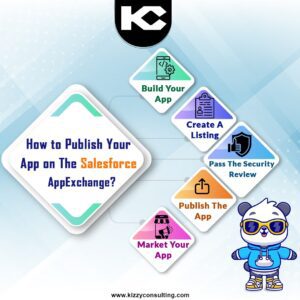
Key steps involved in publishing a Salesforce AppExchange app.
Salesforce AppExchange Publishing Overview
Before starting your listing, understand the publishing workflow, solution requirements, and security-review expectations.
What Is Salesforce AppExchange?
Salesforce AppExchange is Salesforce’s enterprise marketplace for discovering, installing, and managing third-party applications and other Salesforce solutions. It allows Salesforce customers to extend their CRM environment with applications and technologies developed by Salesforce partners and independent software vendors.
AppExchange solutions can support a wide range of business functions, including sales, marketing, customer service, finance, data management, productivity, industry-specific processes, and integrations.
For an ISV, AppExchange can therefore serve as both a product-distribution channel and a way to demonstrate how its technology solves a specific customer problem within the Salesforce ecosystem.
Why Publish an App on Salesforce AppExchange?
Publishing an application can help a technology company build visibility within the Salesforce ecosystem, provide customers with a standardized way to discover its solution, and establish a repeatable distribution model.
Marketplace Visibility
Give Salesforce customers a dedicated destination to discover your product.
Product Distribution
Package and distribute a solution designed specifically for the Salesforce ecosystem.
Customer Trust
Build customer confidence through appropriate security, documentation, and marketplace processes.
Ecosystem Growth
Create opportunities to work with Salesforce customers, consultants, and technology partners.
Step 1: Define and Build Your Salesforce App
Before thinking about the AppExchange listing, start with the product itself. Define the customer problem, target users, core functionality, integrations, data requirements, and expected business outcome.
Salesforce provides multiple development technologies and packaging approaches. The appropriate architecture depends on whether the solution is primarily native to Salesforce, uses Salesforce APIs, relies on external services, or combines multiple components.
Define These Before Development
- Target customer and industry
- Primary business problem
- Core application features
- Salesforce products and editions supported
- External systems and APIs required
- Data processed or stored by the application
- Security and permission model
- Packaging and distribution approach
- Pricing and licensing model
Salesforce’s ISV onboarding guidance recommends having a clear understanding of the solution architecture early in the development process so that security and distribution requirements can be addressed from the beginning.
Building a Custom Salesforce App First?
If you are still at the product-development stage, see our detailed guide on how to plan, develop, test, and prepare a custom Salesforce AppExchange application.
Step 2: Package and Prepare Your Solution
Your application needs to be packaged and prepared according to the distribution model you intend to use. Packaging allows Salesforce solutions to be distributed consistently and helps define how components, dependencies, upgrades, and licensing are managed.
The exact packaging approach depends on the solution architecture and Salesforce’s current packaging requirements. Salesforce’s ISVforce documentation provides guidance for building and distributing AppExchange solutions.
Components
Determine which application components belong in the distributable solution.
Dependencies
Document dependencies on Salesforce features, packages, APIs, or external systems.
Upgrades
Plan how customers will receive future versions and enhancements.
Step 3: Test Your App Thoroughly
Testing should happen well before an AppExchange submission. Test the application in representative Salesforce environments and verify that its functionality, permissions, integrations, data handling, and user experience behave as expected.
- Functional testing
- Integration testing
- Permission and access testing
- Data security testing
- Performance testing
- Upgrade and installation testing
- Negative and edge-case testing
- User acceptance testing
Step 4: Prepare for the Salesforce AppExchange Security Review
Security review is one of the most important parts of preparing an AppExchange solution. Salesforce requires security review for certain solution types, including Salesforce Platform packages and Salesforce Platform API solutions. Other solution types may have different requirements.
Salesforce recommends addressing security during development rather than treating it as a final pre-launch task. The review can involve automated scanning as well as manual security analysis.
Security Areas to Review
- Secure coding practices
- Authentication and authorization
- CRUD and field-level access
- Data exposure and sharing
- API and integration security
- Secrets and credential management
- External endpoints and applications
- Input validation and secure data handling
- Documentation of data flows
Salesforce’s current guidance also requires detailed documentation for integrations and secrets in applicable Connected App and External Client App scenarios. New integrations should use External Client Apps rather than Connected Apps under the current guidance.
Step 5: Submit Your Solution for Security Review
When your solution is ready and security review applies, the review is initiated through the Salesforce Partner Console. Salesforce’s current workflow includes preparing and submitting the required information, submission verification, testing by Product Security, and completion of the review.
Your submission should contain the information Salesforce needs to understand how the solution works and how it handles data. Depending on the architecture, this can include usage documentation, data-flow documentation, scanner reports, credentials for applicable integrations, and other required materials.
Prepare Your Submission Materials
- Application and architecture details
- Usage and installation documentation
- Data-flow documentation
- Security and privacy information
- Integration details and required credentials where applicable
- Security scanner results and explanations of relevant false positives
- Test credentials and instructions for reviewers
Salesforce documentation indicates that a typical security review can take several weeks, so teams should include review and potential remediation time in their launch plan.
Step 6: Create Your Salesforce AppExchange Listing
The listing is the public-facing presentation of your application. It should make it immediately clear who the product is for, what problem it solves, how it works, and why a Salesforce customer should consider it.
Salesforce’s Partner Console provides tools for creating and managing listings, connecting technologies such as packages and APIs, and monitoring listing analytics.
Clear Product Name
Make the purpose of the application easy to understand.
Strong Value Proposition
Explain the customer problem and measurable value your solution addresses.
Product Visuals
Use clear screenshots, demonstrations, and other approved listing assets.
Documentation
Give prospective customers enough information to understand implementation and usage.
Step 7: Submit, Approve, and Publish Your App
Once your listing and associated solution requirements are complete, submit the listing through the Partner Console for the applicable approval workflow. The console is also used to manage published and in-progress listings.
If Salesforce identifies issues during review, address the findings, update the solution or documentation as required, and follow the applicable resubmission process.
Do not treat publication as the end of the product lifecycle. An AppExchange application needs ongoing maintenance, security updates, compatibility testing, documentation updates, and customer support.
Step 8: Market and Grow Your App
Publishing your application creates a marketplace presence, but customers still need to understand why the product is relevant to them. A focused go-to-market strategy can help turn marketplace visibility into qualified interest.
AppExchange Marketing Checklist
- Create a dedicated product landing page.
- Publish educational content around the problem your app solves.
- Demonstrate the product through videos and walkthroughs.
- Use relevant Salesforce and industry communities.
- Build relationships with Salesforce consultants and implementation partners.
- Collect customer feedback and case studies.
- Monitor listing performance and lead activity.
- Continue improving the product based on customer needs.
Salesforce’s Partner Console includes analytics that can provide visibility into listing activity such as views, test drives, and lead events, helping partners evaluate how customers interact with their listings.
Best Practices for Publishing a Salesforce AppExchange App
1. Start With the Customer Problem
Build around a clearly defined customer pain point instead of adding features without a clear business purpose.
2. Build Security In Early
Security should be considered throughout architecture and development, not only immediately before submission.
3. Keep the UX Simple
Make the product intuitive for Salesforce administrators and end users.
4. Document Everything
Clear installation, configuration, security, integration, and usage documentation reduces friction.
5. Test Before Review
Find functional, security, and integration issues internally before submitting your solution.
6. Keep Improving
Use customer feedback, product analytics, and Salesforce platform changes to guide future releases.
Need Help Developing and Publishing Your Salesforce App?
Kizzy Consulting can help ISVs and organizations with Salesforce AppExchange application development, packaging, integrations, security-review preparation, and AppExchange publishing.
Frequently Asked Questions About Salesforce AppExchange
How do I publish an app on Salesforce AppExchange?
The process generally involves building and testing the solution, packaging it appropriately, connecting the solution through the Salesforce Partner Console, completing any required security review, creating the listing, submitting it for approval, and publishing it. Requirements vary based on the solution type.
Does every Salesforce AppExchange app require a security review?
Not every solution type has the same requirement. Salesforce currently identifies Salesforce Platform packages, Marketing Cloud Engagement API solutions, and Salesforce Platform API solutions as solution types requiring security review in the relevant publishing workflow, while other solution types can have different requirements.
How long does Salesforce AppExchange security review take?
Salesforce’s current Trailhead guidance says a solution typically takes around 4–5 weeks to move through the security-review process, although actual timing can vary based on the submission and any issues that need to be addressed.
What should I prepare before submitting my app for security review?
Prepare architecture and usage documentation, data-flow information, security details, scanner results where applicable, testing instructions, and credentials for applicable integrations. Salesforce provides a solution-specific checklist to help partners identify the materials required for their architecture.
Can a small company publish an app on Salesforce AppExchange?
Yes. AppExchange is used by ISV partners and other Salesforce ecosystem participants. The practical requirements are tied to the solution, partner program, publishing workflow, security, technical quality, and marketplace requirements rather than simply company size.
How can I improve my AppExchange listing?
Focus on a clear value proposition, specific customer use cases, strong product visuals, accurate documentation, clear pricing information, and an easy-to-understand explanation of how the application works with Salesforce.
Can Kizzy Consulting help develop a Salesforce AppExchange app?
Yes. Kizzy Consulting provides Salesforce AppExchange development services covering application development, packaging, integrations, security-review preparation, and publishing support.
Ready to Build and Publish Your Salesforce App?
From product architecture and development to packaging, security-review preparation, and AppExchange publishing, get expert Salesforce support for your ISV journey.
Start a conversation with Kizzy Consulting.
Email [email protected] or use the consultation form below.
Conclusion
Publishing an app on Salesforce AppExchange involves much more than creating a marketplace listing. The strongest AppExchange products start with a clearly defined customer problem, a well-designed Salesforce architecture, secure development practices, thorough testing, and useful documentation.
From there, partners need to understand the applicable packaging and security-review requirements, prepare a strong AppExchange listing, and create a sustainable plan for marketing, customer support, and product improvements.
With the right technical foundation and a customer-focused product strategy, AppExchange can become an important channel for distributing Salesforce solutions and building a presence within the Salesforce ecosystem.