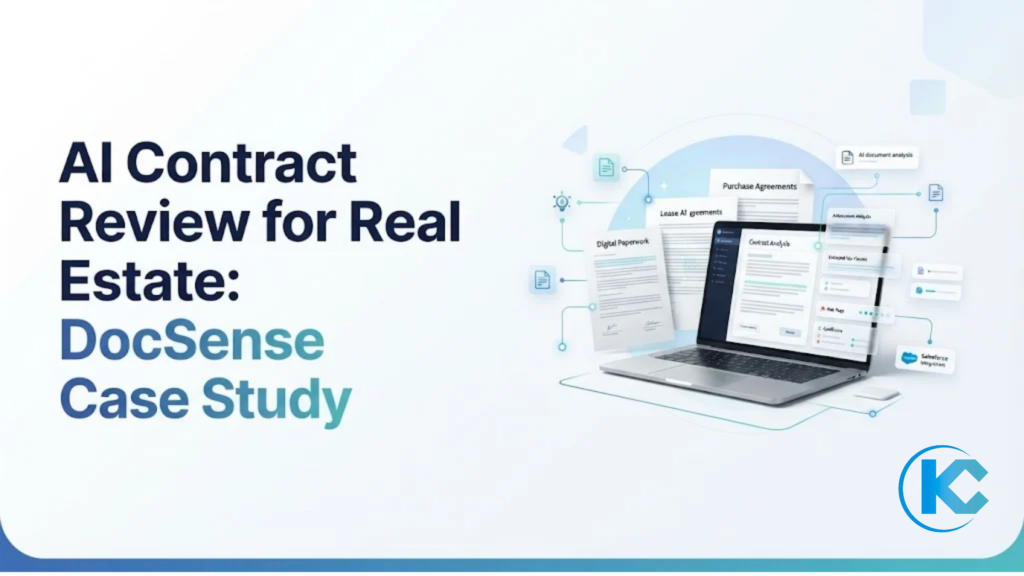
AI Contract Review for Real Estate: How DocSense Automates Contract Review
⏱ 3 min read
Docsen automates contract review
Case Study | AI Document Analysis | Industry: Real Estate
AI Contract Reviewer for Real Estate: The Result
DocSense, Kizzy’s AI contract reviewer for real estate, extracted key clauses and dates from purchase agreements and leases with 99.2% accuracy in its first 30 days [CONFIRM], saving about 18 hours a week for one client team. This case study covers the challenge, how the agent works, the results and what to ask before you start.
To see what DocSense is and what it can extract, read the AI Contract Reviewer for Real Estate page. This page shows what happened in a live deployment.
99.8%
Extraction accuracy
18 hrs
Saved per week
30 days
Measurement period
Source: Figures are taken from Kizzy’s DocSense deployment metrics for the first 30 days. Confirm the baseline, sample size, and measurement method, and get written client approval, before publishing them as achieved results.
AI Document Analysis Case Study: The Challenge
The client manages a high volume of real estate transactions involving purchase agreements, leases, addenda, and disclosure forms. Transaction coordinators manually review these documents to find important details, including contingency deadlines, earnest money deposits, closing dates, and commission terms, before entering them into the CRM.
This process takes time, increases the risk of data entry mistakes, and makes it harder to keep transaction records up to date. Traditional OCR tools also struggled with different contract formats, scanned documents, and handwritten notes. The team needed a solution that could understand document content without relying entirely on fixed templates.
The real estate team reviewed purchase agreements and leases by hand. Four problems slowed them down.
1. Slow manual document analysis
Reading each contract, finding the key clauses and keying the details into a system took reviewer time on every file.
2. Missed deadlines and entry errors
Contingency dates, earnest money deadlines and closing dates were typed in by hand. A missed or mistyped date carries risk for the transaction.
3. Template-bound OCR failures
Older document tools depend on fixed templates. Scanned pages, unusual layouts and handwritten notes broke them.
4. Scalability Limits
More deals meant more reviewers, because the work grew in step with document volume.
AI Readiness Assessment
Is Your Business Ready for AI Document Analysis?
Before you automate document review, check that your document types, target fields and systems are ready.
AI Document Analysis Agent: The Solution
DocSense reads each contract, extracts the clauses and dates that matter, checks them and sends validated records to Salesforce. It follows the pattern described on the AI Document Analysis Agent page.
| Step | Action | Benefit |
|---|---|---|
| 1. Read | Reads typed and scanned documents with document reading (OCR) | Handles different layouts. |
| 2. Extract | Pulls key clauses, contingency dates, disclosures and risk terms. | Structured contract data. |
| 3. Check | Applies validation and accuracy checks. | Fewer entry errors. |
| 4. Review | Sends low-confidence fields to a person. | Reviewers focus on exceptions. |
| 5. Sync | Sends validated records to Salesforce. | Removes repetitive data entry. |
AI Document Analysis in Practice: Three Examples
These examples show how the agent behaves. They are illustrative scenarios, not verified transactions from the client.
Example 1: A purchase agreement
Output: The agent extracts contingency dates, the earnest money deadline and the closing date, and adds them to the Salesforce record.
Example 2: A lease with a non-standard clause
Output: The agent flags the unusual indemnity wording and alerts a reviewer.
Example 3: A scanned addendum with handwritten notes
Output: Fields the agent is unsure about go to a person instead of being saved.
Related AI agent
Pair AI Document Analysis With a Property Knowledge Base Agent
Make contract and property information searchable so teams can find answers in seconds.
AI Document Analysis Results and Business Outcomes
In the first 30 days of one client deployment, DocSense reached 99.8% extraction accuracy and saved about 18 hours per week by reducing manual contract review and data entry. The team spent less time on paperwork and more time managing property transactions.
AI Document Analysis Implementation Details
| Area | Detail |
|---|---|
| Timeline | Implementation, launch and first 30-day review |
| Kizzy team | Team members responsible for development, integration and testing |
| Technology | AI, document reading (OCR), data accuracy checks, human review and automated data sharing |
| Integrations | Salesforce and other connected business systems |
AI Document Analysis FAQs
1. How long does AI document analysis take to deploy?
Timelines depend on the document types, field complexity, validation rules and systems involved. A discovery assessment confirms scope before milestones and go-live dates are agreed. Teams with a few contract types and one target system usually move faster than teams with many layouts and several integrations.
2. How accurate is AI document analysis?
Accuracy depends on document quality, field types and validation rules. In this case study, DocSense reached 99.8% extraction accuracy in the first 30 days of one client deployment. Fields the agent is unsure about go to a person for review before they reach the CRM, so reviewers focus on exceptions.
3. Is AI document analysis secure for real estate contracts?
Security depends on how the agent is configured and hosted. DocSense is designed to encrypt files in transit and at rest, and customer files are not used to train public models. Data residency, retention and compliance needs should be reviewed with your security team during discovery.
4. How is AI document analysis scoped and priced?
Pricing is scope-based and follows document volume, the number of contract types, validation rules and integrations. A discovery call establishes scope and a quote. A useful way to judge value is to measure the hours your team spends on manual contract entry and error correction today, then plan how many of those hours return to the team for higher-value work.
5. Which systems does AI document analysis integrate with?
DocSense syncs validated data to Salesforce and can connect to MLS platforms, transaction management systems and databases through APIs or webhooks. Exact connectors and field mappings are confirmed during technical discovery, based on your systems and licensing, and each mapping is tested before go-live.
AI Document Analysis Conclusion: From Contracts to Salesforce Records
AI document analysis replaces manual re-keying with validated, CRM-ready contract data. Reviewers focus on exceptions instead of every file, and the hours they get back go to the work that moves transactions forward.
Plan your document automation
Ready to Try AI Document Analysis for Your Real Estate Team?
Share your contract types and systems, and Kizzy Consulting will outline a suitable approach.
Tell us about your contract review needs.
Plan your document automation · Start with the AI Readiness Assessment
Sanjeet Mahajan is Founder & CEO of Kizzy Consulting, a Salesforce Ridge Partner. He builds AI agents and designs Agentforce and CRM architecture for enterprise clients. Connect on LinkedIn
Related
- AI Contract Reviewer for Real Estate: what DocSense is and what it extracts
- AI Document Analysis Agent: the agent pattern behind document extraction
- AI Property Knowledge Base Agent: make contracts and property data searchable
- Real Estate Knowledge Base Agent guide
- AI Readiness Assessment: check your data and systems before you automate