Salesforce Scoping Rules vs Restriction Rules: Complete Guide
⏱ 3 min read
SALESFORCE DATA SECURITY
Understand the difference between Salesforce Scoping Rules and Restriction Rules, how they affect data visibility, and when each rule should be used.
In Salesforce, Scoping Rules and Restriction Rules play important roles in controlling data visibility and user access. Although both can influence the records users see, they solve different problems.
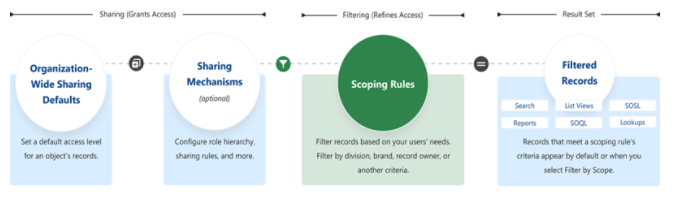
Scoping Rules primarily help users focus on the records that are most relevant to their work. They reduce noise in searches, list views, reports, and other Salesforce experiences without removing the user’s underlying record access.
Restriction Rules, in contrast, provide an additional layer of record-level security. They can restrict which records a user is able to access even when the user would otherwise have access through Salesforce sharing mechanisms.
Quick distinction: Scoping Rules help users focus on relevant records, while Restriction Rules help limit record access.
What Are Salesforce Scoping Rules?
Salesforce Scoping Rules enhance user productivity by reducing noise and unnecessary searches. They allow organizations to define a default scope of records based on selected criteria.
Importantly, Scoping Rules do not restrict the record access that users already have. Users can still access records they are otherwise authorized to access.
01
Improve Productivity
Reduce irrelevant records and help users focus on the data that matters to their role.
02
Default Record Scope
Define which records should appear by default based on selected criteria.
03
No Access Removal
Users retain access to records they are already authorized to access.
Availability in the original Salesforce documentation:
Lightning Experience in Performance and Unlimited editions.
Lightning Experience in Performance and Unlimited editions.
Do Salesforce Scoping Rules Affect User Access?
No. Salesforce Scoping Rules do not remove or reduce the record access a user already has. They can be enabled or disabled on a query-by-query basis, depending on the Salesforce feature and context.
This distinction is important when designing a Salesforce security model. Scoping Rules are primarily about helping users work with a more relevant subset of records rather than creating a hard security boundary.
How Do Salesforce Scoping Rules Work With Salesforce Features?
How Are Salesforce Scoping Rules Configured?
In the original implementation context of this article, Scoping Rules were created and managed using Salesforce APIs, including the Tooling API and Metadata API.
What Are Salesforce Restriction Rules?
Salesforce Restriction Rules enhance record-level security by allowing organizations to limit which records certain users can access.
Unlike Scoping Rules, Restriction Rules can further reduce the records available to users based on a defined record filter. This makes them an important part of Salesforce data security when users should not be able to access every record that would otherwise be available through sharing.
Record-Level Security
Restriction Rules can further limit which records a user can access.
Focused Data Access
Users see only records that satisfy the applicable restriction criteria.
Security & Compliance
They can support Salesforce data governance and security requirements.
Availability in the original Salesforce documentation:
Lightning Experience in Enterprise, Performance, Unlimited, and Developer editions.
Lightning Experience in Enterprise, Performance, Unlimited, and Developer editions.
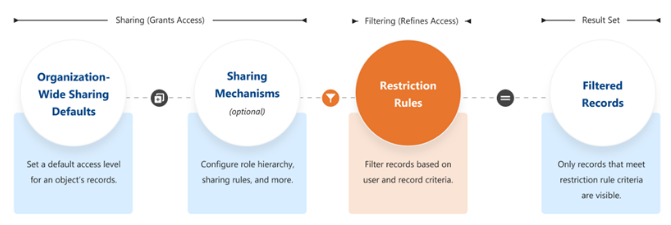
Do Salesforce Restriction Rules Affect Sharing Settings?
Yes. Restriction Rules can further narrow the records a user can access through Salesforce sharing settings.
When a Restriction Rule is applied to a user, records that the user would otherwise have read access to through sharing can be filtered so that only records matching the applicable recordFilter remain available.
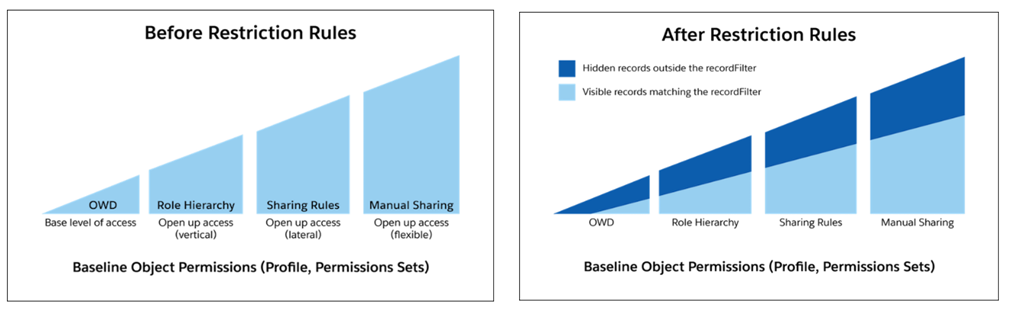
How Are Salesforce Restriction Rules Configured?
Restriction Rules can be created and managed in Salesforce Setup or through the Tooling API and Metadata API.
Why Restriction Rules Matter
A Salesforce security architecture often combines organization-wide defaults, role hierarchy, sharing rules, manual sharing, permission sets, and record-level controls. Restriction Rules provide an additional way to narrow record visibility for applicable users.
Salesforce Integration
Salesforce Data Security Goes Beyond Access Rules
Salesforce data governance becomes even more important when CRM data is connected with external systems. For example, payment and subscription workflows may require controlled data synchronization between Salesforce and Stripe. Explore our guide on managing subscriptions and invoices from Salesforce using Stripe APIs and Webhooks.
Salesforce Scoping Rules vs Restriction Rules
Key Takeaways for Salesforce Data Security
Scoping Rules
Help users focus on relevant Salesforce records without removing their existing access.
Restriction Rules
Provide an additional record-level layer that can narrow what users can access.
Security Architecture
Both should be considered within the broader Salesforce permissions and sharing model.
Need Help With Salesforce Security & Implementation?
Kizzy Consulting helps organizations design, implement, integrate, and optimize Salesforce environments across industries. From data security and automation to Salesforce integrations, our team can help align the platform with your business processes.
Salesforce Scoping Rules and Restriction Rules FAQs
What is the difference between Salesforce Scoping Rules and Restriction Rules?
Salesforce Scoping Rules help users focus on relevant records without removing their existing access. Restriction Rules can further limit the records a user is able to access based on defined criteria.
Do Salesforce Scoping Rules restrict record access?
No. Scoping Rules do not remove the record access a user already has. Their primary purpose is to provide a more focused view of relevant records.
How do Salesforce Restriction Rules improve data security?
Restriction Rules can further filter records available to users, including records they might otherwise have access to through Salesforce sharing settings.
Can Salesforce Restriction Rules override sharing access?
Restriction Rules can further narrow the records a user can access after sharing mechanisms have granted access. They therefore work as an additional filtering layer rather than simply granting access.
Where do Salesforce Scoping Rules apply?
In the original context of this article, Scoping Rules applied to areas such as Lightning Experience list views, lookups, reports, search, SOQL, and SOSL, subject to the applicable conditions.
How are Salesforce Scoping Rules configured?
The original Salesforce documentation referenced Tooling API and Metadata API methods for creating and managing Scoping Rules. Salesforce capabilities and configuration options can change over time.
How are Salesforce Restriction Rules configured?
Restriction Rules can be managed through Salesforce Setup and can also be handled through Salesforce APIs such as the Tooling API and Metadata API, depending on the implementation approach.
Why are Salesforce data security rules important?
Salesforce security rules help organizations control how users interact with CRM data, reduce unnecessary data exposure, support governance requirements, and create a more focused user experience.
Kizzy Consulting
Kizzy Consulting is a Salesforce Ridge Consulting Partner that has successfully implemented 100+ Salesforce projects for 100+ clients across sectors including Financial Services, Insurance, Retail, Sales, Manufacturing, Real Estate, Logistics, and Healthcare across the US, Europe, Australia, and other markets.
Ready to improve your Salesforce environment?
Email [email protected] or Contact Kizzy Consulting.