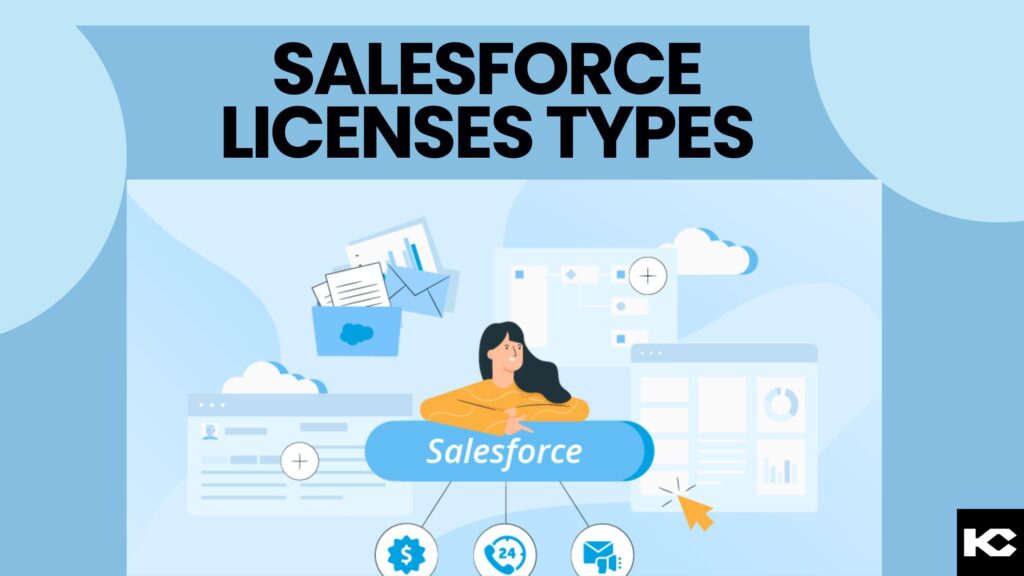
Salesforce Licenses and Agentforce Pricing: Types, Costs and How to Buy (2026)
⏱ 8 min read
SALESFORCE LICENSING GUIDE · 2026
Understand Salesforce license types, edition differences, Experience Cloud access, public pricing, and the licensing models available for Agentforce. Use this guide to align user roles, functionality, AI usage, and licensing costs with your business requirements.
Quick Answer: What Are Salesforce Licenses?
Salesforce licenses control what each user can access, from full Sales or Service Cloud users to Platform and Experience Cloud users. Agentforce is priced separately: consumption through Flex Credits, per-conversation pricing for eligible service use, or per-user add-ons and Agentforce 1 Editions. Choose by user role, agent volume and channel.
Author: Sanjeet Mahajan, Founder & CEO, Kizzy Consulting
Last updated: October 26, 2026
What Are Salesforce Licenses and How Do They Work?
Salesforce licenses establish the functionality available within an organization and the baseline access assigned to individual users. Each Salesforce user requires an appropriate user license. Depending on the product, additional feature licenses and permission set licenses can extend access when supported by the user’s license and purchased entitlements.
Think of a license as the foundation of a user’s access. Profiles, permission sets, and other security settings determine what the user can do with the functionality available to them. A license alone does not automatically grant unrestricted access to every record or feature.
For example, a sales representative may need access to leads, accounts, contacts, and opportunities. A developer building a custom internal application may require a different combination of capabilities. An integration account may need API access rather than a regular interactive login.
Salesforce Licenses: Editions vs. User Access
| Concept | What it determines |
|---|---|
| Salesforce edition | The product package, features, and capabilities available to the organization. |
| User license | The baseline functionality available to an individual user. |
| Feature license | Access to specific additional functionality, where supported. |
| Permission set license | Entitlement to additional product features or capabilities. |
| Usage-based entitlement | A consumption allowance, such as a defined number of logins or AI credits. |
According to Salesforce Trailhead’s licensing guide, editions, add-ons, licenses, and permissions work together to determine available functionality. Availability varies by product, edition, and contract.
Is Your Business Ready for AI?
Before adding AI capabilities to your Salesforce environment, evaluate your data, infrastructure, workflows, permissions, and business use cases to identify the right starting point.
Salesforce Pricing by Edition (2026)
Salesforce pricing depends on the product, edition, number of users, contract terms, and optional add-ons. The following table summarizes the prices included in the supplied draft for Sales Cloud suites. These are public US-dollar price figures, not a customized quote or a complete estimate of implementation and operating costs.
Pricing reference date: October 26, 2026. Currency: USD. Prices are per user per month unless stated otherwise. Confirm current pricing and billing terms before purchasing.
| Sales Cloud suite | Price in supplied draft | General positioning | What to check |
|---|---|---|---|
| Free Suite | $0/user/month | Individuals and very small teams starting with CRM. | User limits and feature restrictions. |
| Starter Suite | $25/user/month | Small businesses looking for integrated CRM capabilities. | Customization, automation, integration, and feature restrictions. |
| Pro Suite | $100/user/month | Growing businesses that need more customization and automation. | API access, integrations, automation limits, and add-ons. |
| Core | $195/user/month | Sales teams needing advanced CRM and pipeline capabilities. | Included AI entitlements and advanced features. |
| Advanced | $395/user/month | Organizations with more demanding sales processes. | Required capabilities, storage, and contract conditions. |
| Max | $550/user/month | Organizations seeking a broader premium sales offering. | Included features and any additional products required. |
Official source: Salesforce Sales Cloud pricing and edition comparison.
These prices refer to listed Sales Cloud suites, not every Salesforce product or legacy edition. Service Cloud, Experience Cloud, industry products, integrations, and specialized licenses can have different pricing. Salesforce may change public prices or package names, so reconfirm the applicable price before purchasing.
What Affects the Total Cost of Salesforce Licensing?
- Number of users: The number of licensed employees and external users affects the subscription total.
- Required capabilities: Advanced reporting, automation, APIs, service features, and industry functionality may require a different edition or add-on.
- External access: Customer and partner portals may use member-based or login-based licensing models.
- AI usage: Agentforce consumption and additional AI entitlements may be priced separately from CRM user licenses.
- Implementation: Configuration, integrations, migration, training, and ongoing administration can add to the overall cost.
- Contract terms: Billing frequency, contract length, negotiated discounts, and renewal terms affect the amount a business pays.
What Are the Main Salesforce License Types?
Salesforce provides several license categories to support internal employees, external users, applications, and specialized functionality. The available options depend on the Salesforce products and entitlements purchased by the organization.
1. Salesforce User Licenses
User licenses establish the baseline access assigned when a user account is created. The appropriate license depends on the user’s responsibilities and the product offering.
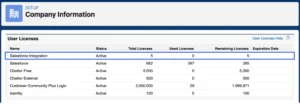
- Salesforce license: Intended for users who require standard CRM functionality, including supported access to accounts, contacts, leads, opportunities, and other CRM features.
- Salesforce Platform license: Designed for users who primarily need supported custom applications and platform functionality rather than the full range of standard CRM objects.
- Identity license: Supports identity and single sign-on use cases where users need access to connected applications without requiring a full CRM license.
- Chatter Free license: Supports eligible internal collaboration use cases, subject to current availability and restrictions.
- Integration licensing: Designated integration-user options may support system-to-system scenarios where available and appropriate for the organization’s product and contract.
These licenses are not interchangeable. Check supported objects, API access, product requirements, and restrictions before assigning a license.
2. Salesforce Feature Licenses
Feature licenses provide access to specific functionality that is not automatically included in a user’s baseline license. Examples may include Marketing User, Knowledge User, or Service Cloud User, depending on the product and configuration.
For instance, if a marketing employee cannot perform a required campaign-related task, an administrator should check the applicable product entitlement and Marketing User setting before changing the user’s broader access configuration.

3. Salesforce Permission Set Licenses
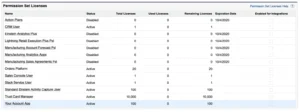
Permission set licenses, also called PSLs, provide entitlements to additional product capabilities. They are commonly associated with specialized Salesforce features and applications.
After confirming that the required entitlement is available, an administrator can assign the relevant permission set license and then configure the corresponding permission set. Some products require this entitlement before additional permissions can be assigned.
4. Salesforce Usage-Based Entitlements
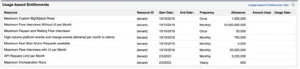
Usage-based entitlements provide a defined allowance for certain resources instead of operating exclusively as fixed per-user seats. Examples include monthly login allocations for supported login-based licenses and consumption credits for eligible AI products.
These entitlements can be useful when evaluating occasional access patterns or AI workloads. Administrators should monitor consumption and confirm the applicable counting rules because different Salesforce products use different entitlement models.
Essentials vs Professional: What Replaced Essentials?
Salesforce’s small-business licensing has changed, so it is important to distinguish older edition names from current offerings. Salesforce Essentials is a legacy edition with a published retirement process, while Starter Suite and Pro Suite are small-business offerings. Professional Edition is a separate edition name and should not be treated as interchangeable with Pro Suite.
The supplied draft identifies August 18, 2026, as the date by which Essentials customers were required to consent to the Pro Suite upgrade by the earlier of their contract end date or that date, and September 18, 2026, as the end of Essentials support. Confirm your organization’s migration status and current terms directly with Salesforce.
Sources: Salesforce Essentials migration timeline and Salesforce Essentials to Pro Suite migration guidance.
| Offering | Positioning | Important distinction |
|---|---|---|
| Salesforce Essentials | Legacy small-business CRM edition. | Retired offering with a published migration process. Check your organization’s status. |
| Starter Suite | Small-business CRM suite with included sales, service, marketing, and commerce capabilities. | Evaluate it for new implementations with straightforward requirements. |
| Pro Suite | Small-business suite with more customization, automation, and supported integrations. | Salesforce identifies it as the upgrade path for Essentials customers under its retirement program. |
| Professional Edition | A separate Salesforce edition name. | Do not confuse Professional Edition with Pro Suite. |
Starter Suite vs Pro Suite
- Consider Starter Suite when the organization needs a straightforward CRM foundation and the included functionality meets its needs.
- Consider Pro Suite when the organization needs more customization, automation, and flexibility as its sales and service processes grow.
- Evaluate other Salesforce editions when requirements include advanced enterprise features, specific integrations, or specialized products not covered by these suites.
Compare current capabilities and limitations on Salesforce’s official pricing page before choosing.
What Are Salesforce Experience Cloud Licenses?
Salesforce Experience Cloud licenses support authenticated external users, including customers, business partners, and other stakeholders who access branded portals. These users generally require a suitable external license rather than a standard internal employee license.
- Customer Community: Supports eligible customer self-service experiences with access to supported objects and features.
- Customer Community Plus: Supports customer experiences that require additional capabilities, such as supported reporting and sharing functionality.
- Partner Community: Designed for business partners who collaborate on sales activities, leads, opportunities, and partner relationship management processes.
- External Apps: Supports eligible custom digital experiences for external stakeholders.
- External Identity: Supports external identity and authentication scenarios.
- Channel Account: Supports specific business-to-business portal use cases and associated licensing models.
Some external licenses support member-based and login-based purchasing models. Member-based licenses are generally evaluated by the number of licensed users, whereas login-based models use an allocation of logins. The right choice depends on the number of users, frequency of access, object permissions, and required sharing model.
Review the official Salesforce Experience Cloud license documentation before finalizing a portal design. Legacy license names and entitlements may differ from current offerings.
Related Read: Salesforce Consulting Services
Explore how Salesforce consulting can help your organization plan its CRM architecture, configure user access, and align Salesforce capabilities with business processes.
Agentforce Pricing and Licensing (2026)
Agentforce licensing is separate from the question of which CRM user license an employee needs. Depending on the use case, organizations may pay for AI consumption, select an eligible per-user add-on, or purchase an edition that includes Agentforce capabilities and a defined credit allowance.
Salesforce’s public Agentforce pricing page presents consumption-based options and per-user offerings. The right model depends on whether the agents serve customers or employees, how frequently they execute actions, whether voice is involved, and which capabilities are included in the organization’s existing products.
Agentforce Pricing Models
| Model | Price in supplied draft | How it works |
|---|---|---|
| Salesforce Foundations | $0 | Provides access to selected AI development and platform capabilities. Eligibility and included usage depend on the product and edition. |
| Flex Credits | $500 per 100,000 credits | Consumption-based pricing in which eligible agent actions use credits according to the applicable rate card. |
| Conversations | $2 per conversation | Conversation-based pricing for eligible use cases. Check product and contract eligibility. |
| Agentforce add-ons | From $125/user/month | Per-user offerings for eligible products under the applicable terms. |
| Agentforce Industries add-ons | From $150/user/month | Industry-focused add-on options for eligible offerings. |
| Agentforce User License | $5/user/month | Provides eligible employee access to Agentforce with limited CRM object access; Flex Credits may be required for metered usage. |
| Agentforce 1 Editions | From $550/user/month | Eligible editions may include an Agentforce add-on and a defined annual Flex Credit allocation, subject to product terms. |
Official source: Salesforce Agentforce pricing. Prices, included credits, eligibility, and terms can change. Confirm the current rate card and contract details before budgeting.
What Are Salesforce Flex Credits?
Flex Credits are a consumption unit for eligible Agentforce actions. The supplied pricing information lists Flex Credits at $500 per 100,000 credits. Actual consumption depends on the applicable Salesforce rate card and the types of actions an agent performs.
What Counts as a Billable Agentforce Action?
Flex Credits are consumed per action an agent runs, such as a record update, a knowledge lookup, or a prompt. A single customer request can trigger several actions, so cost follows the design of the agent as much as the number of conversations. Voice, prompt-heavy, and multi-step actions can use credits at different rates. Check the current Salesforce rate card before forecasting.
Which Agentforce Pricing Model Fits?
| Situation | Model to consider |
|---|---|
| Customer-facing service agent with predictable chat volume | Per-conversation pricing or Flex Credits |
| Many agents and actions across teams | Flex Credits, including eligible PayGo or pre-commit arrangements |
| Employees using Agentforce throughout the workday | Eligible per-user add-on or Agentforce 1 Edition |
| Pilot or proof of concept | Eligible Foundations allowance plus a small Flex Credit allocation, if available |
These are starting points for evaluation, not guarantees of eligibility. Confirm product availability, included usage, rate-card rules, and contract terms with Salesforce.
How to Estimate Agentforce Costs
- Define the use case. Decide whether the agent supports customers, employees, voice interactions, or a combination.
- Map the actions. List each action the agent is expected to perform, including record retrieval, updates, prompts, integrations, and follow-up steps.
- Estimate volume. Forecast interactions and actions per interaction, then account for peak usage and exceptions.
- Check included entitlements. Review the credits and features included in existing editions and add-ons.
- Compare pricing models. Evaluate Flex Credits, conversation pricing, and eligible per-user options against the expected workload.
- Monitor actual consumption. Compare real usage with the forecast and adjust the design where appropriate.
How We Forecast Agentforce Costs With Clients
Kizzy maps each use case to the actions the agent will take, multiplies those actions by expected monthly volume, adds sandbox and testing usage, and reviews actual consumption during the first 30 days against the forecast. This keeps the budget tied to the outcomes the agent delivers.
Agentforce implementation costs are not limited to licenses. Data preparation, integrations, governance, testing, and ongoing monitoring can also affect the total cost of ownership.
Planning an Agentforce Implementation?
Kizzy Consulting helps organizations assess use cases, prepare Salesforce environments, design agent workflows, and plan integrations and governance before deployment.
How to Buy Salesforce Licenses
Businesses can purchase Salesforce products directly from Salesforce or work with a Salesforce partner to evaluate products, plan implementation, and support the licensing process. The best route depends on the complexity of the requirements and the level of implementation help needed.
Option 1: Buy Directly From Salesforce
Organizations can explore public pricing, start an eligible free trial, speak with a Salesforce sales representative, and purchase supported products through Salesforce’s available buying channels.
- Review the official pricing page for the relevant product.
- Identify the required edition, user counts, and optional capabilities.
- Discuss contract terms, billing, add-ons, and renewals with Salesforce.
- Confirm feature availability and license requirements before purchase.
Start with Salesforce’s official guide to buying Salesforce products.
Option 2: Buy Through a Salesforce Partner
A Salesforce partner can help evaluate licensing requirements alongside implementation, integrations, customization, training, and ongoing support. This can be useful when several user groups need different licenses or when the organization is introducing Agentforce, Experience Cloud, industry products, or complex integrations.
Before proceeding, confirm whether the partner is authorized to transact the products you need, how the commercial arrangement works, and whether the quote comes from Salesforce or the partner. Not every partner offers the same licensing or purchasing services.
How Kizzy Consulting Reviews License Fit
Kizzy Consulting can help organizations assess license fit as part of Salesforce consulting and managed services. The review focuses on business requirements and technical design rather than simply selecting the most expensive edition.
- User-role assessment: Map employees, administrators, developers, integration accounts, customers, and partners to required capabilities.
- License and feature review: Identify baseline licenses, additional entitlements, API needs, and relevant product restrictions.
- Architecture alignment: Review CRM objects, automation, integrations, Experience Cloud requirements, and Agentforce use cases.
- Usage and cost review: Assess assigned seats, login-based usage where applicable, consumption-based AI costs, and unnecessary allocations.
- Ongoing governance: Establish a review process for onboarding, offboarding, renewals, and changing business requirements.
Kizzy Consulting can support licensing analysis, implementation planning, and ongoing Salesforce optimization. Actual license purchases, availability, discounts, and contractual terms must be confirmed with Salesforce or an authorized reseller.
Explore Salesforce consulting services or contact [email protected] to discuss your requirements.
How Can You Choose and Manage Salesforce Licenses?
A structured licensing process helps businesses avoid access gaps, unnecessary purchases, and configuration problems. Use the following steps when planning a new implementation or reviewing an existing Salesforce organization.
- Identify user roles. List sales representatives, service agents, administrators, developers, integration accounts, customers, and partners.
- Map required functionality. Document the CRM objects, custom applications, reports, dashboards, APIs, and specialized features each group needs.
- Choose the baseline license. Select a compatible user license based on required functionality and the available product offering.
- Identify additional entitlements. Determine whether feature licenses, permission set licenses, or usage-based entitlements are required.
- Configure permissions. Apply profiles, permission sets, and sharing rules that provide the appropriate level of access.
- Review actual consumption. Monitor assigned licenses, remaining capacity, login usage where applicable, and inactive accounts.
- Validate commercial terms. Confirm current pricing, contract restrictions, edition compatibility, and purchasing options with Salesforce.
To review your organization’s current allocation, open Salesforce Setup and navigate to Company Information. The User Licenses section shows license types and their usage. Related feature license and permission set license information can also help administrators assess entitlement consumption.
For larger organizations, maintain a license inventory that connects each license type to a user group, business purpose, assigned users, and review date. This creates a repeatable process for onboarding, offboarding, audits, and license optimization.
Frequently Asked Questions About Salesforce Licenses and Agentforce Pricing
1. What are the main Salesforce license types?
The main types are full user licenses for Sales, Service and other clouds, Salesforce Platform licenses for custom apps, Experience Cloud licenses for customers and partners, and add-on licenses such as Agentforce.
2. How much does a Salesforce license cost?
Salesforce license costs depend on the product, edition, number of users, contract terms, and optional add-ons. The supplied pricing figures list Sales Cloud suite prices ranging from Free Suite at $0 to Max at $550 per user per month. Confirm the current price and billing terms on the official Salesforce pricing page before purchasing.
3. What is the difference between Salesforce Essentials and Professional?
Salesforce Essentials was a legacy small-business CRM edition, and Salesforce has published a retirement and migration process for Essentials customers. Professional Edition is a separate edition name and should not be confused with Pro Suite. Starter Suite is a current small-business offering, while Salesforce’s published Essentials migration path is Pro Suite. Confirm current product options and migration status with Salesforce.
4. How is Agentforce priced?
Agentforce is priced separately from CRM user licenses. Salesforce offers consumption pricing through Flex Credits, per-conversation pricing for eligible service use cases, per-user add-ons, and Agentforce 1 Editions that include an annual Flex Credit allocation.
5. What are Salesforce Flex Credits?
Flex Credits are the consumption unit for Agentforce. Each eligible action an agent runs, such as updating a record or answering a question, uses credits according to Salesforce’s rate card. Salesforce lists Flex Credits at $500 per 100,000 credits in the supplied pricing information.
6. Do I need a Salesforce license to use Agentforce?
Employees who use Agentforce inside Salesforce need an eligible user license or the Agentforce User License. Customer-facing agents are paid for through Flex Credits or conversation pricing rather than per-user licenses. Confirm the applicable product, entitlement, and contract requirements with Salesforce.
7. How much does an Agentforce conversation cost?
The supplied pricing information lists conversation-based pricing at $2 per conversation for eligible use cases. Check product and contract eligibility, since some organizations may use Flex Credits instead.
8. What is the Agentforce for Sales license?
Agentforce for Sales is a per-user add-on that gives sales users Agentforce capabilities for eligible Sales Cloud editions. The supplied pricing information lists Agentforce add-ons from $125 per user per month. Confirm current product names, eligibility, and pricing with Salesforce.
9. Where can I buy Salesforce licenses?
You can buy Salesforce products directly through Salesforce’s official purchasing channels or work with an authorized Salesforce partner where applicable. Direct purchasing lets you discuss product options and contracts with Salesforce. A partner can help assess license fit alongside implementation, integration, customization, and support requirements. Start with Salesforce’s official buying guide.
Conclusion: Choose Salesforce Licenses Based on Business Needs
Choosing Salesforce licenses starts with understanding what each user needs to accomplish. The right combination supports business operations while keeping access, security, and licensing costs manageable.
- Match functionality: Select a baseline license based on the CRM objects and applications users require.
- Validate additional access: Check feature licenses, permission set licenses, and usage-based entitlements.
- Review current offerings: Distinguish Starter Suite and Pro Suite from legacy or differently named editions.
- Plan AI costs: Review Agentforce consumption, included credits, and eligible per-user options before deployment.
- Review regularly: Monitor license assignments, usage, and contract terms as business needs change.
For organizations investing in Salesforce automation and AI, licensing should be reviewed alongside solution architecture. Understanding which users, integrations, and AI workloads need access helps avoid unnecessary purchases and supports a more maintainable Salesforce environment.
Need Help Choosing Salesforce Licenses?
Align your Salesforce licensing, user permissions, and CRM capabilities with your business requirements. Kizzy Consulting can help assess your current setup, identify licensing considerations, and plan Salesforce implementation and optimization.
Discuss your requirements with our team to determine the right next steps.
Explore More Salesforce Guides
- Salesforce Service Cloud Voice implementation guide
- Salesforce Health Cloud vs. Life Sciences Cloud
- Which Salesforce cloud is right for your business?
- Salesforce Revenue Cloud implementation guide
- Salesforce Experience Cloud implementation guide
- What is Agentforce?
- AI agent cost optimization
- Agentforce readiness for 2026
- Agentforce use cases for nonprofits
- Revenue Cloud implementation services
For help reviewing Salesforce license fit, implementation requirements, or AI readiness, contact [email protected] or visit Kizzy Consulting.