Salesforce Licenses: Types, Uses & Selection Guide (2026)
⏱ 4 min read
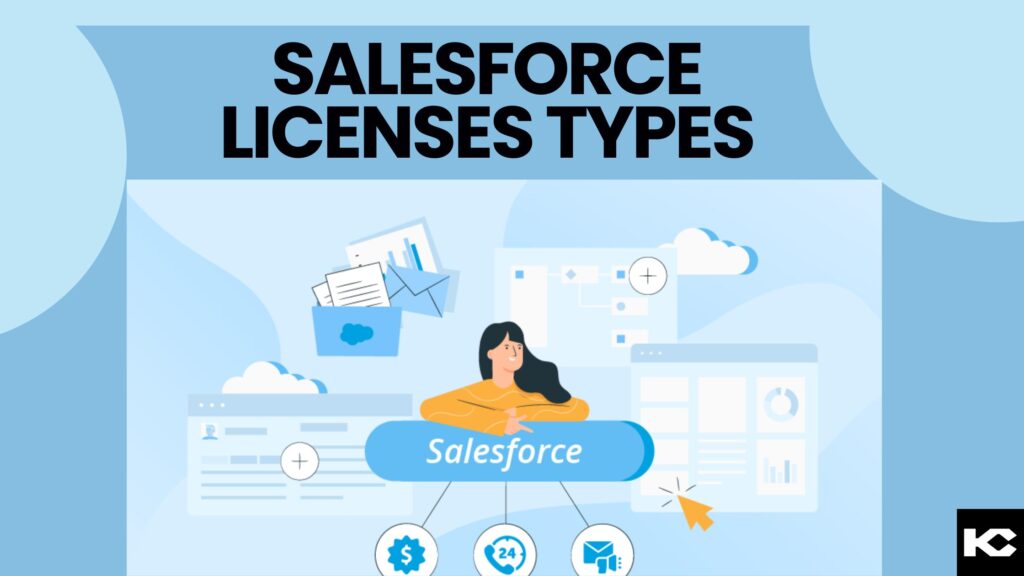
Salesforce licenses determine which products, CRM objects, applications, and features users can access within a Salesforce organization. Choosing the right Salesforce licenses helps businesses provide the required access to sales teams, service agents, developers, customers, partners, and integration systems without paying for unnecessary capabilities.
Quick Answer: What Are Salesforce Licenses?
Salesforce licenses define the baseline access available to users, applications, and certain services. Common categories include user licenses, feature licenses, permission set licenses, and usage-based entitlements. The right combination depends on each user’s responsibilities, required CRM objects, additional features, and login frequency.
Author: Sanjeet Mahajan, Founder & CEO, Kizzy Consulting
Last updated: October 14, 2026
What Are Salesforce Licenses and How Do They Work?
Salesforce licenses establish the functionality available within an organization and the baseline access assigned to individual users. Each Salesforce user requires one user license, while additional feature licenses and permission set licenses can extend access when supported by the user’s license and purchased products.
Think of a license as the foundation of a user’s access. Profiles, permission sets, and other security settings determine what the user can do with the functionality available to them. A license alone does not automatically grant unrestricted access to every record or feature.
For example, a sales representative may need access to leads, accounts, contacts, and opportunities. A developer building a custom internal application may not require the same CRM capabilities. An integration account may need API access rather than a regular interactive login.
These differences make license selection an important part of Salesforce implementation, access management, and cost optimization.
Salesforce Licenses: Editions vs. User Access
| Concept | What it determines |
|---|---|
| Salesforce edition | The overall product package and capabilities available to the organization. |
| User license | The baseline functionality available to an individual user. |
| Feature license | Access to specific additional functionality. |
| Permission set license | Entitlement to additional product features or capabilities. |
| Usage-based entitlement | A consumption allowance, such as a defined number of logins or other resources. |
According to Salesforce Trailhead’s licensing guide, editions, add-ons, licenses, and permissions work together to determine available functionality. Availability varies by product and edition.
Is Your Business Ready for AI?
Before adding AI capabilities to your Salesforce environment, evaluate your data, infrastructure, workflows, and business use cases to identify the right starting point.
What Are the Main Salesforce License Types?
Salesforce provides several license categories to support internal employees, external users, applications, and specialized functionality. The available options depend on the Salesforce products and entitlements purchased by the organization.
1. Salesforce User Licenses
User licenses establish the baseline access assigned when a user account is created. Common options include the Salesforce license, Salesforce Platform licenses, Identity licenses, and collaboration-focused licenses where available.
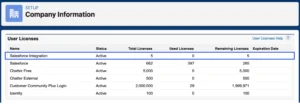
- Salesforce license: Intended for users who require access to standard CRM functionality, such as accounts, contacts, leads, opportunities, and other supported CRM features.
- Salesforce Platform license: Designed for users who primarily need custom applications and supported platform functionality rather than the full range of standard CRM objects.
- Identity license: Supports identity and single sign-on use cases where users need access to connected applications without requiring a full CRM license.
- Chatter Free license: Supports eligible internal collaboration use cases involving Chatter, groups, profiles, and files without a standard Salesforce CRM license.
- Salesforce Integration license: Provides API-focused access for supported system-to-system integration scenarios without regular Salesforce UI access.
These licenses are not interchangeable. Check the supported objects, API access, product requirements, and restrictions before assigning a license.
2. Salesforce Feature Licenses
Feature licenses provide access to specific functionality that is not automatically included in a user’s baseline license. Examples can include Marketing User, Knowledge User, or Service Cloud User, depending on the product and configuration.
For instance, if a marketing employee cannot perform a required campaign-related task, an administrator should check the applicable product entitlement and Marketing User setting before changing the user’s broader access configuration.

3. Salesforce Permission Set Licenses
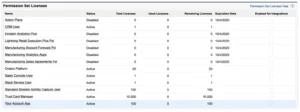
Permission set licenses, also called PSLs, provide entitlements to additional product capabilities. They are commonly associated with specialized Salesforce features and applications.
After confirming that the required entitlement is available, an administrator can assign the relevant permission set license and then configure the corresponding permission set. Some products require this entitlement before the additional permissions can be assigned.
4. Salesforce Usage-Based Entitlements
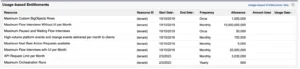
Usage-based entitlements provide a defined allowance for certain resources instead of operating exclusively as fixed per-user seats. Examples include monthly login allocations for supported login-based licenses.
These entitlements can be useful when evaluating occasional access patterns. Administrators should monitor consumption and confirm the applicable counting rules because different Salesforce products use different entitlement models.
Which Salesforce License Is Right for Internal Users?
The appropriate internal Salesforce license depends on the work each employee performs and the CRM objects and applications they need. Start with the user’s responsibilities instead of assigning the most comprehensive license to everyone.
| User requirement | License to evaluate | Key consideration |
|---|---|---|
| Sales and CRM operations | Salesforce | Required standard CRM objects and apps. |
| Custom internal applications | Salesforce Platform | Custom object and application requirements. |
| Application authentication | Identity | SSO and identity requirements. |
| API-based system integration | Salesforce Integration | API access, security, and integration requirements. |
| Internal collaboration | Chatter Free, where available | Whether collaboration alone meets the requirement. |
Salesforce Platform also has seat-based and login-based options in supported offerings. Seat-based licensing can suit regular users, while login-based licensing may suit eligible users who access the platform occasionally. Compare the commercial terms and expected usage before choosing.
What Are Salesforce Experience Cloud Licenses?
Salesforce Experience Cloud licenses support authenticated external users, including customers, business partners, and other stakeholders who access branded portals. These users generally require a suitable external license rather than a standard internal employee license.
- Customer Community: Designed for customer self-service experiences with supported access to objects such as cases and knowledge.
- Customer Community Plus: Supports customer experiences that require additional capabilities, including supported reports, dashboards, and sharing functionality.
- Partner Community: Designed for business partners who collaborate on sales activities, leads, opportunities, and partner relationship management processes.
- External Apps: Supports eligible custom digital experiences for external stakeholders, with access determined by the license and associated product offering.
- External Identity: Supports external identity and authentication scenarios.
- Channel Account: Supports specific business-to-business portal use cases and associated licensing models.
Some external licenses support member-based and login-based purchasing models. Member-based licenses are generally evaluated by the number of licensed users, whereas login-based models use a shared allocation of logins. The right choice depends on the number of users, frequency of access, object permissions, and required sharing model.
Review the official Salesforce Experience Cloud license documentation before finalizing a portal design. Legacy license names and entitlements may differ from current offerings.
Related Read: Salesforce Consulting Services
Explore how Salesforce consulting can help your organization plan its CRM architecture, configure user access, and align Salesforce capabilities with business processes.
How Can You Choose and Manage Salesforce Licenses?
A structured licensing process helps businesses avoid access gaps, unnecessary purchases, and configuration problems. Use the following steps when planning a new implementation or reviewing an existing Salesforce organization.
- Identify user roles. List sales representatives, service agents, administrators, developers, integration accounts, customers, and partners.
- Map required functionality. Document the standard CRM objects, custom apps, reports, dashboards, APIs, and specialized features each group needs.
- Choose the baseline license. Select a compatible user license based on the required functionality and the available product offering.
- Identify additional entitlements. Determine whether feature licenses, permission set licenses, or usage-based entitlements are required.
- Configure permissions. Apply profiles, permission sets, and sharing rules that provide the appropriate level of access.
- Review actual consumption. Monitor assigned licenses, remaining capacity, login usage, and inactive accounts.
- Validate commercial terms. Confirm current pricing, contract restrictions, edition compatibility, and purchasing options with Salesforce.
To review your organization’s current allocation, open Salesforce Setup and navigate to Company Information. The User Licenses section shows license types and their usage. Related feature license and permission set license information can also help administrators assess entitlement consumption.
For larger organizations, maintain a license inventory that connects each license type to a user group, business purpose, assigned users, and review date. This creates a repeatable process for onboarding, offboarding, audits, and license optimization.
Frequently Asked Questions About Salesforce Licenses
1. What are the four main types of Salesforce licenses?
The four broad categories are user licenses, feature licenses, permission set licenses, and usage-based entitlements. User licenses establish baseline access, while the other categories provide additional features or consumption allowances. The exact options available depend on your Salesforce products, edition, and purchased entitlements.
2. What is the difference between Salesforce and Salesforce Platform licenses?
A Salesforce license is intended for users who need broad access to standard CRM functionality. A Salesforce Platform license is designed for users whose work primarily involves supported custom applications and platform capabilities. Check required standard objects, custom objects, and product restrictions before selecting either license.
3. Can one Salesforce user have multiple licenses?
Each Salesforce user has one assigned user license. However, a user can also receive multiple eligible feature licenses and permission set licenses to access additional functionality. The user’s license and entitlements must support the requested permissions, and the organization must have the required entitlements available.
4. How can I check available Salesforce licenses?
Open Salesforce Setup and navigate to Company Information. Review the User Licenses section to see the license types, assigned counts, and remaining availability. Administrators can also review feature licenses and permission set licenses and use supported reporting options to track assignments across the organization.
5. How much do Salesforce licenses cost?
Salesforce license costs vary by product, edition, contract, and licensing model. Some offerings use per-user pricing, while eligible login-based options use consumption-based allocations. Review the current official Salesforce pricing information and confirm your organization’s quote with its Salesforce representative.
Conclusion: Choose Salesforce Licenses Based on Business Needs
Choosing Salesforce licenses starts with understanding what each user needs to accomplish. The right combination supports business operations while keeping access, security, and licensing costs manageable.
- Match functionality: Select a baseline license based on the CRM objects and applications users require.
- Validate additional access: Check feature licenses, permission set licenses, and usage-based entitlements.
- Review regularly: Monitor license assignments, usage, and contract terms as business needs change.
Need Help Choosing Salesforce Licenses?
Align your Salesforce licensing, user permissions, and CRM capabilities with your business requirements. Share your requirements with our team to discuss the right implementation approach.