Salesforce Service Cloud Voice Pricing & Implementation Guide [2026]
⏱ 9 min read
Salesforce Service Cloud Voice Implementation Guide 2026
Build a unified customer service experience by connecting voice, digital channels, CRM data, and AI in Salesforce.
This Salesforce voice implementation guide covers the benefits, features, license and pricing options, setup process, implementation timeline, and a real-world migration case study for Service Cloud Voice with Amazon Connect and partner telephony.
By Sanjeet Mahajan, CEO & Founder, Kizzy Consulting
Executive Quick Answer
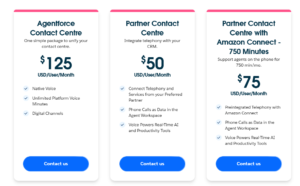
Salesforce prices Service Cloud Voice, now listed as Partner Contact Center, per user per month: $50 with your own telephony provider, or $75, $125 or $200 with Amazon Connect bundles of 750, 2,000 or 5,000 minutes. That is how much Salesforce Voice costs per user license. Your total also depends on AWS usage, call recording storage, transcription and AI features. Prices are from Salesforce’s public pricing page, checked on October 19, 2026.
01
Unified Voice
Calls inside Salesforce
02
AI Insights
Real-time intelligence
03
Transcription
Capture conversations
04
Omni-Channel
Connect every channel
Contents
hide
What Is Salesforce Service Cloud Voice?
Salesforce Service Cloud Voice (often shortened to Salesforce Voice or Service Voice) is a cloud telephony and VoIP integration that brings phone calls directly into the Salesforce Service Console. Instead of switching between a separate phone system and your CRM, agents take and make calls, see live transcripts, and update cases in one screen. It is Salesforce’s voice solution for contact centers, and it works with Amazon Connect or with a partner telephony provider you already use.
Salesforce now lists the product as Partner Contact Center, but the names Service Cloud Voice, Salesforce Voice, and Service Voice are still widely used in documentation, Trailhead, and the market.
Service Cloud Voice vs. Agentforce Voice
A common point of confusion is how Service Cloud Voice differs from the newly introduced Agentforce capabilities, and how Agentforce voice implementation fits alongside it.
- Service Cloud Voice focuses on integrating enterprise voice capabilities and telephony infrastructure (like Amazon Connect) natively into the Salesforce UI for human agents.
- Agentforce Voice focuses on autonomous AI agents conducting conversational, generative voice interactions directly with customers.
Looking to add autonomous AI-powered voice interactions to your contact center? Explore our complete Agentforce Voice Agent Setup Guide to see how Agentforce voice implementation services can help AI resolve customer issues automatically.
Key Features of Salesforce Service Cloud Voice and Their Benefits
Salesforce Service Cloud Voice integrates telephony with Salesforce Service Cloud, allowing service teams to manage calls and customer information within the same environment. This is how Service Cloud Voice improves customer service interactions: agents get the full customer context before they say hello, and supervisors get one place to monitor calls. The solution can work with Amazon Connect to deliver an AI-driven voice experience directly inside the Salesforce Service Console.
Unified Agent Experience
Give agents access to calls, chats, cases, customer information, and service workflows from one Salesforce workspace.
Real-Time Transcription
Automatically capture conversations as they happen so agents and supervisors have better context during and after calls.
AI-Powered Insights
Use Salesforce AI capabilities to support recommendations, next-best actions, sentiment analysis, and agent productivity.
Intelligent Call Routing
Route calls based on agent skills, availability, customer requirements, and workload to improve service efficiency.
Call Recording in Service Cloud
Record calls and keep recordings attached to the related case, contact, or account so they are easy to find for coaching, quality checks, and compliance.
Service Cloud Voice Analytics
Report on call volumes, handle time, outcomes, and sentiment next to your case and CRM data using standard Salesforce reports and dashboards.
Service Cloud Voice vs. Other Telephony Solutions
| Feature / Capability | Legacy Telephony | Generic Cloud CCaaS | Service Cloud Voice |
|---|---|---|---|
| CRM Data Integration | ✕ Siloed | ~ Manual sync | ✓ Native / real-time |
| Real-Time Call Transcription | ✕ Not available | ~ Add-on | ✓ Available |
| AI Agent Assist | ✕ | ~ Third-party | ✓ Salesforce AI |
| Omni-Channel Routing | ✕ Voice only | ~ Varies | ✓ Voice + digital |
| Amazon Connect Integration | ✕ | ~ Custom | ✓ Supported |
| Sentiment Analysis | ✕ | ~ Add-on | ✓ AI-enabled |
| Agent Scripting | ~ Basic | ~ Basic | ✓ CRM-aware |
| Enterprise Scalability | ✕ Hardware-bound | ✓ Cloud-native | ✓ Cloud + CRM |
Service Cloud Voice Alternatives and Competitors
If you are evaluating a Service Cloud Voice alternative, the main options fall into three groups. Which one fits depends on your current telephony, channels, and budget.
- Salesforce Contact Center: A separate Salesforce package with native voice and digital channels, so you do not need a third-party telephony vendor.
- Standalone CCaaS platforms connected through CTI: Cloud contact center vendors such as Five9, Genesys, Talkdesk, or NICE connected to Salesforce through a CTI adapter or a partner integration.
- Cloud phone and VoIP providers: Providers such as Twilio, Aircall, or RingCentral that connect to Salesforce through apps, APIs, or Open CTI. These are usually lighter weight, with fewer native Service Console capabilities.
What to look for in a CCaaS platform if Salesforce is your primary CRM: native call records in Salesforce (not just tasks), screen pop, Omni-Channel presence sync, transcript and recording access on the Salesforce record, reliable carrier connectivity and APIs, and a clear licensing model. Our Salesforce integration consultants can help you compare options against your requirements.
Planning Your Service Cloud Voice Implementation?
Get guidance on Salesforce architecture, Service Cloud configuration, integrations, and deployment planning.
Pre-Implementation Planning
Effective planning is essential for a smooth Service Cloud Voice rollout. Before configuration begins, establish clear objectives, understand your current telephony environment, and involve the right stakeholders.
01. Define Objectives
Identify goals such as improving agent productivity, reducing handling time, increasing first-contact resolution, or improving customer satisfaction.
02. Assess Current Telephony
Review your existing phone systems, workflows, call routing, recordings, integrations, and processes that need to be retained or replaced.
03. Involve Stakeholders
Bring IT, customer service, sales, operations, security, and other stakeholders into the planning process early.
04. Plan Security & Compliance
Review data access, recording policies, storage requirements, and applicable regulations such as GDPR or HIPAA.
Service Cloud Voice with Amazon Connect vs. Partner Telephony (BYOT)
Before you start, decide how your voice infrastructure will connect to Salesforce. Service Cloud Voice supports two models, and this choice drives your cost, timeline, and architecture.
Service Cloud Voice with Amazon Connect
Salesforce and AWS provide a prebuilt integration with Amazon Connect, so you can provision the contact center from Salesforce Setup. Telephony runs on Amazon Connect. This is a strong fit if you want the fastest path to native voice, recording, and real-time transcription.
Service Cloud Voice with Partner Telephony (BYOT)
Service Cloud Voice BYOT means “bring your own telephony.” You keep your existing provider, such as Five9, Genesys, Avaya, or Cisco Webex, and connect it to the Service Console through a partner integration. This is a strong fit if you have an established contact center platform you do not want to replace.
Cisco, Webex, and Genesys: If you use Cisco (including Webex contact center products) or Genesys, check Salesforce’s partner telephony listings for the current integration status of your exact product and version before you commit. Capabilities such as transcription and recording differ by partner.
Salesforce Service Cloud Voice License Requirements
A Salesforce Service Cloud Voice license is assigned per user, and each agent who handles voice interactions needs one. Before you enable voice, confirm the following:
- The user has a Service Cloud license (or the equivalent edition) and the Service Cloud Voice or Partner Contact Center license.
- Enhanced Omni-Channel is enabled, because Salesforce voice requires Enhanced Omni-Channel for routing voice work items.
- The right permission sets are assigned (covered in Step 1 below).
- For partner telephony, the transcription license from your partner is in place if you want transcripts.
License names and packaging change over time, so verify your edition and contract with your Salesforce account executive.
Salesforce Service Cloud Voice Pricing: Features and Costs
Understanding Service Cloud Voice pricing is important for budgeting and ROI planning. Whether you are asking how much Salesforce Voice costs, what a Salesforce Voice user license costs, or what the Service Cloud Voice price is for your team, it starts with the per-user options below. Salesforce now lists Service Cloud Voice as Partner Contact Center. Your overall cost can depend on licensing, voice usage, Amazon Connect infrastructure, storage, transcription, AI capabilities, and implementation requirements.
| Option | Price | What it covers |
|---|---|---|
| Partner Contact Center | $50 | Your own partner telephony provider. Transcription requires a partner license. |
| With Amazon Connect, 750 minutes | $75 | Amazon Connect bundle with 750 platform minutes per user per month. |
| With Amazon Connect, 2,000 minutes | $125 | Amazon Connect bundle with 2,000 platform minutes per user per month. |
| With Amazon Connect, 5,000 minutes | $200 | Amazon Connect bundle with 5,000 platform minutes per user per month. |
| Contact Center (separate package) | $125 | Native voice, unlimited platform voice minutes, and digital channels. |
Source: Salesforce Partner Contact Center pricing page, checked on October 19, 2026. Salesforce provides this pricing for information purposes only and it is subject to change.
Important:
Pricing can vary based on Salesforce licensing, contract terms, voice usage, Amazon Connect services, storage, AI capabilities, and implementation scope. Confirm current pricing directly with Salesforce before budgeting.
Pricing can vary based on Salesforce licensing, contract terms, voice usage, Amazon Connect services, storage, AI capabilities, and implementation scope. Confirm current pricing directly with Salesforce before budgeting.
Additional Service Cloud Voice Cost Factors
Amazon Connect Infrastructure
Additional AWS costs may apply depending on contact flows, recording, storage, workforce management, and other services.
Call Recording & Storage
Recording retention and Amazon S3 storage requirements can influence the total cost of a voice deployment.
Transcription at Scale
High call volumes can increase processing requirements and make transcription architecture and optimization more important.
AI Enhancements
Advanced AI features, custom models, bots, and additional automation may require separate investments.
Contract length: Most Salesforce products, including voice, are sold on annual contracts, and multi-year terms are common. Your actual term is set in your order form, so confirm it with Salesforce.
How to Implement and Set Up Service Cloud Voice (Technical Guide)
A successful Service Cloud Voice implementation requires precise configuration between Salesforce, your telephony environment, and Omni-Channel. Here is the technical breakdown of how we execute the Salesforce voice setup, and how to enable Service Cloud Voice in Salesforce from licensing through validation.
Step 1: Acquire Licenses and Assign Permissions
- Confirm your intended users are provisioned with the Service Cloud Voice add-on license.
- Navigate to Setup → Permission Sets.
- Assign the Contact Center Agent and Contact Center Admin permission sets to the respective users.
- Verify access: Log in as a test agent to confirm the Omni-Channel utility widget displays the voice/phone controls.
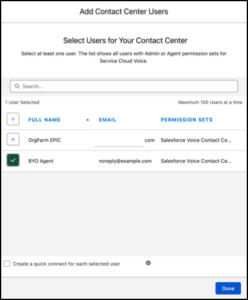
Permission Set Assignments highlighting the “Contact Center Agent” permission set
Step 2: Configure the Contact Center
- Navigate to Setup → Voice → Amazon Setup (or Partner Telephony).
- Follow the guided wizard to spin up a new Amazon Connect instance, or link your existing Amazon Connect instance via single sign-on (SSO).
- Import your agents into the Contact Center definition so Salesforce and your telephony provider recognize the exact same user IDs.
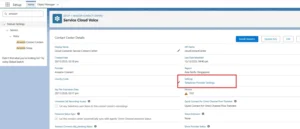
Salesforce Setup → Voice → Contact Centers showing a mapped Amazon Connect instance
Step 3: Customize Omni-Channel Routing
- Navigate to Setup → Omni-Channel → Routing Configurations.
- Create routing configurations specifically mapped to your Voice channels.
- Establish Presence Statuses (e.g., “Available for Voice”, “On Break”) and map these statuses to your telephony provider so state is synced in real-time.
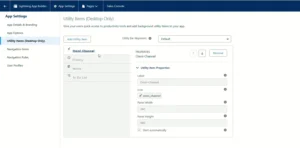
Omni-Channel Presence Status mapping interface
Step 4: Configure Call Routing Flows (Amazon Connect)
- Open the Amazon Connect console via the AWS portal.
- Design your Contact Flows (IVR prompts, press 1 for Support, etc.). This is where you build the Salesforce Service Cloud IVR experience.
- Embed the Invoke AWS Lambda function block to trigger the generation of a VoiceCall record in Salesforce before the call rings to the agent.
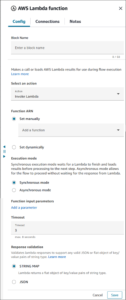
Amazon Connect visual contact flow editor showing a Salesforce Lambda integration block
Step 5: Enable Real-Time Transcription & AI
- Navigate to Setup → Einstein for Service.
- Enable Real-Time Call Transcription and Next Best Action.
- Configure the VoiceCall record page layout in the Lightning App Builder to include the “Conversation” component, allowing agents to see live transcripts as they speak.
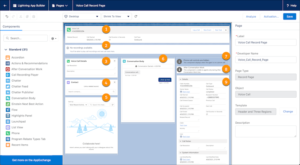
Lightning App Builder showing the Conversation component dragged onto the VoiceCall layout
Step 6: Validate the End-to-End Flow
-
- Test inbound routing: Dial the test number and confirm the IVR routes accurately based on agent state.
- Validate data: Check that the VoiceCall record successfully attaches to the relevant Contact or Case.
- Confirm that the call recording and transcript appear on the Salesforce record after the call is disposed.
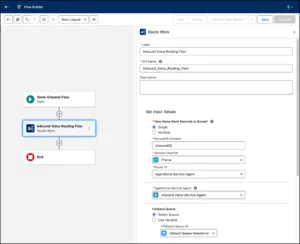
Service Console + Omni-channel + active voice interaction
Service Cloud Voice Data Model, Call Recording, and Integrations
Salesforce Service Cloud Voice data model
The core of the Service Cloud Voice data model is the VoiceCall object, which stores each call and links it to related records such as the Contact, Account, and Case. Recordings and transcripts are stored and surfaced against that call record, which is why reports and dashboards can combine voice metrics with the rest of your CRM data.
Call recording in Service Cloud
Salesforce service cloud call recording is captured by your telephony layer (for example, Amazon Connect with Amazon S3 storage) and made available on the call record in Salesforce. Plan retention periods, access permissions, and consent notices early, because they affect both storage cost and compliance.
How to integrate Salesforce Service Cloud with existing systems
Salesforce VoIP integration with the rest of your stack usually combines several methods:
- Service Cloud Voice integration: The native connection between Salesforce and Amazon Connect or a partner telephony provider.
- APIs and middleware: REST APIs, MuleSoft, or other integration tools to sync data with ERP, billing, and other business systems.
- Flows and Apex: Automations that react to call events, create cases, or update records.
- Open CTI or partner apps: For systems that do not use the native voice integration.
So yes, Salesforce voice and call center integration can connect with outside applications and systems, provided the integration is designed around the VoiceCall data model and your security requirements. This is exactly what our Salesforce integration services cover.
Customizing Service Cloud Voice for Your Business
Once the initial integration is complete, customize Service Cloud Voice around your actual service workflows and agent experience.
Service Console
Display customer history, cases, call information, and relevant records in one workspace.
Agent Scripts
Guide agents through common scenarios and complex conversations with consistent workflows.
Data Capture
Capture call disposition, customer sentiment, outcomes, and other business-specific information.
Call Recording
Configure recording and storage according to business, security, and compliance requirements.
Need Help Optimizing Service Cloud Voice?
Get help with Salesforce integrations, Service Cloud optimization, voice workflows, and ongoing support.
Testing and Training
Testing and training are critical before moving Service Cloud Voice into production. A controlled pilot helps identify routing, integration, usability, and AI-related issues before they affect customers.
Run Pilot Tests
Start with a small group of agents and test routing, transcription, integrations, and overall usability.
Scenario-Based Testing
Simulate different customer scenarios to validate call flows, routing rules, data capture, and AI recommendations.
Train Agents & Supervisors
Provide role-specific training covering calls, transcription, workflows, dashboards, and data security.
Gather Feedback
Use agent and supervisor feedback to refine the experience before the production launch.
Service Cloud Voice Documentation, Trailhead, and Certification
- Official documentation: Salesforce Help hosts the Service Cloud Voice documentation, including setup guides for Amazon Connect and partner telephony, and a Service Cloud implementation guide you can use alongside this article.
- Trailhead: The Service Cloud Voice Trailhead modules are a good way to practice setup in a free Developer Edition or sandbox, and are a handy way to see a Service Cloud Voice demo environment end to end.
- Certification: There is no single dedicated Service Cloud Voice exam. Voice topics appear within Salesforce Service Cloud and related admin and consultant certifications, so check Salesforce’s current certification guides for what is covered.
Case Study: Migrating from Legacy CTI to Native SCV
One of the main benefits of working with an implementation partner is avoiding architectural pitfalls. Here is a genuine Service Cloud Voice scenario we recently resolved for a client looking to modernize their call center.
The Problem
A client previously managed their call center using a standalone Amazon Connect setup linked to Salesforce via a standard Open CTI adapter. While agents could receive calls, the data was heavily fragmented. Call recordings, transcripts, and duration metrics were siloed in Amazon Connect, requiring supervisors to leave Salesforce to run reports. Furthermore, agents were experiencing duplicate screen pops because the legacy CTI and Salesforce Omni-Channel were competing for the interaction.
Our Investigation
- Call Center Definitions: We checked the Salesforce Call Centers setup and found the legacy Open CTI adapter was still active and intercepting the payload.
- Data Architecture: We investigated how calls were logged. The legacy setup was logging basic Task records instead of native VoiceCall records, meaning Salesforce couldn’t attach rich transcription data.
The Fix & Validation
We completely decoupled the old Open CTI configuration. We then provisioned the native Service Cloud Voice with Amazon Connect environment. We mapped the AWS Lambda functions so that Amazon Connect dynamically generated a native VoiceCall object inside Salesforce before the call rang.
The Result: Agents now answer calls directly from the native Omni-Channel utility bar. Every interaction automatically pops the relevant Customer record, and all data—including call duration, recordings, and real-time transcripts—is stored natively in Salesforce, allowing the client to run unified CRM dashboards without ever logging into AWS.
Service Cloud Voice Implementation Timeline and Cost
“How long does it take, and what does it cost to connect Salesforce to a cloud phone system?” is the most common question we hear. Based on Kizzy Consulting’s delivery experience, timelines vary based on your existing infrastructure, integrations, and AI requirements. Implementation cost follows scope, so licensing (see pricing above) is only part of the budget.
| Implementation Scope | Typical Timeline | What’s Included |
|---|---|---|
| Basic Deployment | 4 – 6 Weeks | Core telephony connection, user setup, basic queues, screen pops, and standard Omni-Channel routing. |
| Standard (Voice + Routing) | 6 – 10 Weeks | Custom IVR flows, skill-based routing, CRM workflow automations, and supervisor dashboards. |
| Enterprise (Voice + AI) | 12 – 16+ Weeks | Real-time transcription, Einstein Next Best Action, complex third-party system integrations, and multi-region deployments. |
Salesforce Service Cloud Voice Consulting and Implementation Partners
Choosing the right Service Cloud Voice partner matters as much as choosing the technology. When comparing implementation partners for Amazon Connect or partner telephony, look for:
- Hands-on experience with both Salesforce Service Cloud and Amazon Connect (or your telephony vendor).
- A clear approach to Omni-Channel, VoiceCall data, recording, and transcription.
- Experience migrating from legacy CTI, like the case study above.
- Post-launch support and optimization, not just go-live.
Kizzy Consulting is a Salesforce partner that delivers Salesforce Service Cloud Voice consulting and implementation for B2B enterprises across the US, India, and Australia. Whether you need a full Service Cloud Voice deployment or help adding Agentforce voice implementation services on top, our team can scope the right path.
Launching Service Cloud Voice
- Announce the launch: Communicate the rollout timeline, training resources, and support channels to all relevant teams.
- Monitor performance: Track call handling time, customer satisfaction, agent productivity, routing performance, and other relevant KPIs.
- Provide ongoing support: Give agents and supervisors a clear path to report issues and request help during the early rollout.
- Encourage continuous feedback: Use frontline feedback to identify opportunities for workflow, routing, and AI optimization.
Measuring Success and Optimization
Service Cloud Voice optimization doesn’t stop after launch. Regularly review performance data, agent feedback, customer outcomes, and operational requirements.
Customer Satisfaction
Monitor satisfaction trends and identify service workflows that require improvement.
Optimize AI
Refine AI recommendations and next-best actions using agent feedback and performance data.
Scale Gradually
Expand agents, queues, routing options, and digital channels as business requirements grow.
For organizations connecting Service Cloud Voice with other enterprise systems, Salesforce Integration Services can help create secure data flows between Salesforce, telephony platforms, ERP systems, APIs, and other business applications.
Frequently Asked Questions about Salesforce Service Cloud Voice Implementation:
What is Salesforce Service Cloud Voice?
Salesforce Service Cloud Voice, also called Salesforce Voice, is a cloud telephony integration that brings calls into the Salesforce Service Console. Agents handle calls, see live transcripts, and manage cases in one workspace, using Amazon Connect or a partner telephony provider. Salesforce now lists it as Partner Contact Center.
What are the key features of Salesforce Service Cloud Voice?
Key features include a unified agent experience in the Service Console, real-time transcription, AI-powered insights and next-best actions, intelligent Omni-Channel call routing, call recording, sentiment analysis, and reporting on voice data alongside CRM data.
How does Salesforce Service Cloud Voice improve customer service interactions?
Agents see the customer’s history, open cases, and live transcript while they are on the call, so customers repeat themselves less. Skill-based routing sends calls to the right agent, AI suggestions speed up resolution, and recorded, transcribed calls support coaching and quality review.
How much does Salesforce Service Cloud Voice cost?
Salesforce now lists Service Cloud Voice as Partner Contact Center. According to Salesforce’s public pricing page, checked on October 19, 2026, Partner Contact Center with your own telephony provider costs $50 USD per user per month. Amazon Connect bundles cost $75 for 750 minutes, $125 for 2,000 minutes, and $200 for 5,000 minutes per user per month. Prices are subject to change, so confirm current pricing with Salesforce before budgeting.
How much does a Salesforce Voice user license cost?
Licenses are priced per user per month. Based on Salesforce’s public pricing page (checked October 19, 2026), the entry option is $50 per user per month with your own partner telephony, and Amazon Connect bundles range from $75 to $200 per user per month depending on included minutes. Each agent who handles voice needs a license, and you still need a base Service Cloud license.
What is the pricing structure for Salesforce Service Cloud Voice?
Salesforce Service Cloud Voice is priced per user per month. Your total cost depends on whether you connect a partner telephony provider or choose an Amazon Connect bundle with included platform minutes. Additional costs may include AWS services, call recording and storage, transcription at scale, AI capabilities, and implementation. Most Salesforce products use annual contracts.
How long are Salesforce Voice contracts?
Most Salesforce products, including voice, are sold on annual contracts, and multi-year terms are common. The exact term, renewal conditions, and any discounts are set in your order form, so confirm them with your Salesforce account executive.
Is Amazon Connect included in Service Cloud Voice pricing?
Amazon Connect bundles include a monthly allowance of platform minutes per user: 750, 2,000, or 5,000 minutes, depending on the plan. Additional AWS costs may apply for contact flows, call recording, storage, workforce management, and other services. With the partner telephony option, you connect a provider such as Five9, Genesys, or Avaya, and your telephony services are provided by that partner.
Does transcription cost extra with Service Cloud Voice?
For the partner telephony option, Salesforce notes that transcription requires a partner license. For Amazon Connect deployments, high call volumes can increase processing requirements. Plan your transcription architecture and capacity early to account for usage, scalability, and potential additional costs.
What is the difference between Service Cloud Voice and Salesforce Contact Center?
Salesforce lists Contact Center as a separate package priced at $125 USD per user per month, including native voice, unlimited platform voice minutes, and digital channels. Partner Contact Center, formerly known as Service Cloud Voice, connects Amazon Connect or a partner telephony provider to the Service Console. The right option depends on your existing telephony infrastructure, communication channels, business requirements, and AI roadmap.
What does BYOT mean in Service Cloud Voice?
BYOT stands for “bring your own telephony.” It means connecting your existing telephony provider, such as Five9, Genesys, Avaya, or Cisco, to Service Cloud Voice through partner telephony instead of using Amazon Connect.
How do you enable Service Cloud Voice in Salesforce?
Confirm licenses, turn on Enhanced Omni-Channel, assign the Contact Center permission sets, create the contact center in Setup (Amazon Connect or partner telephony), configure routing and presence, build your call flows, enable transcription, and test end to end. The step-by-step guide above covers each stage.
What’s the typical implementation timeline and cost to connect Salesforce to a cloud phone system?
Based on our delivery experience, a basic deployment takes about 4 to 6 weeks, a standard voice and routing project 6 to 10 weeks, and an enterprise deployment with AI and complex integrations 12 to 16 weeks or more. Cost depends on scope, number of agents, integrations, and licensing, so a short discovery call is the best way to get an accurate estimate.
How do we integrate Salesforce Service Cloud with existing systems?
Most projects combine the native Service Cloud Voice integration with APIs, middleware such as MuleSoft, and Salesforce Flows or Apex to connect ERP, billing, and other systems. The VoiceCall record is the anchor that links calls, recordings, and transcripts to your CRM data.
Who are the main competitors in Salesforce voice integration?
Alternatives include Salesforce Contact Center, standalone CCaaS platforms such as Five9, Genesys, Talkdesk, and NICE, and cloud phone providers such as Twilio, Aircall, and RingCentral. Many of these also integrate with Salesforce, so the choice usually comes down to how native you need the experience to be.
Conclusion
Salesforce Service Cloud Voice Implementation helps organizations create a seamless customer service environment by bringing telephony, CRM data, and AI into a unified workflow.
The key to a successful implementation is working with a partner who understands both the Salesforce platform architecture and the underlying telephony infrastructure. Proper planning, correct Omni-Channel mapping, rigorous UAT testing, and dedicated training are what separate a frustrating deployment from a transformative one.
Build a Smarter Customer Service Experience
With the right implementation strategy, Service Cloud Voice becomes a powerful foundation for connected, AI-enabled customer service operations.
Ready to Implement Service Cloud Voice?
Get expert help with Salesforce implementation, Amazon Connect integration, Service Cloud Voice configuration, AI enablement, and ongoing optimization.
Prefer email? Reach us at [email protected]