Configure Salesforce SAML Single Sign-On [2026]
⏱ 7 min read
Configuring Salesforce SAML Single Sign-On (SSO) lets your users log in to Salesforce and every connected app with one trusted set of credentials instead of a separate password for each system. SAML (Security Assertion Markup Language) is the open standard that makes this possible, passing signed authentication data between an Identity Provider (IdP) and a Service Provider (SP) like Salesforce. This guide breaks down SAML terminology, both SSO flows, step-by-step setup for Salesforce as IdP and as SP, and the security payoff of centralizing authentication.
What is SAML Single Sign-On in Salesforce?
SAML SSO is an open federation standard that lets an Identity Provider authenticate a user once and securely pass that identity to Salesforce (the Service Provider) using a digitally signed SAML assertion. Instead of validating a separate Salesforce password, the platform trusts the signed assertion from the IdP, so users move between Salesforce and other connected applications without logging in again.
Enterprises running Salesforce alongside a growing stack of connected apps need an authentication layer that is both secure and painless for end users. Standalone logins scattered across systems create password fatigue, inconsistent access control, and a wider attack surface. SAML Single Sign-On solves this by centralizing authentication through one trusted Identity Provider. If you’re weighing SSO as part of a broader security review, our Salesforce AppExchange security review guide covers the authentication and access-control checks Salesforce itself expects from any connected application.
Standalone Username/Password Login
- ✗ Separate credentials per application
- ✗ Password fatigue drives weak, reused passwords
- ✗ Access revoked app-by-app, not centrally
- ✗ No single point to enforce MFA policy
- ✗ Harder to audit who accessed what, and when
Salesforce SAML SSO
- ✓ One set of credentials across Salesforce and connected apps
- ✓ Signed, time-limited SAML assertions replace stored passwords
- ✓ Deactivate a user once at the IdP to cut all access
- ✓ MFA and login policy enforced centrally at the IdP
- ✓ Authentication events logged in one trusted place
1. Introduction to SAML (Security Assertion Markup Language)
SAML is an open federation authentication standard that lets an Identity Provider authenticate a user and pass that identity, along with related security information, to a Service Provider. In practice, SAML acts as a trust layer between the two sides: an X.509 certificate is generated and shared up front, and every SAML response the Identity Provider sends afterward is signed with that certificate so the Service Provider can verify it’s genuine.
There are two ways a SAML login can start:
- Service Provider–Initiated Flow — the user starts at Salesforce and is redirected out to the Identity Provider to authenticate.
- Identity Provider–Initiated Flow — the user starts at the Identity Provider and clicks through into Salesforce already authenticated.
2. SAML Terminology You Need to Know
| Term | What It Means |
|---|---|
| Identity Provider (IdP) | The trusted service that authenticates the user – e.g. Salesforce itself, Google, or Microsoft Entra ID |
| Service Provider (SP) | The application the user wants to access – e.g. Salesforce, a web app, or an Experience Cloud site |
| SAML Request | Sent by the Service Provider to the Identity Provider, asking it to authenticate the user |
| SAML Response | Sent back by the Identity Provider, carrying a signed assertion with facts about the user |
| SAML Assertion | The signed statement inside the response – username, email, and other identity attributes the Service Provider validates |
3. How the SAML SSO Authentication Flow Works
Identity Provider–Initiated Flow
- The user logs in to the Identity Provider.
- The Identity Provider sends a cryptographically signed SAML response straight to Salesforce.
- That response carries a SAML assertion telling Salesforce exactly who the user is.
- Salesforce validates the signature and identifies the user.
- The user is now logged in to Salesforce — no separate password prompt.
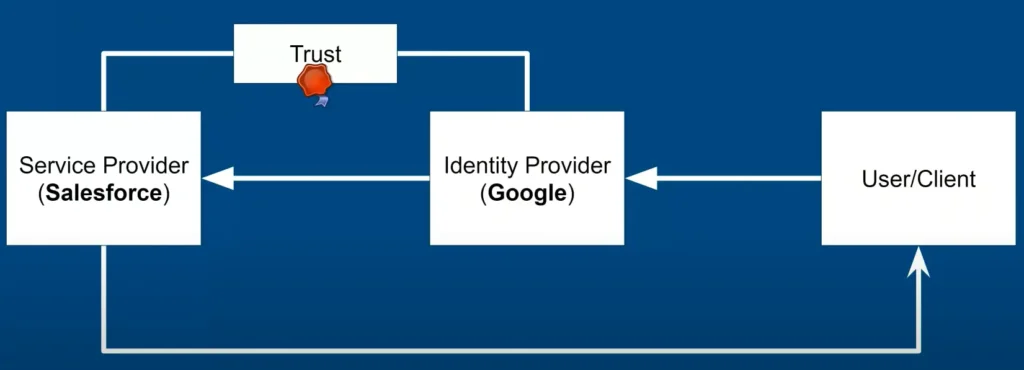
Identity Provider–initiated SAML flow for Salesforce single sign-on
Information Salesforce (as SP) needs from you:
- Assertion Consumer Service (ACS) URL — where the Identity Provider sends SAML responses
- Entity ID — the unique identifier of the Service Provider
- Subject Type — whether identity is sent in the assertion subject or a custom attribute
- Security Certificate — required when Salesforce initiates and signs its own SAML requests
Service Provider–Initiated Flow
- The user tries to access Salesforce directly.
- Salesforce sends a SAML request to the Identity Provider, asking it to authenticate the user.
- The Identity Provider presents its own login page.
- The user authenticates with their Identity Provider credentials.
- The Identity Provider sends a signed SAML response containing the user’s identity back to Salesforce.
- Salesforce validates the signature and identifies the user.
- The user is logged in to Salesforce and can access their org.
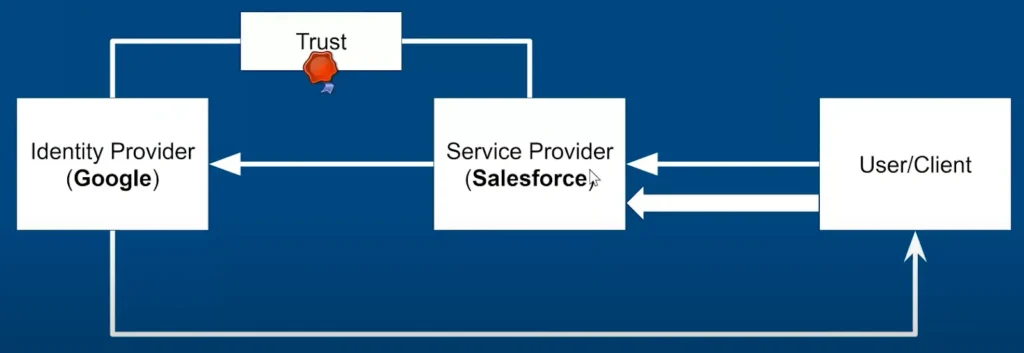
Service Provider–initiated SAML flow, with Salesforce as the requesting Service Provider
Information the Identity Provider needs to supply:
- Issuer ID – the unique identifier of the Identity Provider
- Certificate – used to sign and verify SAML responses
- Assertion parameters – the SAML User ID type and SAML user ID location
Not Sure Which SSO Flow Fits Your Org?
We’ll map your identity stack against Salesforce’s SP and IdP options and tell you honestly which SAML flow – and which Identity Provider – fits your environment.
4. SP-Initiated vs. IdP-Initiated: Side-by-Side
| Criteria | SP-Initiated | IdP-Initiated |
|---|---|---|
| Login starts at | Salesforce (the Service Provider) | The Identity Provider portal |
| SAML Request sent? | Yes, Salesforce sends one | No, flow starts with the response |
| Best for | Users bookmarking or typing the Salesforce URL directly | Users launching Salesforce from an app portal or dashboard |
| Typical use case | Salesforce as the Service Provider, third-party as IdP | Salesforce as the Identity Provider for downstream apps |
5. Setting Up Salesforce as an Identity Provider
Salesforce can act as the trusted Identity Provider for downstream apps like WordPress, JIRA, or Confluence, letting one Salesforce login extend single sign-on to your whole app stack without extra licenses on the receiving end.
- Log in to Salesforce and navigate to your org.
- Enable Identity Provider: Go to Setup, search Identity Provider in Quick Find, and click Enable Identity Provider.
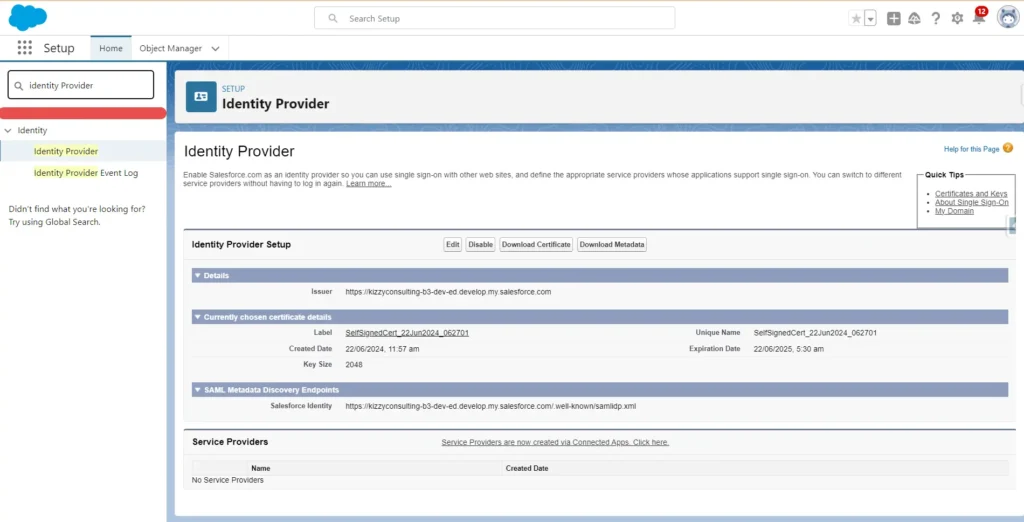
Enabling Salesforce as an Identity Provider under Setup
- Download Metadata: Save the Identity Provider metadata XML file – you’ll hand this to each Service Provider.
- Create a Connected App: In App Manager, click New Connected App and enter the name, API name, and contact email.
- Enable SAML Settings: Check Enable SAML, then set the Entity ID, ACS URL, Subject Type (typically Federation ID or Username), and Name ID Format (usually
urn:oasis:names:tc:SAML:1.1:nameid-format:unspecified). - Manage Profiles and Permission Sets: Assign the Connected App to the profiles and permission sets that should have access.
Note: every setting in the Connected App is driven by the SAML Single Sign-On Settings configured on the Service Provider side.
6. Setting Up Salesforce as a Service Provider
Most enterprise rollouts run the other direction: a third-party Identity Provider – Microsoft Entra ID, Okta, Google, or a dedicated identity broker such as miniOrange – authenticates users, and Salesforce trusts that authentication as the Service Provider.
- Log in to Salesforce and go to Setup.
- Configure SAML Settings: Search Single Sign-On Settings in Quick Find, click Single Sign-On Settings, then New to create a SAML SSO configuration and enable SAML.
- Import Metadata: Upload the Identity Provider’s metadata XML file so Salesforce can pull the Issuer, certificate, and login URL automatically.
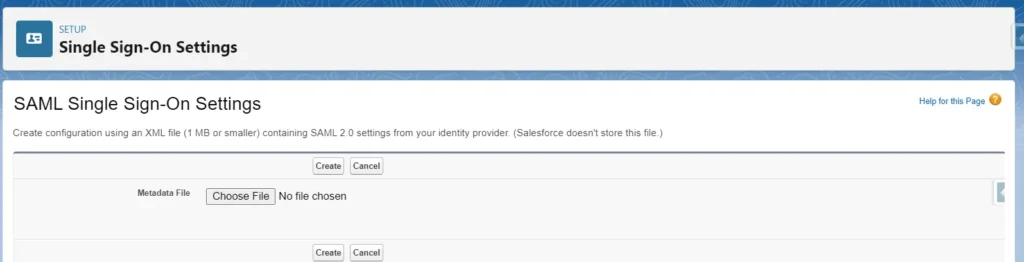
Creating a new SAML Single Sign-On Setting in Salesforce
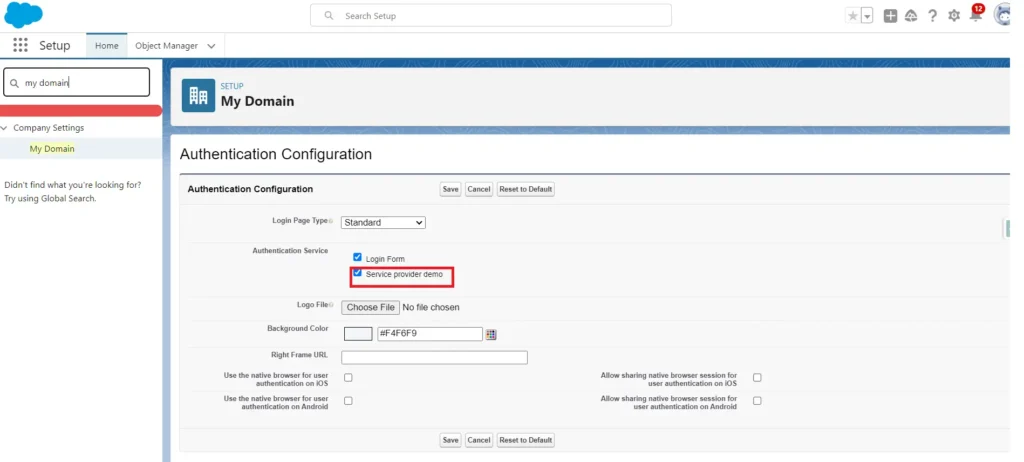
- Enable Authentication Service from My Domain once the SAML setting has been imported and saved successfully.
Enabling SAML authentication under My Domain settings
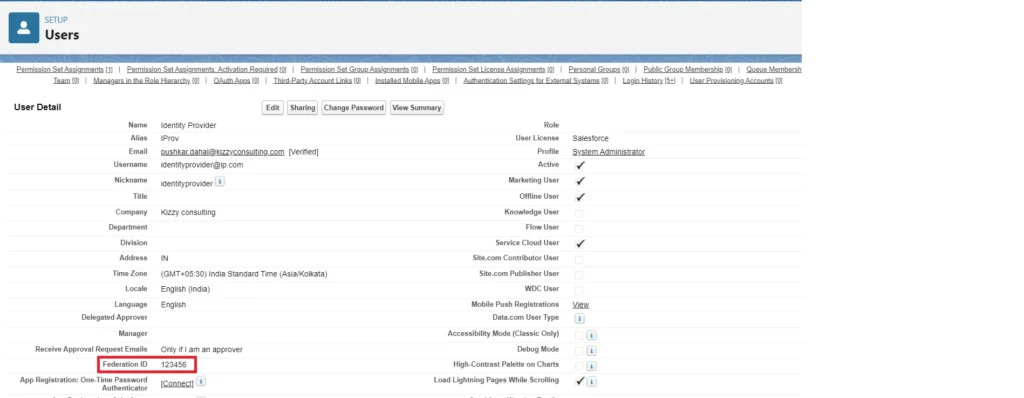
Note: before a user can log in through the Service Provider, their Federation ID must match on both the Identity Provider and the Service Provider side.
Completed SAML SSO configuration with Salesforce as the Service Provider
22%
of confirmed breaches in 2025 started with stolen or compromised credentials (Verizon DBIR)
88%
of basic web-application attacks involved stolen credentials (Verizon DBIR)
$4.67M
average cost of a credential-related breach (IBM Cost of a Data Breach Report)
Why Centralizing Authentication Matters
- Verizon’s 2025 Data Breach Investigations Report found compromised credentials remained the leading initial access vector into confirmed breaches for the second year running.
- IBM’s 2025 Cost of a Data Breach Report put the mean time to identify and contain a credential-related breach at 246 days – time SAML SSO reduces by giving admins one place to revoke access.
- Centralizing login through a single Identity Provider means MFA, password policy, and session timeout rules apply consistently across Salesforce and every connected app, not just the ones an admin remembered to configure.
7. Other Ways to Implement Single Sign-On in Salesforce
SAML federated authentication is the most common path, but Salesforce supports two other SSO mechanisms worth knowing:
- Delegated Authentication — Salesforce doesn’t validate the password itself. Instead it calls an external web service, which checks credentials against a directory like LDAP and returns true or false.
- OpenID Connect — built on OAuth, this lets Salesforce authenticate through popular identity providers using a JSON Web Token rather than a password exchange, which is useful for social sign-on scenarios.
Whichever mechanism you choose, the identity and access decisions you’re centralizing here are the same ones that govern who can reach your Salesforce Data 360 initiatives and any AI agents you’ve connected to Salesforce data – a single compromised login shouldn’t be the weak point in either.
Expert Perspective
“Most clients ask us to configure SAML SSO to fix password fatigue, but the bigger win is control – one Identity Provider means one place to enforce MFA, one place to see login activity, and one place to cut access the moment someone leaves. That’s what actually reduces risk.”
– Sanjeet Mahajan, Founder & CEO, Kizzy Consulting
Stuck on Metadata, Certificates, or Federation IDs?
If your SAML response keeps failing validation or your Federation IDs won’t match up, our Salesforce team can configure and test your SSO setup end to end.
When Should You Configure SAML SSO for Salesforce?
- Users juggle separate Salesforce credentials on top of your corporate directory login
- You need to enforce MFA and password policy consistently across every connected app
- Offboarding a user means manually revoking access system by system
- You’re extending Salesforce identity to downstream apps like WordPress, JIRA, or Confluence
- Compliance requirements call for centralized, auditable authentication logs
- You’re rolling out Experience Cloud sites and want a single external-user login
- Your Hyperforce migration or broader security hardening effort has identity management on the roadmap
Frequently Asked Questions About Salesforce SAML SSO
What’s the difference between SP-initiated and IdP-initiated SAML flow?
SP-initiated flow starts when a user tries to access Salesforce directly, which then requests authentication from the Identity Provider. IdP-initiated flow starts at the Identity Provider, which sends Salesforce a signed response without Salesforce asking first.
Can Salesforce act as both an Identity Provider and a Service Provider?
Yes – Salesforce can be configured as a Service Provider to authenticate against an external IdP, and separately as an Identity Provider to extend SSO out to other connected applications.
What is a Federation ID and why does it need to match?
The Federation ID is the identifier Salesforce uses to match an incoming SAML assertion to a specific user record. It must be identical on both the Identity Provider and Salesforce, or the login will fail.
Does Salesforce SAML SSO still prompt for MFA?
It can – Salesforce may still prompt for MFA during SSO login unless the Identity Provider’s AuthnContext Class is one Salesforce trusts, such as MobileTwoFactorContract, PGP, Smartcard, or TimeSyncToken.
What’s the difference between SAML SSO and delegated authentication?
SAML SSO passes a signed assertion so Salesforce never touches the password. Delegated authentication instead calls an external web service on every login to validate the username and password directly against a directory like LDAP.
Do I need a custom Salesforce domain to set up SSO?
Yes – Service Provider–initiated login into Salesforce requires a My Domain to be registered first, since the ACS URL and login redirects depend on it.
How long does a Salesforce SAML SSO setup take?
A single-org configuration against one Identity Provider is typically completed within a few days once metadata is exchanged; larger rollouts spanning multiple IdPs, custom objects as identity sources, or Experience Cloud sites take longer.
Key Takeaways
- SAML SSO passes a signed assertion between an Identity Provider and Salesforce – no shared password required.
- Two flows exist: SP-initiated (start at Salesforce) and IdP-initiated (start at the Identity Provider).
- Salesforce can be configured as either the Identity Provider or the Service Provider – or both.
- Federation IDs must match exactly between the IdP and Salesforce for login to succeed.
- A custom My Domain is required for SP-initiated login into Salesforce.
- Centralized authentication cuts revocation time and gives one auditable login trail across connected apps.
Conclusion
Configuring Salesforce SAML Single Sign-On is one of the highest-leverage security changes you can make to your org: it removes password fatigue for users while giving admins one central place to enforce MFA, monitor logins, and cut access instantly. Whether Salesforce needs to sit as the Identity Provider for your downstream apps or as the Service Provider trusting an external IdP, getting the ACS URL, Entity ID, certificate, and Federation ID mapping right the first time avoids the most common setup failures.
Ready to Configure Salesforce SAML Single Sign-On?
Kizzy Consulting is a Salesforce consulting partner serving businesses across the United States, India, and Australia. We configure Salesforce as both Identity Provider and Service Provider, connect it to your existing identity stack, and validate the full login flow before go-live.
Contact our Salesforce identity and security experts today, or reach us directly at [email protected].