NetSuite Salesforce Integration: Options, Data Flows and Cost (2026)
Quick answer
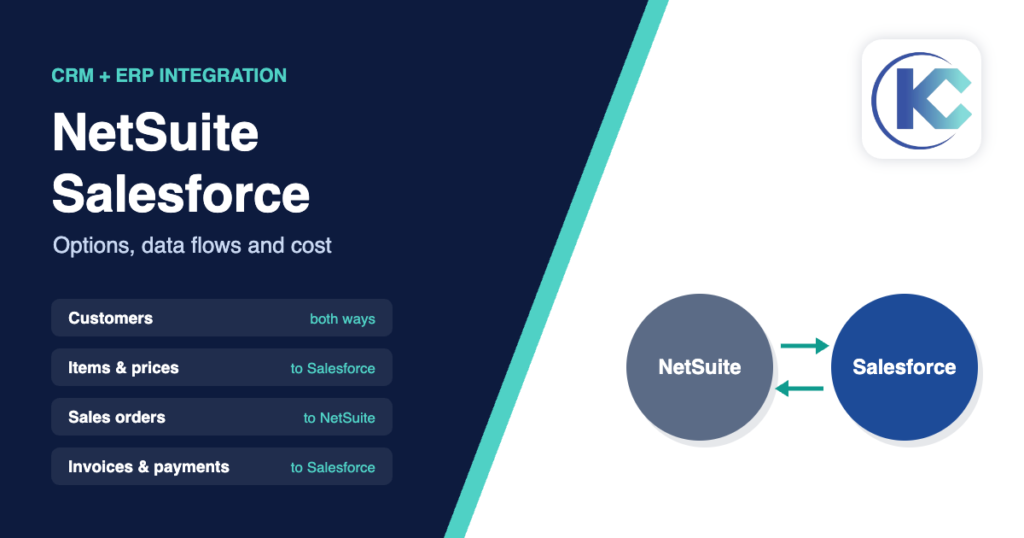
A NetSuite Salesforce integration connects your CRM and your ERP so sales, finance and operations work from the same customer, product and order data. Most companies send customers, items and prices from NetSuite to Salesforce, send won deals from Salesforce to NetSuite as sales orders, and bring order status, invoices and payments back into Salesforce. You can connect the two with a prebuilt connector, an integration platform such as MuleSoft, or a custom API integration. With Kizzy Consulting, standard NetSuite integrations typically fall in our focused project range of $15,000 to $50,000.
Why connect NetSuite and Salesforce
- No double entry. Orders are created once, from the won deal, instead of being retyped in NetSuite.
- Sales sees the full picture. Reps and account managers see invoices, payments and order status on the account.
- Accurate pricing. Quotes use the same items and prices finance maintains in NetSuite.
- Faster quote to cash. Orders reach fulfilment and billing as soon as the deal closes.
- Trusted reporting. Bookings in Salesforce match revenue in NetSuite.
NetSuite Salesforce integration options
| Option | How it works | Best for |
|---|---|---|
| Prebuilt connector or integration app | A packaged integration with ready-made flows for customers, items, orders and invoices, configured rather than coded. | Standard flows with light customisation |
| Integration platform (for example MuleSoft) | Connectors for both systems, with flows, mapping and error handling built on the platform. | Companies connecting several systems, not only NetSuite |
| Custom API integration | Salesforce Apex or middleware calling NetSuite SuiteTalk web services or RESTlets, and NetSuite calling Salesforce APIs. | Unusual processes or logic no connector supports |
What data should sync between NetSuite and Salesforce
| Data | Usual direction | What to watch |
|---|---|---|
| Customers and contacts | Salesforce to NetSuite, then NetSuite IDs back | Decide when a Salesforce account becomes a NetSuite customer, and avoid duplicates. |
| Items and prices | NetSuite to Salesforce | Map item types, price levels and currencies to products and price books. |
| Opportunities or quotes | Salesforce to NetSuite as sales orders | Trigger on a clear status, such as closed won or an approved quote. |
| Sales order status and fulfilment | NetSuite to Salesforce | Show it on the opportunity or a related order record. |
| Invoices and payments | NetSuite to Salesforce | Read-only in Salesforce, so finance stays the owner. |
| Subsidiaries and currencies | NetSuite to Salesforce | Multi-subsidiary setups need careful mapping and testing. |
How to set up a NetSuite Salesforce integration
- Agree the process. Map quote-to-cash end to end with sales and finance, and decide who owns each record and field.
- Choose the approach. Connector, integration platform or custom build, based on your flows, volumes and other systems.
- Prepare both systems. Clean duplicate customers, align item and product names, and add external ID fields on both sides.
- Build the flows. Start with customers and items, then orders, then status, invoices and payments.
- Handle errors. Log failed records, alert an owner and make it easy to retry.
- Test with real scenarios. New customer, repeat customer, multi-currency order, cancelled order and credit memo, in sandboxes for both systems.
- Go live in stages. Turn on one flow at a time and watch the logs for the first weeks.
Connecting NetSuite and Salesforce?
Tell us what you want to sync, how many subsidiaries you run in NetSuite, and your target date. A Salesforce consultant will reply within 1 business day.
Common NetSuite Salesforce integration mistakes
- Two masters for the same field. Without a clear owner, records overwrite each other.
- Syncing too early. Pushing every prospect into NetSuite creates customers finance never needed.
- Ignoring subsidiaries and currencies. They break order creation if they are not mapped from the start.
- No error handling. Silent failures mean missing orders nobody notices.
- Skipping finance in testing. Finance should sign off on orders, invoices and credit memos before go-live.
What a NetSuite Salesforce integration costs
| Option | Typical price (USD) | Best for |
|---|---|---|
| Free Org Health Check | Free | Reviewing your Salesforce org before you connect it to NetSuite |
| Focused integration project | $15,000 to $50,000 | Standard flows: customers, items and prices, orders, invoices and payments |
| Enterprise integration | $50,000 to $150,000+ | Several subsidiaries or currencies, high volumes, several connected systems |
| Managed services after go-live | From $2,000/month | Monitoring, fixes and changes as your process grows |
Connector, integration platform, NetSuite and Salesforce licences are billed separately by their vendors. The exact scope and price are agreed in writing before work starts. Request a free Org Health Check for a scoped estimate.
Why work with Kizzy Consulting
Kizzy Consulting is a Salesforce Select Consulting Partner. Our certified consultants map your quote-to-cash process with sales and finance first, choose the simplest approach that fits, build with proper error handling, and support the integration after go-live. You get a clear scope and price before work starts.
NetSuite Salesforce integration FAQs
Does NetSuite integrate with Salesforce?
Yes. NetSuite and Salesforce do not share data out of the box, but they connect through a prebuilt connector or integration app, an integration platform such as MuleSoft, or a custom integration that uses NetSuite SuiteTalk web services or RESTlets and the Salesforce APIs.
What data should sync between NetSuite and Salesforce?
Most companies sync customers and contacts, items and prices from NetSuite to Salesforce, closed-won opportunities or quotes from Salesforce to NetSuite as sales orders, and order status, invoices and payments back to Salesforce so sales and service teams can see them.
Should NetSuite or Salesforce be the master for each record?
Usually Salesforce owns leads, opportunities and the sales process, and NetSuite owns items, pricing, orders, invoices and payments. Customers are often created in Salesforce and finalised in NetSuite. Agree one owner per field before building, or the two systems will overwrite each other.
How much does a NetSuite Salesforce integration cost?
A connector or integration app has its own subscription. Implementation with Kizzy Consulting typically falls in our focused project range of $15,000 to $50,000 for standard flows such as customers, items, orders and invoices. Complex multi-subsidiary or high-volume integrations typically cost $50,000 to $150,000 or more.
How long does a NetSuite Salesforce integration take?
It depends on how many objects sync, whether the sync is one-way or two-way, the number of subsidiaries and currencies, and how much custom logic is needed. We confirm the timeline in a written scope after reviewing both systems.
Can we use MuleSoft for NetSuite and Salesforce?
Yes. MuleSoft has connectors for both NetSuite and Salesforce and suits companies that also connect other systems, such as e-commerce, warehouse or billing tools. For a single NetSuite to Salesforce flow, a prebuilt connector may be enough.