SAP Salesforce Integration: Benefits, Methods, and Best Practices
⏱ 3 min read
ERP and CRM Integration Guide
If your teams use SAP for orders and finance and Salesforce for sales and service, this guide covers what to connect, how to connect it and how to keep the data reliable.
By Sanjeet Mahajan • Founder & CEO, Kizzy Consulting
Quick Answer: What Is SAP Salesforce Integration?
SAP Salesforce integration links SAP ERP data with Salesforce CRM records and workflows. It synchronizes customers, products, prices, orders, and invoices through APIs, custom connections, or integration platforms. The right approach depends on your business processes, data volumes, security needs, and system complexity.
What Is SAP Salesforce Integration?
SAP commonly manages operational and financial processes, while Salesforce supports customer relationships, sales pipelines and service activities. Connecting the two lets teams share the records they need instead of entering the same information in both systems.
For example, a sales rep working in Salesforce may need live product availability and pricing from SAP. Once an opportunity is won, the business can automatically transfer order details to SAP for fulfillment, processing, or invoicing.
| SAP Data | Salesforce Record or Process | Business Purpose |
|---|---|---|
| Business partner & customer details | Accounts and Contacts | Keep customer information aligned |
| Materials and product details | Products | Make product information available to sales teams |
| Pricing information | Price Books or quoting workflows | Support consistent pricing |
| Sales orders and delivery status | Opportunities, quotes and order workflows | Connect sales activity with fulfillment |
| Invoices and financial records | Related account and transaction views | Improve financial visibility |
Exact mappings depend on your SAP product edition, Salesforce configuration, and business rules. Always establish record ownership and system-of-record decisions prior to development.
Need Salesforce Integration Services?
Connect Salesforce with your ERP and other business systems to synchronize data, automate workflows, and improve visibility across your operations.
How Does SAP Salesforce Integration Work?
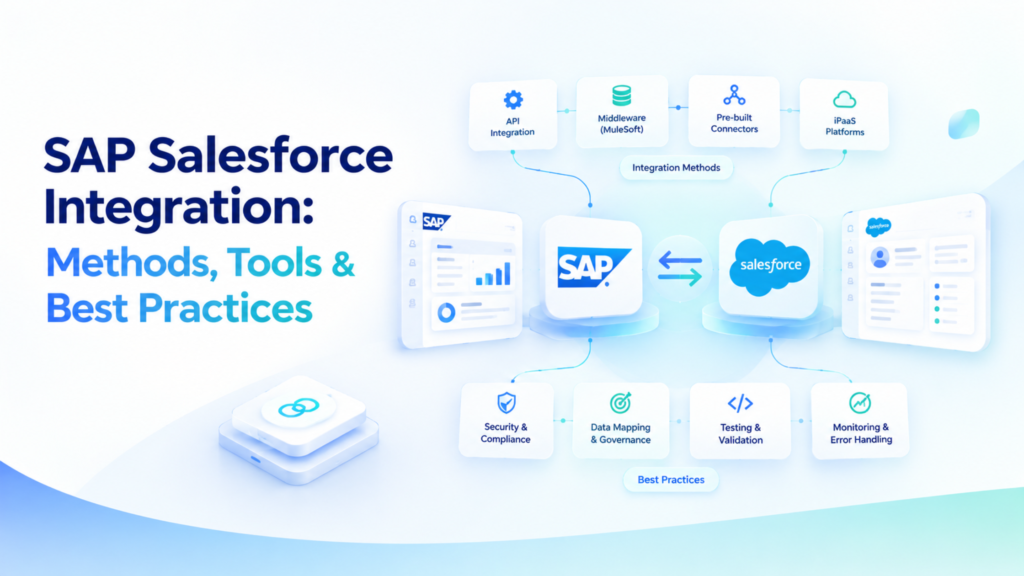
SAP Salesforce integration works by defining how data is requested, transformed, validated, and transferred between systems. Your integration architecture should account for authentication, field mapping, update frequency, error handling, and monitoring.
- Define the business process: Identify the workflow to connect, such as customer creation, order processing, or inventory checks.
- Map records and fields: Document corresponding fields, required values, identifiers, and transformation rules.
- Choose the connection method: Select direct APIs, custom middleware, or an integration platform based on complexity and scale.
- Configure security and synchronization: Set permissions, authentication, triggers, schedules, and data validation rules.
- Test and monitor: Verify end-to-end scenarios, failed transactions, duplicate handling, and recovery procedures before and after deployment.
Not every process needs instant synchronization. Event-driven updates suit order and inventory workflows, while scheduled batch processing suits large data transfers and reporting. Many organizations combine both. If you also want SAP data in unified customer profiles, see our guide to Data 360 connectors.
What Are the Benefits of SAP Salesforce Integration?
Connecting SAP ERP with Salesforce CRM improves efficiency and visibility across departments:
- Less duplicate data entry: Eliminate repetitive manual entry of customer, product, or order details.
- Improved data quality: Enforce validation and automated synchronization rules to minimize discrepancies.
- Better customer visibility: Provide sales and service teams with complete operational context directly inside Salesforce.
- Streamlined workflows: Transfer orders, fulfillment updates, and invoices smoothly between systems.
- Stronger cross-functional collaboration: Enable sales, finance, and operations to align around unified data.
Related Read: Salesforce Consulting Services
Explore how expert Salesforce consulting can help align your CRM capabilities, business workflows, and integration requirements.
Which SAP Salesforce Integration Method Should You Choose?
The right integration method depends on your system count, workflow complexity, data volume, maintenance overhead, and internal technical expertise.
| Method | Best Suited For | Key Consideration |
|---|---|---|
| Direct API integration | Focused workflows with manageable requirements | Adding more connections can increase maintenance complexity |
| Middleware or iPaaS | Multiple workflows or systems needing centralized integration management | Requires platform selection, configuration, and ongoing administration |
| Custom integration | Specialized processes that need tailored behavior | Demands development expertise and a long-term maintenance plan |
Organizations often evaluate tools like MuleSoft Anypoint Platform or SAP Integration Suite. Always verify supported connectors, authentication mechanisms, error recovery, throughput costs, and team capabilities against current vendor documentation.
How SAP Connects to Salesforce
How SAP connects depends first on which SAP system you run. SAP S/4HANA, in the cloud or on-premise, exposes OData APIs for business objects such as sales orders, business partners and products. Older SAP ERP 6.0 (ECC) systems more often integrate through IDocs for asynchronous document exchange and BAPIs called over RFC for synchronous calls. SAP’s mainstream maintenance for ECC on enhancement packages 6 to 8 ends on 31 December 2027, so design new integrations with an S/4HANA move in mind.
On the integration layer, two platforms are common:
- MuleSoft Anypoint Platform offers an SAP S/4HANA OData Connector and an SAP Connector that sends and receives IDocs and calls BAPIs.
- SAP Integration Suite on SAP Business Technology Platform (BTP) includes a Salesforce adapter that supports create, read, update and delete operations, the Bulk API and subscriptions to Salesforce events.
On the Salesforce side:
- Salesforce Connect shows SAP data as external objects through its OData 2.0 or 4.0 adapter, without copying the data into Salesforce.
- Platform Events and Change Data Capture publish changes in Salesforce, such as a new order or an updated account, so SAP-side flows can react without polling.
Agentforce on SAP Data
Once SAP data is reachable from Salesforce, Agentforce agents can use it to answer the questions sales and service teams ask most. A service agent can check an order’s status, a sales rep can confirm stock for a product before quoting, and a finance user can see whether an invoice is open or paid, all without leaving Salesforce.
The agent reads SAP data through the same integration layer: Salesforce Connect external objects, or agent actions built with Flow, Apex or MuleSoft APIs that call SAP. Read actions can run directly. Actions that write to SAP, such as changing an order or creating a credit memo, should need a person’s approval first, and every action should be logged.
Start with read-only questions, check the answers against SAP, then add write actions one at a time. Our Agentforce consulting services cover this setup.
What Are the Common SAP Salesforce Integration Challenges?
Integration projects can falter when data models or business rules aren’t properly aligned. Keep these hurdles in mind:
- Data mapping discrepancies: Structural differences can trigger missing fields or duplicates. Solidify mappings early.
- Synchronization conflicts: Conflicting updates or poor schedules create outdated records. Set clear priorities.
- Security compliance: Financial and customer records need strict permissions, encryption and audit logs.
- API limits & performance: High transaction peaks require careful batching, retries, and monitoring.
- Ongoing maintenance: Platform upgrades impact integrations. Assign dedicated ownership.
How Can You Implement SAP Salesforce Integration Successfully?
- Set clear objectives: Define the process, business owner, and expected success metrics.
- Assess current systems: Review SAP modules, Salesforce objects, data hygiene, and existing APIs.
- Design the data flow: Map fields, assign record ownership, schedule frequencies, and outline error handling.
- Test end-to-end scenarios: Validate successful payloads, invalid records, retries, and disaster recovery.
- Deploy and monitor: Roll out in a controlled manner, reconcile records, and establish continuous monitoring.
For broader automation initiatives, check out Kizzy Consulting’s implementation services.
Our team builds ERP integrations with Salesforce, such as our QuickBooks to Salesforce integration, using the same field mapping, sync and error-handling patterns described here.
SAP Salesforce Integration: Frequently Asked Questions
What is SAP Salesforce integration used for?
It connects SAP ERP data and processes with Salesforce CRM. Common uses include synchronizing customer records, checking inventory, transferring orders, and sharing invoices.
Can SAP and Salesforce sync data instantly?
Yes. Workflows can use APIs or event-driven integration for near-instant updates, depending on system constraints, API rate limits and business needs. Scheduled batch syncs suit large data transfers and reporting.
Which tools can connect SAP and Salesforce?
Options include direct APIs, custom middleware, Salesforce Connect for viewing SAP data without copying it, and integration platforms such as MuleSoft Anypoint Platform and SAP Integration Suite.
What are the main challenges of SAP Salesforce integration?
Common obstacles include data mapping, duplicate handling, update synchronization, security controls, API limits, and long-term maintenance.
How do you choose the right SAP Salesforce integration approach?
Start by mapping required business workflows. Assess data volume, complexity, security, available resources and internal team expertise before choosing direct APIs, middleware or custom builds.
Conclusion: Plan Your SAP Salesforce Integration Around Business Needs
Successful SAP Salesforce integration connects the right data to the right workflows:
- Define outcomes and system ownership early.
- Choose an integration style matching your scale and support capacity.
- Protect data quality with thorough testing and ongoing monitoring.
Need Help Planning Your Integration Strategy?
Discuss your Salesforce environment, integration requirements, and business workflows with Kizzy Consulting to identify a practical path forward.