Salesforce Winter ’27 Admin Checklist: 14 Features to Review Before Your Upgrade
⏱ 4 min read
SALESFORCE WINTER ’27 RELEASE NOTES
These Salesforce Winter ’27 release notes for admins cover changes to Agentforce enablement, reporting, security, list views, field history tracking, and Flow Builder. Use the Salesforce Winter ’27 admin checklist below to review the most important updates, spot risks, and confirm your org is ready before adopting new capabilities.
14 Feature Areas
10-Minute Admin Checklist
Agentforce Readiness
10-Minute Admin Checklist
Agentforce Readiness
THE QUICK ANSWER
What Do the Salesforce Winter ’27 Release Notes Mean for Admins?
Start with the Salesforce Winter ’27 admin checklist: confirm your release window, review Einstein and Agentforce settings, audit Manage AI Agents permissions, and check existing agents. Then test the reporting, sharing, field history, SOQL, and Flow changes in a sandbox. Enabling Agentforce does not automatically activate an agent.
IMPORTANT RELEASE CHECK
Winter ’27 Agentforce Default Enablement: What the Release Notes Mean for Admins
Salesforce is enabling the Agentforce platform by default for eligible orgs on a rolling basis, as reported by Salesforce Ben. Removal of the Agentforce platform toggle from its previous Setup location is planned for later in the Winter ’27 release.
The important distinction: Platform enablement does not automatically deploy an autonomous agent. Agents still require configuration and activation, while customer-facing interactions depend on the relevant channel and deployment setup.
Admin takeaway: Review AI agent permissions, sensitive data access, ownership, and approval processes before introducing agents into business-critical workflows.
What Changes, and What Stays Under Admin Control?
- Platform access: Eligible orgs may have Agentforce enabled by default.
- Einstein Setup: The Einstein generative AI setting remains relevant to the configured AI experience. Review its current state and dependencies.
- Agent activation: Agents still require configuration and activation.
- Permissions: Restrict Manage AI Agents to authorized users.
- Billing: Salesforce says default enablement adds no cost and changes no billing, but usage of agents is a separate matter. Verify your contract, usage model, and licensing terms.
Salesforce Winter ’27 Release Notes: 14 Features Admins Should Review
Use this feature-by-feature summary of the Salesforce Winter ’27 release notes to determine what matters to your org, what needs testing, and where you may need to update permissions, configuration, or internal processes.
01 · REPORTING
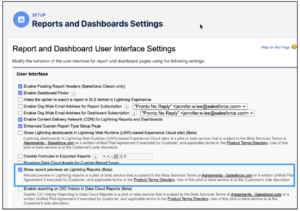
Preview Records from Lightning Reports Without Losing Context (Beta)
Users can preview records in a sidebar without leaving Lightning reports. Select the eye icon and choose a record to inspect its details while retaining the current report context.
Admin action: Test record access, preview behavior, and compatibility with frequently used reports. Confirm beta availability before training users.
02 · EXPERIENCE CLOUD
Embed Lightning Reports in LWR Experience Cloud Sites (Beta)
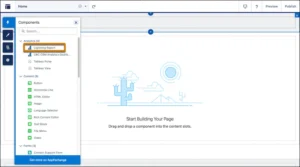
Admins can embed Lightning reports in eligible Lightning Web Runtime (LWR) Experience Cloud sites. Enable the feature in Setup, then add the Lightning Report component through Experience Builder and configure the report ID.
Admin action: Validate site access, report visibility, sharing, and portal user permissions.
03 · EXPERIENCE CLOUD
Embed Lightning Dashboards in LWR Experience Cloud Sites (Beta)
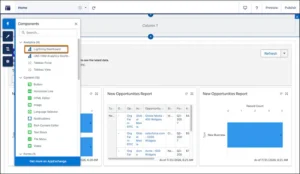
This beta capability lets admins display Lightning dashboards on eligible LWR Experience Cloud pages. Enable the feature, add the Lightning Dashboard component in Experience Builder, and specify the dashboard ID.
Admin action: Test dashboard visibility, permissions, data exposure, and embedded component behavior.
04 · REPORTING
Show Only Matching Records Across Joined Report Blocks (Beta)
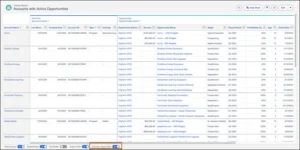
The Common Rows Only option filters joined reports to records appearing across all report blocks. For example, a report combining Accounts and Active Opportunities can focus on accounts with matching active opportunities. Salesforce Customer Support must enable this beta feature.
Admin action: Compare report totals and matching records before sharing results with stakeholders.
KIZZY AI READINESS ASSESSMENT
Before You Switch On AI, Check What’s Ready.
Production-ready AI requires trusted data, secure permissions, defined workflows, and measurable outcomes. Assess your organization’s readiness before scaling Agentforce.
05 · USER EXPERIENCE
Add the Follow Button to the Dynamic Highlights Panel
Admins can display the Follow/Unfollow button in the Dynamic Highlights Panel, allowing users to follow records and receive relevant feed updates. Configure visibility through the panel properties in Lightning App Builder using the Hide Follow/Unfollow button setting.
Admin action: Confirm that record following supports your team’s collaboration and notification needs.
06 · RECORD SHARING
The Keep Manual Shares When Transferring Records setting lets admins preserve manual shares during ownership changes. Find it under Setup → Sharing Settings. It is off by default and can affect access across the org.
Security consideration: Test ownership transfers to ensure retained shares do not grant unintended access.
07 · SECURITY
Enforce Profile Filtering
The profile-filtering release update introduced in Summer ’26 is enforced in Winter ’27. It restricts users from viewing other users’ profiles unless they have the required permission, such as View All Profiles.
Admin action: Check integrations, support procedures, and administrative workflows that require cross-profile visibility.
08 · ADMINISTRATIVE SECURITY
Use a Dedicated Permission for Setup Audit Trail
A dedicated View Setup Audit Trail permission lets admins grant audit-trail access without automatically granting the broader View Setup permission. Existing access is preserved according to the Salesforce Winter ’27 release notes.
Admin action: Review permission assignments and grant audit access through appropriate profiles or permission sets.
09 · LIST VIEWS
Make Inline Editing in List Views More Flexible
Two optional User Interface Settings improve list-view inline editing:
- Remove list view inline edit dependencies on page layout: Allows editing fields users can access even when those fields are absent from the page layout.
- Make inline edits in list views with multiple record types: Supports inline editing across records with different record types.
Both settings are off by default and can be configured under Setup → User Interface Settings.
Admin action: Test field permissions, validation rules, record types, and editing behavior.
10 · AUDITABILITY
Track Field History on the User Object
User Field History Tracking adds visibility into selected User object field changes. Confirm the supported fields, field limit, and retention requirements in the Salesforce Winter ’27 release notes before relying on this capability for compliance.
Admin action: Identify user-account changes relevant to security reviews and audit requirements.
11 · DEVELOPER EXPERIENCE
Compare Field Values in SOQL with FORMULA() (Beta)
The beta SOQL FORMULA() enhancement supports formula-based comparisons in WHERE clauses for selected query scenarios, potentially reducing the need for additional formula fields. Availability is currently limited to sandbox, Developer Edition, and scratch-org environments on API version 68.0 or later, not production.
Developer note: Verify API-version and environment restrictions before using this beta feature.
12 · AGENTFORCE
Configure Salesforce More Easily with Agentforce
Setup With Agentforce offers natural-language assistance for selected configuration tasks, including managing mobile Dynamic Actions and creating related-list enrichments. Admins can describe changes, answer clarification questions, and review proposed configurations. Org Health and Usage metrics can also be favorited or hidden.
Admin action: Review AI-proposed changes, validate permissions, and follow change-management procedures before deployment.
13 · FLOW BUILDER
Improve Flow Builder Testing, Debugging, and Maintenance
Flow Builder improvements include richer version comparisons, edit history, element grouping, unused-resource visibility, reusable test scenarios, beta mock outputs for actions and subflows, and better required-field validation. These capabilities can simplify automation maintenance and troubleshooting.
Admin action: Test critical flows in a sandbox, focusing on permissions, user context, fault paths, sharing, and record locking.
14 · SCREEN FLOWS & AUTOMATION
Extend Automation with Screen Flows and New Components
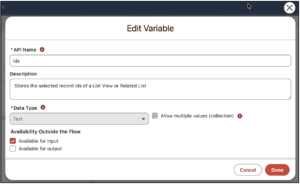
Winter ’27 expands screen flows for selected-record actions from list views and related lists. A native Time component and additional testing and debugging improvements can help teams build guided workflows with less custom development.
Admin action: Evaluate relevant use cases and verify component availability before redesigning existing workflows.
RELATED READ
Keep Your Org Healthy After Every Release
Once the Salesforce Winter ’27 release notes land, it is a good moment to review permissions, automation, and data quality. This guide lists what to check in your Salesforce org every six months.
YOUR RELEASE ACTION PLAN
Salesforce Winter ’27 Admin Checklist: 7 Checks in 10 Minutes
Run through these seven checks from the Salesforce Winter ’27 release notes to understand your org’s Agentforce readiness, identify permission gaps, and make a deliberate adoption decision before the rollout becomes another last-minute admin task.
Your 7-Point Salesforce Winter ’27 Admin Checklist
- 01
Confirm your release window.
Winter ’27 reached production in three windows, September 4, October 2, and October 9, according to the Salesforce Admin Blog. Check your instance on the Salesforce Trust maintenance calendar and confirm whether your edition is in scope for Agentforce enablement. - 02
Record your current Einstein AI settings.
Document the current state of the Einstein generative AI setting and identify existing features, workflows, or integrations that depend on it. - 03
Audit Manage AI Agents permissions.
Inventory users with the Manage AI Agents permission and restrict access to authorized builders who genuinely need it. - 04
Inventory existing Agentforce agents.
Separate created agents from activated agents, identify their owners, and document the channels connected to every active agent. - 05
Document your Agentforce credit model.
For consumption-based pricing, record your contracted credit rates per action, the difference between production and sandbox usage, whether credits roll over, and how overages are billed. Take these terms from your Salesforce contract, not from third-party summaries. - 06
Verify unmetered user assignments.
If your contract includes unmetered usage, check that the Unmetered User-Based AI permission is assigned to the correct users and matches your contractual entitlements. - 07
Make a deliberate adoption decision.
Decide whether your organization will adopt Agentforce this quarter or defer adoption. Document the decision, accountable owner, and next review date.
Need Help With Your Salesforce Winter ’27 Release Review?
If your inventory uncovers agents without clear ownership, excessive permissions, or missing governance controls, Kizzy Consulting can help you establish a structured approach before more builders arrive, starting with our Agentforce consulting services.
SALESFORCE WINTER ’27 ADMIN GUIDE
Salesforce Winter ’27 Release Notes FAQs
KIZZY CONSULTING
Turn the Salesforce Winter ’27 Release Notes Into Business Value
Reading the Salesforce Winter ’27 release notes is only the first step. Kizzy Consulting helps teams evaluate Agentforce readiness, strengthen governance, optimize Salesforce configurations, and turn enterprise AI initiatives into practical business outcomes.