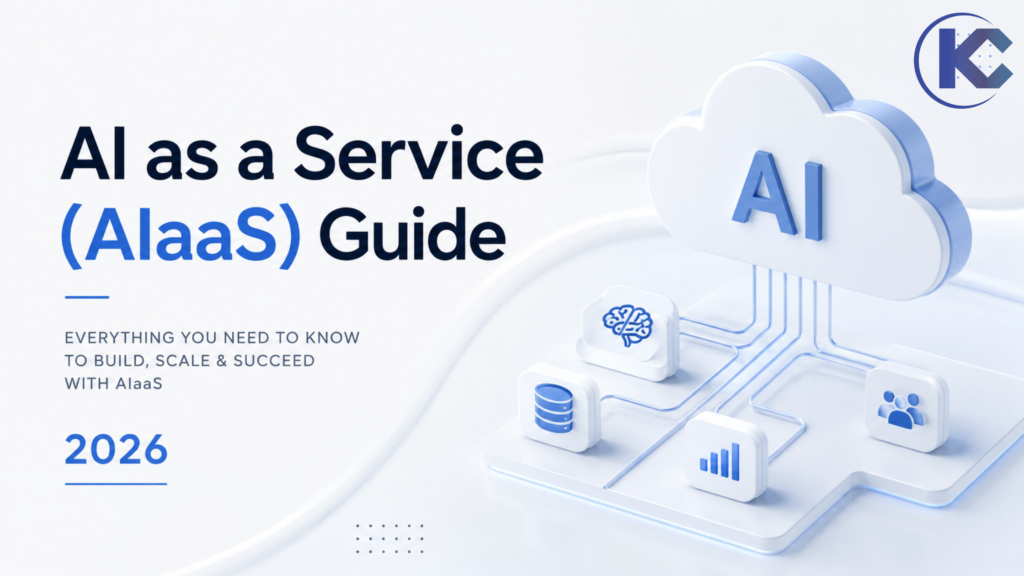
AI as a Service (AIaaS) Guide 2026
⏱ 6 min read
AI as a Service (AIaaS) gives businesses access to artificial intelligence capabilities without requiring them to build every model, GPU environment, data pipeline, or AI engineering capability from scratch.
Instead of treating AI as a one-time software purchase, organizations can consume models, machine learning platforms, generative AI, AI agents, computer vision, speech, and other capabilities through managed cloud services and APIs.
By Sanjeet Mahajan, CEO & Founder, Kizzy Consulting
Executive Quick Answer
What is AI as a Service (AIaaS)?
AI as a Service is a cloud-based model for consuming AI capabilities without building the entire AI technology stack internally. Depending on the provider, AIaaS can include foundation models, generative AI, machine learning, natural language processing, computer vision, speech, data analytics, and AI agents delivered through managed platforms, APIs, SDKs, or applications.
For enterprises, the important question is not simply whether AIaaS is available. It is whether the service can connect securely to business data, existing applications, workflows, governance controls, and measurable business outcomes.
API + Cloud
Consume AI capabilities without owning the entire underlying infrastructure.
On Demand
Scale usage according to workload, users, transactions, or inference demand.
Enterprise Ready
AI can be connected to CRM, ERP, data platforms, applications, and business workflows.
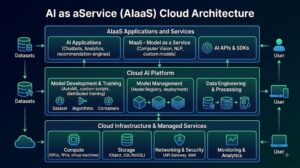
What Is AI as a Service (AIaaS)?
AI as a Service, commonly abbreviated as AIaaS, is a way for organizations to access artificial intelligence capabilities through cloud platforms and managed services rather than building every component themselves.
The underlying service may include an AI model, inference endpoint, machine learning environment, AI application, agent platform, or a combination of these components. Businesses typically interact with the service through a web application, API, SDK, managed development environment, or enterprise platform.
This approach is particularly useful when a company wants to experiment with AI quickly, embed AI into an existing product, automate a business workflow, or scale an AI workload without owning and operating all of the underlying infrastructure.
For example, a company might use an AIaaS platform to analyze customer conversations, extract information from documents, generate content, classify support requests, predict demand, or power an AI agent that takes actions inside an existing CRM.
IBM similarly describes AIaaS as cloud-based delivery of AI tools and products, allowing organizations to access AI without building their own models or local AI infrastructure.
How Does AI as a Service Work?
Most AIaaS implementations follow a relatively simple pattern: an application sends data or a request to an AI service, the AI service performs inference or another AI operation, and the resulting output is returned to the application or workflow.
01
Business Application
CRM, website, mobile app, ERP, portal, or internal system.
02
API / Integration
The application sends a request, data, or event to the AI service.
03
AI Processing
A model or AI service processes the request.
04
Business Action
The output is used by an application, workflow, employee, or AI agent.
For example, Amazon Bedrock provides managed access to foundation models through AWS services and APIs, while Amazon SageMaker AI provides managed capabilities for building, training, and deploying machine learning models.
Microsoft Foundry similarly provides access to models through APIs and managed deployment options, allowing organizations to integrate model capabilities into applications.
AIaaS Architecture: From AI Model to Business Outcome
An enterprise AIaaS architecture is more than an API connected to an AI model. Production implementations typically require an integration layer, identity and access controls, business data, monitoring, evaluation, governance, and a mechanism for turning AI output into an actual business action.
Business Application
↓
API / Integration Layer
↓
Business Data + Knowledge
↓
AI Model / AI Agent
↓
Guardrails + Evaluation + Monitoring
↓
Business Workflow / Outcome
This architecture is why enterprise AI implementation often requires more than selecting a model. Data quality, integration, security, workflow design, evaluation, and change management can determine whether an AIaaS implementation produces measurable value.
Types of AI as a Service
AIaaS is a broad category. Different providers offer different combinations of models, infrastructure, APIs, applications, and managed AI capabilities.
Generative AI Services
Text, code, image, audio, and multimodal generation delivered through hosted models and APIs.
Machine Learning as a Service
Managed tools for building, training, deploying, and monitoring machine learning models.
AI Agent Services
AI agents that can reason over
business context, use tools, retrieve information, and execute defined actions.
Computer Vision
Image and video analysis for OCR, classification, detection, inspection, and document processing.
Speech & Voice AI
Speech recognition, transcription, voice generation, call analysis, and conversational voice applications.
AI Analytics
Prediction, classification, anomaly detection, forecasting, and intelligent data analysis.
AIaaS vs SaaS vs PaaS vs IaaS
These terms are related but describe different layers of cloud technology.
| Model | What You Get | Best For |
|---|---|---|
| IaaS | Compute, storage, networking, and infrastructure resources. | Teams that need infrastructure control. |
| PaaS | Managed application development and deployment environment. | Developers building and deploying applications. |
| SaaS | Finished software accessed through the internet. | Business users who need ready-to-use applications. |
| AIaaS | AI models, APIs, ML platforms, AI applications, or agent capabilities delivered as managed services. | Businesses that want to integrate or consume AI without building the entire AI stack internally. |
AIaaS can therefore sit across multiple cloud layers. A business may consume a finished AI application as SaaS, call a foundation model through an API, or use a managed machine learning platform to build and deploy its own models.
Planning an Enterprise AI Project?
Before choosing a model or platform, identify the business process, data requirements, integrations, AI architecture, and success metrics. Kizzy Consulting helps businesses move from AI strategy to production-ready implementation.
Enterprise AIaaS Use Cases
The strongest AIaaS use cases connect AI directly to a measurable business process rather than deploying AI simply because a model is available.
Customer Service
Summarize conversations, classify cases, retrieve knowledge, draft responses, and automate service workflows.
Sales
Qualify leads, summarize accounts, prepare meeting briefs, generate follow-ups, and update CRM records.
Document Processing
Extract information from contracts, PDFs, forms, invoices, reports, and other unstructured documents.
Operations
Automate repetitive workflows, analyze operational data, route requests, and coordinate multi-step processes.
Healthcare
Support documentation, information retrieval, patient communication, and administrative workflows subject to appropriate controls.
Real Estate
Analyze property documents, answer knowledge questions, qualify inquiries, and automate CRM workflows.
How AIaaS Works With Salesforce
For organizations already using Salesforce, AIaaS can become an intelligence layer around the CRM rather than a separate system that employees have to learn and operate independently.
Salesforce
CRM + business data
CRM + business data
→
Integration Layer
APIs + workflows
APIs + workflows
→
AIaaS
Models + agents
Models + agents
→
Business Action
Automation + outcome
Automation + outcome
For example, an AI service can analyze an inbound customer conversation, identify intent, summarize the interaction, extract next actions, and pass structured information into Salesforce. An AI agent can then use that context to support a service workflow or take an authorized action.
Salesforce’s current Agentforce platform supports AI agents that can connect business data, reason over requests, and take actions across workflows.
For businesses evaluating this approach, Kizzy Consulting provides AI integration and implementation services that connect AI capabilities with existing enterprise systems.
AIaaS and Agentic AI: What’s the Difference?
Generative AI typically produces an output in response to a prompt. Agentic AI goes further by combining models with instructions, tools, data, workflows, and actions.
For example, a generative AI application might summarize a customer call. An agentic workflow could analyze the call, identify the customer’s issue, retrieve account information, determine the appropriate next step, update the CRM, create a follow-up task, and escalate the case when a defined condition is met.
AIaaS can provide the underlying models or managed agent infrastructure that makes these experiences possible. However, the enterprise implementation still requires careful workflow design, permissions, data grounding, evaluation, and governance.
See Kizzy’s AI Agents solutions and AI Agent & Automation Development services for examples of how AI agents can be connected to business workflows.
AIaaS Pricing: How Much Does AI as a Service Cost?
There is no single AIaaS price because providers charge for different resources and capabilities. Pricing can depend on model usage, tokens, API requests, compute, storage, users, agent executions, data processing, or enterprise service levels.
| Pricing Model | How It Works | Best For |
|---|---|---|
| Pay-as-you-go | Charges based on usage such as API calls, tokens, compute, or processing volume. | Variable workloads and early-stage implementations. |
| Subscription | Recurring fee for a defined product or usage tier. | Predictable team or application usage. |
| Per-user / Per-seat | Pricing based on the number of users accessing an AI application or platform. | AI copilots and employee-facing applications. |
| Enterprise / Custom | Negotiated pricing based on scale, security requirements, support, SLAs, deployment model, and usage. | Large production deployments. |
The Hidden AIaaS Costs to Budget For
- Model usage: inference, tokens, requests, or compute.
- Data: storage, ingestion, retrieval, embeddings, and data processing.
- Integration: APIs, middleware, CRM/ERP integrations, and custom development.
- Evaluation: testing accuracy, hallucination rates, workflow behavior, and edge cases.
- Security: identity, access controls, monitoring, governance, and compliance requirements.
- Operations: monitoring, optimization, maintenance, and human oversight.
For current provider pricing, always check the provider’s official pricing documentation because model availability, usage rates, and packaging can change.
AIaaS Providers and Platforms
The AIaaS market includes hyperscale cloud providers, model providers, specialized AI platforms, and enterprise software companies. The right option depends on your use case, data requirements, architecture, security model, and existing technology stack.
Amazon Web Services
AWS provides managed AI and machine learning services including Amazon Bedrock and SageMaker AI.
Microsoft
Microsoft Foundry provides access to models and managed AI capabilities through APIs and deployment options.
Salesforce
Salesforce Agentforce provides an enterprise platform for building and deploying AI agents across business workflows.
AIaaS Security, Privacy, and Governance
Moving AI workloads to a managed service does not remove your responsibility for data governance. Before sending business or customer data to an AIaaS provider, evaluate how the service handles data, access, retention, monitoring, and model usage.
Data Privacy
Understand where data is processed, stored, retained, and whether it can be used for model improvement.
Access Control
Apply least-privilege access to AI applications, APIs, agents, tools, and business data.
Compliance
Assess requirements relevant to your industry, geography, data types, and customer contracts.
Monitoring
Monitor quality, failures, usage, cost, latency, security events, and business outcomes.
How to Choose an AIaaS Provider
The cheapest AI API is not necessarily the cheapest enterprise solution. Evaluate the complete operating model around the AI service.
1
Start With the Business Use Case
Define the process, users, inputs, outputs, success metric, and acceptable level of automation before selecting a platform.
2
Evaluate Model and Platform Fit
Compare model capabilities, latency, context requirements, modalities, tool use, deployment options, and reliability.
3
Check Integration Requirements
Confirm that the service works with your CRM, ERP, data warehouse, APIs, identity provider, and existing application architecture.
4
Evaluate Security and Governance
Review data handling, authentication, permissions, encryption, retention, compliance, logging, and administrative controls.
5
Model Total Cost of Ownership
Include usage, integration, data, monitoring, evaluation, engineering, support, and ongoing optimization costs.
6
Plan for Portability
Consider how difficult it would be to change models, providers, APIs, or architecture as your requirements evolve.
When Should a Business NOT Use AIaaS?
AIaaS is not automatically the right answer for every AI workload. A business may consider a different approach when:
- Data residency or regulatory requirements require a deployment model that the selected provider cannot support.
- Workloads are highly specialized and require a custom model or infrastructure strategy.
- Usage is extremely predictable and large-scale enough that dedicated infrastructure may become economically attractive.
- Latency requirements make remote inference unsuitable for a particular application.
- Vendor lock-in creates unacceptable architectural or commercial risk.
The right decision should be based on the complete business, technical, security, and financial requirements rather than simply choosing between “cloud AI” and “in-house AI.”
Need Help Turning AIaaS Into a Production Solution?
Kizzy Consulting helps businesses evaluate AI use cases, design AI architecture, integrate AI with existing systems, and move AI projects from proof of concept to production.
How Kizzy Consulting Helps With AIaaS
AIaaS is the technology layer. The business value comes from integrating that technology into the right workflow.
Kizzy Consulting helps organizations move from AI experimentation to production by combining AI strategy, architecture, integration, AI agent development, and Salesforce expertise.
AI Strategy
Identify high-value AI use cases and create a practical roadmap based on business outcomes.
AI Integration
Connect AI services to Salesforce, APIs, databases, ERP systems, applications, and business workflows.
AI Agents
Build AI agents that retrieve knowledge, use tools, execute workflows, and support business teams.
AI Pods
Use a dedicated cross-functional AI engineering team to build, evaluate, integrate, and launch a production-ready AI solution.
Explore Kizzy AI Pod Services for a focused approach to building production-ready AI agents and AI applications.
Frequently Asked Questions About AIaaS
What is AI as a Service in simple terms?
AI as a Service means accessing AI capabilities through cloud-based services instead of building and operating the entire AI technology stack yourself. Depending on the service, this can include AI models, APIs, machine learning platforms, generative AI, computer vision, speech, or AI agents.
Is AIaaS the same as SaaS?
No. SaaS generally provides a finished software application, while AIaaS provides AI capabilities such as models, inference services, machine learning platforms, or AI functionality that can be consumed or integrated into other applications.
What are examples of AIaaS?
Examples include managed AI and machine learning platforms such as Amazon Bedrock and SageMaker AI, Microsoft Foundry model services, and enterprise AI platforms such as Salesforce Agentforce. The exact definition of AIaaS can vary because providers package AI capabilities differently.
How much does AIaaS cost?
AIaaS pricing varies by provider and workload. Common models include pay-as-you-go, subscription, per-user pricing, and custom enterprise pricing. The total cost should also include integration, data, evaluation, monitoring, security, and ongoing engineering.
What is Machine Learning as a Service (MLaaS)?
Machine Learning as a Service, or MLaaS, is a category of AIaaS focused on managed machine learning capabilities such as model development, training, deployment, inference, and monitoring.
Can AIaaS work with Salesforce?
Yes. AI services can be connected to Salesforce through APIs, integration platforms, applications, or native AI capabilities. Common use cases include summarizing customer interactions, analyzing documents, enriching CRM records, automating case workflows, and powering AI agents.
Is AIaaS suitable for enterprise AI?
AIaaS can be suitable for enterprise AI when the provider and architecture meet the organization’s requirements for security, data governance, integration, reliability, cost, compliance, and operational control. Enterprise readiness depends on the complete implementation, not just the underlying AI model.
Conclusion: Is AIaaS Right for Your Business?
AI as a Service has lowered the barrier to adopting artificial intelligence. Businesses can access sophisticated models and managed AI capabilities without building every part of the infrastructure themselves.
But successful enterprise AIaaS is not simply about choosing an API. The real value comes from connecting AI to trusted business data, existing applications, secure integrations, well-designed workflows, measurable outcomes, and appropriate human oversight.
If you’re evaluating AIaaS for Salesforce, customer service, document processing, AI agents, or broader enterprise automation, Kizzy Consulting can help you identify the right architecture and implementation approach.
Ready to Put AIaaS to Work?
Whether you’re evaluating AI providers, integrating AI with Salesforce, building AI agents, or moving an AI proof of concept into production, Kizzy Consulting can help.
AI Strategy • AI Integration • AI Agents • Salesforce • Agentforce