How to Integrate AI Agents With Business Systems in 2026
⏱ 5 min read
Enterprise AI Guide 2026
AI agents become truly useful when they can access the data, tools, and systems your business already depends on. Learn how to connect AI agents to CRMs, APIs, databases, knowledge bases, and enterprise workflows – and move from an impressive AI demo to production-ready automation.
Contents
hide
Executive Quick Answer
How do you integrate an AI agent with a business?
Connect the agent to the systems it needs to read from and act on – such as CRM platforms, databases, APIs, document repositories, communication tools, and business applications. Then add authentication, permissions, guardrails, human approval, monitoring, and fallback workflows before allowing the agent to operate in production.
The important shift is from treating an AI agent as a standalone chatbot to treating it as a
software layer that can reason over business context and execute actions across existing systems.
AI Agent Integration at a Glance
Connect
Connect Systems
Give agents controlled access to the systems where business data and actions live.
Control
Add Controls
Use authentication, permissions, guardrails, and approval workflows.
Deploy
Deploy Safely
Evaluate workflows before moving agents into production.
Monitor
Monitor Results
Track task completion, failures, latency, cost, and human escalation.
Business Outcomes of AI Agent Integration
The value of AI agent integration is not simply that an AI system can answer questions. The real opportunity is connecting AI reasoning to the workflows that already drive the business.
Reduce Manual Work
Automate repetitive tasks such as data entry, record updates, document processing, and routine communication.
Accelerate Workflows
Allow agents to retrieve information and execute approved actions without requiring employees to switch between multiple applications.
Improve Customer Experience
Give customer-facing teams faster access to relevant customer, product, order, and service information.
Create Scalable Automation
Build reusable agent workflows that can expand across departments, systems, and business processes.
Have an AI Agent Idea?
Tell us about your workflow, systems, and desired business outcome. Kizzy Consulting can help identify where an AI agent can create measurable value.
What Is AI Agent Integration?
AI agent integration is the process of connecting an AI agent to the software, data, and tools it needs to complete real business tasks.
A standalone AI model can generate text, classify information, summarize content, or answer questions. An integrated AI agent goes further: it can retrieve customer information, query a database, create or update a CRM record, search internal documents, call an API, trigger a workflow, or hand a task to a human.
This distinction is critical for enterprise AI. The value of an agent is not determined only by how intelligent its underlying model is. It also depends on whether the agent can securely access the right context and perform the right actions.
Think of an AI Agent as a Layer Between Intelligence and Execution
Reason
Understand the request and determine what needs to happen.
Retrieve
Find relevant information from business data and knowledge sources.
Act
Use APIs, tools, and applications to perform approved actions.
Improve
Use monitoring and evaluation to improve reliability over time.
The Architecture Behind an Integrated AI Agent
A production AI agent should not be designed as a single model sitting behind a chat interface. A more flexible architecture separates the user experience, agent logic, models, data, external tools, and governance.
| Layer | Purpose | Examples |
|---|---|---|
| User / Channel | Where people or systems interact with the agent. | Web, mobile, Slack, email, messaging, CRM |
| Agent Layer | Reasoning, planning, orchestration, and task execution. | Custom agents, Agentforce, orchestration frameworks |
| Model Layer | Provides language understanding and reasoning capabilities. | LLMs and specialized models |
| Knowledge Layer | Provides business-specific context. | RAG, knowledge bases, documents, databases |
| Integration Layer | Allows agents to interact with external systems. | APIs, SDKs, MCP, connectors, workflows |
| Governance Layer | Controls access, security, approvals, and observability. | RBAC, authentication, guardrails, logs, monitoring |
This layered approach makes it easier to change models, add new tools, introduce new channels, or expand the agent’s capabilities without rebuilding the entire system.
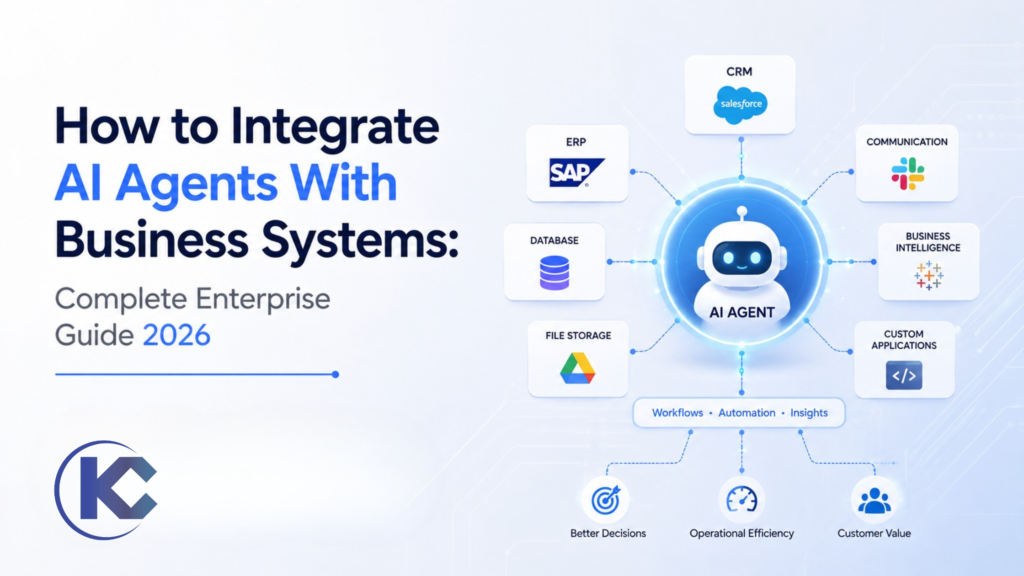
Connect AI Agents to Systems of Record
One of the most important principles in enterprise AI agent integration is simple:
the agent needs access to the systems where the business actually keeps its information.
Instead of forcing employees to copy information into an AI application, integrate the agent with the systems already used by the organization.
CRM
Customers, leads, opportunities, cases, accounts, and sales activity.
ERP
Orders, inventory, finance, procurement, and operational information.
Data Platforms
Data warehouses, databases, analytics platforms, and structured business data.
Knowledge Systems
Policies, SOPs, manuals, contracts, knowledge bases, and internal documents.
How AI Agents Connect to Business Applications
APIs are one of the most important building blocks for connecting AI agents to enterprise software.
Through APIs, an agent can retrieve information or request an approved action from another system. For example, a sales agent could retrieve a customer’s account information, check an order status, update a CRM record, or create a follow-up task.
A Simple Agent-to-System Flow
User Request → Agent Reasoning → Retrieve Context → Select Tool → Authenticate → Execute Action → Validate Result → Respond
Use RAG to Give AI Agents Business Context
APIs are useful for structured systems, but enterprise knowledge also lives inside documents and unstructured content.
Retrieval-Augmented Generation (RAG) allows an AI system to retrieve relevant information from trusted knowledge sources before generating a response. This can include policies, product documentation, contracts, support manuals, SOPs, and internal knowledge bases.
A strong enterprise architecture often combines both approaches:
APIs for actions and structured data, and retrieval systems for unstructured knowledge.
APIs
Best for retrieving structured records and executing defined actions in business applications.
RAG
Best for retrieving relevant information from documents, knowledge repositories, and unstructured enterprise content.
Single Agent vs. Multi-Agent Integration
Not every business process requires multiple agents. In many cases, a single well-designed agent is easier to operate, test, and maintain.
More complex workflows may benefit from multiple specialized agents. One agent can handle customer communication, another can retrieve information, another can perform analysis, and another can execute an approved business action.
| Architecture | Best For | Main Advantage | Main Challenge |
|---|---|---|---|
| Single Agent | Focused business workflows | Simpler architecture | Limited specialization |
| Multi-Agent | Complex workflows with multiple responsibilities | Specialized agents can collaborate | More orchestration and monitoring complexity |
Security and Governance: The Part You Cannot Skip
Connecting an agent to enterprise systems also means giving software the ability to access data and potentially perform actions. That makes security and governance fundamental to the architecture – not an afterthought.
Authentication
Verify the identity of users, systems, and agents accessing enterprise resources.
Authorization
Limit what each agent can read, modify, or execute.
Guardrails
Prevent prohibited actions, unsafe outputs, and unauthorized workflows.
Human Approval
Require human review for sensitive or high-impact actions.
Auditability
Record important actions, tool calls, workflow events, and decisions.
Threat Protection
Protect against prompt injection, misuse, unauthorized access, and unexpected agent behavior.
AI Agent Integration and Deployment Roadmap
Building the agent is only one stage. Production deployment requires a structured path from business problem to validated, monitored operation.
Define the Outcome
Start with a measurable business problem rather than starting with a model.
Map the Workflow
Identify users, systems, data sources, decisions, actions, and human handoffs.
Design the Architecture
Choose the agent topology, models, data architecture, tools, and integration approach.
Build & Integrate
Connect APIs, databases, knowledge sources, applications, and approved tools.
Evaluate
Test accuracy, reliability, tool calls, edge cases, latency, and task completion.
Deploy & Monitor
Launch with observability, feedback loops, governance, and continuous improvement.
When Should Humans Stay in the Loop?
Full autonomy is not always the right objective. For many enterprise processes, the better architecture is
AI-assisted autonomy: the agent handles routine work while humans approve high-risk decisions.
Good Candidates for Human Approval
- High-value financial transactions
- Contract or legal decisions
- Customer refunds or credits above defined thresholds
- Regulated or sensitive decisions
- Destructive database or system actions
- Actions involving sensitive customer information
Move Your AI Agent From Prototype to Production
Kizzy helps businesses architect, integrate, evaluate, and deploy AI agents across Salesforce, APIs, enterprise applications, knowledge systems, and custom workflows.
Real-World AI Agent Integration Use Cases
Sales Agents
Research prospects, qualify leads, update CRM records, draft follow-ups, and schedule meetings.
Customer Support
Retrieve customer context, answer questions, classify cases, and escalate complex issues.
Operations
Monitor workflows, trigger actions, move information between systems, and identify exceptions.
Document Processing
Extract information from contracts, forms, invoices, reports, and other enterprise documents.
Knowledge Agents
Search internal knowledge and provide grounded answers from trusted enterprise sources.
AI Voice
Handle calls, retrieve customer information, qualify requests, and update connected systems.
Avoid Building an AI Architecture You Cannot Evolve
A major architectural decision is how tightly your agent is coupled to a particular model, platform, or vendor.
Platform-native agent builders can be extremely useful, particularly when an organization wants to move quickly or already operates heavily within that ecosystem. But enterprises should also consider portability, model flexibility, data ownership, integration dependencies, and long-term operating costs.
A more modular architecture separates the agent from the underlying model and keeps business integrations explicit. This makes it easier to replace a model, add another tool, or change components without rebuilding the entire application.
Questions to Ask Before Committing to a Platform
- Can we change the underlying model later?
- Can the agent connect to systems outside the platform?
- Can we reuse our application logic across environments?
- How are permissions and credentials managed?
- How will we monitor agent decisions and tool calls?
- What happens if a connected service becomes unavailable?
How Kizzy Consulting Helps With AI Agent Integration
AI agent integration sits at the intersection of AI engineering, enterprise architecture, automation, and business process design. Kizzy Consulting approaches agent development around the complete workflow – not just the model.
AI Strategy & Architecture
Identify high-value use cases, define the architecture, and determine where AI agents fit within your technology stack.
Custom AI Agents
Build agents capable of reasoning, retrieving information, calling tools, and executing business workflows.
Enterprise Integration
Connect agents with Salesforce, APIs, databases, ERP systems, knowledge platforms, and enterprise applications.
AI Pods
Bring architecture, engineering, product thinking, evaluation, and deployment together around one focused AI outcome.
Learn more about Kizzy’s AI Pod Services for a dedicated team approach to building and deploying production-ready AI agents. If you’re still validating the idea, explore AI PoC & MVP Development Services to test technical feasibility before committing to a larger production rollout.
AI Agents + Salesforce: A High-Value Enterprise Combination
Salesforce is often one of the most valuable systems to connect to an AI agent because it contains customer, sales, and service context that agents can use to make decisions and execute workflows.
Agents can retrieve CRM information, summarize records, classify cases, qualify leads, create tasks, and trigger workflows while respecting the organization’s security and permission model.
For Salesforce-native agent deployments, explore
Kizzy’s Agentforce Consulting & Implementation Services
.
How to Monitor an AI Agent After Deployment
Deployment is not the finish line. An AI agent operates in an environment where models, data, APIs, business rules, and user behavior can change.
Production monitoring should therefore cover both AI performance and traditional application reliability.
| Metric | What It Tells You |
|---|---|
| Task Completion | Whether the agent successfully completes the intended workflow. |
| Latency | How quickly the agent responds and completes actions. |
| Tool Failures | Whether APIs, connectors, or external systems are causing failures. |
| Escalation Rate | How frequently the agent needs human assistance. |
| Cost per Task | Whether the economics of the workflow remain sustainable as usage grows. |
AI Agent Integration Checklist
Before moving an AI agent into production, verify the following:
- ☐ The business outcome and success metrics are clearly defined.
- ☐ Required data sources have been identified.
- ☐ API and system integrations have been mapped.
- ☐ Read and write permissions are explicitly defined.
- ☐ Sensitive actions require appropriate human approval.
- ☐ Authentication and authorization are implemented.
- ☐ Guardrails and fallback workflows are defined.
- ☐ The agent has been evaluated against realistic scenarios.
- ☐ Tool calls and integrations have been tested.
- ☐ Monitoring and observability are available in production.
- ☐ There is a process for continuous improvement.
Conclusion: The Future of AI Agents Is Connected
The next stage of enterprise AI is not simply about building more capable models. It is about connecting those models to the systems, data, and workflows that businesses already rely on.
A production-ready AI agent needs more than an LLM. It needs access to relevant business context, reliable tools, carefully designed integrations, security controls, human oversight, evaluation, and continuous monitoring.
Organizations that approach AI agents as part of their technology architecture – not as isolated chatbots – will be better positioned to turn agentic AI into measurable operational value.
Frequently Asked Questions about AI Agent Integration
What is AI agent integration?
AI agent integration connects an AI agent to business systems, data sources, APIs, tools, and workflows so it can retrieve information and perform useful actions rather than only generate responses.
Can AI agents connect to Salesforce?
Yes. AI agents can integrate with Salesforce to access customer and business context, update records, support service workflows, qualify leads, and execute approved CRM actions.
How do AI agents connect to APIs?
Agents can use APIs as tools. The agent determines which approved tool is required, authenticates with the target system, sends the appropriate request, and uses the returned information to continue the workflow.
Do AI agents need access to company data?
Most enterprise agents need some form of business context to perform useful work. That context may come from APIs, databases, CRM systems, knowledge bases, documents, or RAG systems. Access should always be limited according to the agent’s role and permissions.
Should every AI agent be fully autonomous?
No. The appropriate level of autonomy depends on the workflow and risk. Sensitive or high-impact actions may require human approval, while low-risk repetitive tasks can often be automated more extensively.
How long does AI agent integration take?
Timelines vary according to the number of systems, data complexity, security requirements, workflow complexity, and deployment environment. A focused agent can be relatively quick to prototype, while enterprise production deployment requires additional architecture, testing, governance, and monitoring.
What is the biggest mistake companies make with AI agents?
Treating the agent as a standalone AI feature instead of designing the complete workflow around it. An agent that cannot securely access the right data or execute useful actions will have limited business value regardless of how capable its underlying model is.
AI AGENT INTEGRATION
Ready to Connect AI Agents to Your Business?
Whether you’re starting with one workflow or planning an enterprise-wide agent architecture, Kizzy can help you identify the right use case, design the integration, and build toward production.
Connect your AI strategy with the systems your business already uses.