Salesforce Field Service Lightning Functional Data Model [2026]
⏱ 3 min read
Field Service CRM Architecture
Salesforce Field Service Lightning Functional Data Model (2026)
In our previous article, we explored the capabilities of Salesforce Field Service and how it transforms field service management operations. In this guide, we break down the Salesforce Field Service Lightning Functional Data Model (2026) – the robust CRM architecture that powers scalable, intelligent field service execution and workforce optimization.
If you’re looking to understand exactly how Salesforce FSL works for dispatching and scheduling, this article gives you a clear, structured view of the complete FSL data model, object relationships, and enterprise architecture.
The Salesforce Service Life Cycle & Operations
To understand the Service Cloud data model of Salesforce FSL and to get a complete gist of the system workflow, let us first walk through a brief demonstration of the Salesforce Service Cycle. Salesforce Service Cloud is strategically implemented for catering to the demands of the modern service industry.
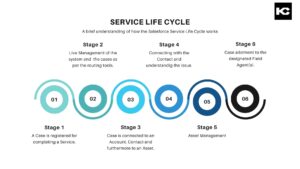
Salesforce Service Life Cycle
At the core of Salesforce Service Cloud, every customer service request begins with a Case. With Field Service Lightning (FSL), this lifecycle extends into real-world field operations through a highly structured object flow:
Case ➔ Work Order ➔ Service Appointment
This specific progression is the absolute foundation of the Salesforce FSL data model framework:
- Case – Captures the initial customer issue or support inquiry.
- Work Order – Defines the specific required service task and operational scope.
- Service Appointment – Schedules and executes the actual physical field visit.
This seamless Case to Work Order to Service Appointment flow in Salesforce ensures that every support request becomes an actionable, trackable task for the mobile workforce.
Salesforce Field Service Lightning Data Model Explained: Core CRM Objects
The Salesforce Field Service Lightning Functional Data Model is intelligently designed to connect high-level planning, intelligent dispatch scheduling, and mobile execution. Here are the core CRM objects that make it happen:
OBJECT 01
Work Order Object (Salesforce)
The Salesforce Work Order object acts as the operational layer between a Case and its execution. It defines:
- Scope of work
- Priority level
- Required technical skills
OBJECT 02
Service Appointment (Salesforce)
The Service Appointment object in Salesforce represents the actual scheduled visit. This is where field service scheduling in Salesforce happens. It includes:
- Date and exact time
- Geographic location
- Assigned field technician
OBJECT 03
Service Resources
Service Resources in Salesforce FSL are your active field technicians. This object enables intelligent resource allocation based on:
- Technician Skills & Certifications
- Real-time Availability
- Assigned Territory
OBJECT 04
Service Territories & Operating Hours
Service Territories in Salesforce define strictly where services are delivered. Operating Hours support constraint-based scheduling in Salesforce FSL by ensuring:
- Time zone alignment
- Business hour constraints
WORKSPACE
Dispatcher Console (Salesforce FSL)
The Dispatcher Console in Salesforce Field Service Lightning is the ultimate control center for logistics operations. Dispatchers use this interactive workspace to:
- Assign Service Appointments swiftly.
- Optimize service routes and daily schedules.
- Manage real-time field activity and handle emergencies.
Pro Tip: To enhance geospatial visualization within the console, many teams integrate the Salesforce Lightning Map Component for real-time tracking and territory mapping.
Operational Workflow
End-to-End Salesforce Field Service Process Flow
Here is exactly how the Salesforce Field Service data model architecture works in practical application from start to finish:
1
A Case is created in Salesforce Service Cloud triggered by a customer need.
2
A Work Order is generated to outline the necessary repair or service steps.
3
A Service Appointment is scheduled based on customer availability.
4
A specialized Service Resource is assigned to the appointment.
5
The field job is completed on-site using the FSL Mobile App.
6
The Work Order and Case are closed or escalated for further action.
This highly structured automation flow guarantees:
- Faster service resolution and higher first-time fix rates.
- Optimized workforce utilization and route density.
- Real-time service tracking for stakeholders and customers.
Salesforce Field Service Lightning Setup & Configuration
To properly enable the Salesforce Field Service Lightning architecture within your existing CRM environment, organizations must execute a series of critical steps:
1. Install
FSL Managed Package
FSL Managed Package
2. Configure
Field Service Setup Menu
Field Service Setup Menu
3. Assign
FSL Permission Sets
FSL Permission Sets
4. Set Up
Territories & Operating Hours
Territories & Operating Hours
Completing these elements ensures a complete Salesforce Field Service configuration ready for live execution. Below is a visual representation of how these data objects interact:
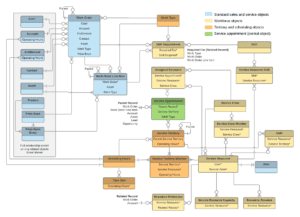
Field Service Lightning Data Model Structure
Salesforce Field Service Lightning Permissions and Security
Post-installation, we enable the necessary security Permissions in the Salesforce Field Service App. Once enabled, these permissions are securely applied to users in the form of Permission Sets based on exact job requirements. For instance, we give our dispatchers specific access to the Dispatch Console, while a Field Agent (Service Resource) gets isolated access strictly to the field service mobile app environment.
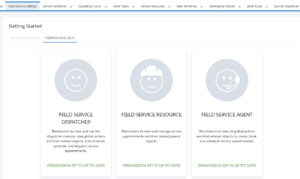
Salesforce FSL Permission Set Layout
Unleashing the Power of Salesforce: Sometimes, standard permission sets and objects aren’t enough. Explore the need for Custom Development to tailor your Field Service architecture to complex, highly specific business requirements.
Dispatcher Service Control and Appointment Completion
Do you recall how FSL relies on a dispatcher console and resource management capabilities? The Dispatcher effectively controls the Service Resources, Operating Hours, and Service Territories exclusively using the powerful Dispatcher Console GUI.

Salesforce FSL Dispatch Console
In Salesforce FSL, a Dispatcher generates a Work Order on the basis of the related Case. That Work Order subsequently leads to Service Appointment creation. The Service Appointment is the final transactional record containing all actionable information about the Case—determining the Date, time, and Location of the field visit.
Meanwhile, the Service Appointment connects deeply with Service Territories, Operating Hours, and Service Resources. Operating Hours for Service Territories are configured based strictly on time zones. Service Resources then execute and complete the assigned Service Appointments within their valid operating hours and in their respective service territories. Completion of all related Service Appointments subsequently leads to the closing of a work order.
Once the field servicing work is officially marked complete, the CRM system either closes the case automatically or escalates it for follow-up. This highly streamlined process ensures that all service requests are addressed in a timely, data-driven, and efficient manner. By offering robust AI scheduling and dispatching capabilities, Salesforce FSL enables modern businesses to optimize resources and respond rapidly to customer needs.
Why the Salesforce Field Service Data Model Matters in 2026
With the massive rise of AI in Field Service and Agentforce, the Salesforce Field Service 2026 architecture is evolving rapidly. A well-implemented, deeply integrated FSL data model enables organizations to achieve:
- Intelligent scheduling and AI-based task automation.
- Highly scalable field service operations across global territories.
- AI-driven service route optimization and workforce utilization.
- Seamless data integration across the entire Salesforce CRM ecosystem.
This is exactly why mastering the Salesforce Field Service Lightning Functional Data Model is critical for modern service organizations looking to outpace the competition. We hope this technical breakdown helps in better understanding Salesforce FSL. Stay tuned for more expert techno-literary insights!
Field Service Data Architecture: FAQ Section
1. What is Salesforce Field Service Lightning (FSL)?
Salesforce Field Service Lightning (FSL) is a comprehensive field service management solution that helps enterprise businesses intelligently manage scheduling, dispatching, asset tracking, and mobile field operations using the Salesforce platform.
2. What are the key objects in the Salesforce FSL data model?
The main Salesforce FSL objects holding the data architecture together include:
- Case
- Work Order
- Service Appointment
- Service Resource
- Service Territory
3. How does the Salesforce Field Service data model work operationally?
The Salesforce Field Service data model works through a strict, structured operational flow: Case → Work Order → Service Appointment → Resource Assignment → Job Completion.
4. What is the role of the Dispatcher Console in Salesforce FSL?
The Dispatcher Console is the primary GUI used to assign, schedule, and optimize service appointments. It ensures efficient field operations by giving dispatchers a bird’s-eye view of all territories and mobile technicians in real-time.
5. Why is mastering the FSL data model important?
Understanding the underlying FSL data model directly enables:
- Efficient automated scheduling
- Real-time geospatial tracking
- Scalable, global service operations
- Preparation for AI-driven enterprise automation in 2026 and beyond
Need help with the Salesforce Field Service Lightning Implementation for your Business?
Our team of certified Salesforce architects can design, deploy, and scale your field operations to absolute perfection.
About Kizzy Consulting
Kizzy Consulting is a premier Salesforce Consulting Partner based in Panchkula, India. Kizzy has successfully implemented 100+ Salesforce projects for 100+ clients across sectors like Financial Services, Insurance, Retail, Sales, Manufacturing, Real Estate, Logistics, and Healthcare in countries like the US, Europe, Germany, and Australia.
Get a free consultation now by emailing us at [email protected] or contact us here to start mapping out your robust CRM architecture today.