Salesforce Field Service Lightning: Features and Benefits (2026)
⏱ 3 min read
Mobile Workforce Management
Contents
hide
Salesforce Field Service Lightning (FSL): Features, Benefits & Setup Guide
As Salesforce Partners, we understand the importance of providing excellent customer service. It is crucial to ensure customer satisfaction, which ultimately leads to business growth. Salesforce Field Service Lightning (FSL) is a powerful enterprise CRM tool that helps businesses manage their field service operations efficiently.
Salesforce FSL is a cloud-based workforce optimization tool fully integrated with the Salesforce platform. By implementing FSL, organizations can streamline field service operations, increase mobile technician productivity, and dramatically improve the end-to-end customer experience.
Key Features of Salesforce Field Service Lightning
Field Service Lightning comes with a wide range of features designed for mobile workforce management. It helps businesses manage field service operations seamlessly across the entire Salesforce ecosystem. Watch a quick feature overview here.
WORKFLOW
Work Order Management
Salesforce FSL enables businesses to create, manage, and track work orders efficiently. You can manually create work orders and intelligently assign them to specific technicians based on their real-time availability, technical skill set, and geographic location.
LOGISTICS
Intelligent Scheduling and Dispatch
FSL comes with powerful scheduling and dispatch optimization capabilities. It enables businesses to automate appointments, assign the right mobile workers, and dispatch them to the job site while providing real-time CRM updates on technician status.
MOBILITY
Salesforce FSL Mobile App
The FSL mobile application is used by service resources to access work orders, customer CRM information, and precise job details on the go. The app enables technicians to update job status, track travel time, and seamlessly capture digital customer signatures.
ASSETS
Inventory & Asset Management
Enables businesses to manage enterprise inventory more efficiently. It provides real-time parts visibility, helps organizations track inventory usage across mobile vans or warehouses, and automates replenishment processes.
REPORTING
Automated Service Reports
Service Reports are generated automatically for reporting the work completed by the Service Resource. These detailed documents can be reviewed and signed by the customer, field worker, or any other operational stakeholders.
FSL Dispatcher Console & Mobile UI Experience

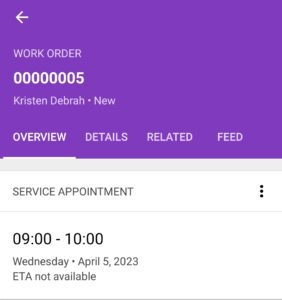
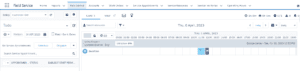
FSL Dispatcher Console Gantt Chart Overview
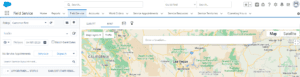
FSL Dispatcher Console Map View
Core Benefits of Using Salesforce Field Service Lightning
Salesforce Field Service Lightning offers a massive range of enterprise workforce benefits. Watch a quick breakdown of how FSL transforms daily operations.
1. Improved Operational Productivity
FSL enables businesses to streamline their field service operations, leading to maximum productivity. By automating scheduling processes, businesses reduce task completion times and drastically improve overall technician efficiency.
2. Increased Customer Satisfaction
Provides businesses with real-time updates on technician ETA and job progress. Accurate arrival tracking builds trust and enhances the end-to-end customer service experience.
3. Better Resource Management
Enables intelligent workforce optimization. Real-time visibility into parts inventory and field technician availability ensures the right service resources are dispatched to the right job at the exact right time.
4. Improved Omnichannel Communication
Delivers robust collaboration features like integrated messaging and Chatter. Connecting dispatchers, mobile workers, and customers in real-time creates a highly effective operational loop.
5. Intuitive User Interface (UI)
FSL boasts an amazing Lightning UI for both its mobile application and the desktop Dispatcher Console, ensuring high adoption rates and accelerating the user experience multifold.
6. Instant Up-Sell Potential
Service Resources can answer live customer queries on-site by checking available products within their FSL app. This boosts customer trust and immediately generates higher CRM sales opportunities.
Advanced FSL Capabilities
Geospatial Visualization & The FSL Data Architecture
Salesforce Lightning Map Component
Visualizing where your technicians and customer assets are located is critical for route optimization. The Salesforce Lightning Map Component allows dispatchers to display customer locations, service routes, and territories dynamically using Google Maps API integration. This drastically improves logistical planning and spatial awareness.
➔ Learn how to implement the Salesforce Lightning Map Component
Salesforce Field Service Lightning Data Model
Underneath the slick Dispatcher Console lies a highly relational CRM data structure. To truly master FSL, businesses must understand the intricate Salesforce Field Service Lightning Data Model, which securely connects objects like Work Orders, Service Appointments, Service Territories, and Operating Hours to enable intelligent AI-driven scheduling.
➔ Deep dive into the Salesforce Field Service Lightning Data Model
How to Set Up Salesforce Field Service Lightning
Deploying an enterprise CRM solution like Field Service Lightning is relatively straightforward when following the correct implementation roadmap. Here are the core setup steps:
1
Purchase FSL Package
The first step is to secure the necessary Field Service licensing. You can do this through the official Salesforce website or by contacting your dedicated SF account representative.
2
Install the Managed Package
Once licensed, you must install the managed package into your Salesforce Org. Follow the standard installation documentation provided by Salesforce Help.
3
Configure FSL Data Architecture
Configure the system to match your business processes. This involves setting up work order management, service territories, operating hours, dispatch settings, and asset inventories.
4
Train Your Technicians
Drive user adoption by actively training your mobile workforce. Ensure your service resources know exactly how to use the FSL mobile app to log hours, consume inventory, and update statuses.
Integrating FSL & Surpassing Traditional Service Management
Seamless Salesforce Integration: Field Service Lightning is fully integrated natively with other Salesforce products, including Sales Cloud, Service Cloud, and Marketing Cloud. This unified platform ensures that businesses can manage their entire customer lifecycle – from initial marketing campaign to final on-site repair from a single CRM source of truth.
Salesforce FSL vs. Traditional Field Service Management: Traditional field service operations rely heavily on disconnected legacy systems, whiteboards, and manual processes that are time-consuming and error-prone. FSL completely automates these enterprise workflows. By shifting to intelligent AI scheduling and connected mobile apps, businesses eliminate manual errors, massively improve route density, and delight customers with transparent service.
Conclusion: Is Salesforce FSL Right for Your Business?
Absolutely. FSL is an incredibly powerful platform that can help businesses manage their entire field service workforce with unparalleled efficiency. With features leading to improved ROI, higher customer satisfaction, and brilliant resource management, Salesforce FSL should be the definitive go-to solution for any organization dispatching teams to the field.
Frequently Asked Questions (FAQs) About Field Service Lightning
1. What is Salesforce Field Service Lightning (FSL)?
FSL is an extension of Service Cloud designed for mobile workforce management. It connects dispatchers, mobile technicians, and managers through a unified platform to intelligently schedule, track, and execute on-site work orders.
2. How does the FSL Data Model work?
The FSL Data Model is a structured relational architecture inside Salesforce that links crucial operational objects—like Work Orders, Service Appointments, Operating Hours, and Territories—ensuring smooth scheduling and routing algorithms.
3. Can I track technicians on a map?
Yes. Using the FSL Dispatcher Console and integrations like the Salesforce Lightning Map component, dispatchers can view real-time geospatial locations of technicians and optimize routes accordingly.
4. Does FSL work offline?
Yes! The Salesforce Field Service mobile app has robust offline capabilities, allowing service resources to capture signatures, update statuses, and log inventory consumption even in areas with zero cellular connectivity.
Implement Field Service Lightning with Kizzy Consulting
We can be a single answer to all your Salesforce strategies and queries. Kizzy Consulting leverages years of experience and deep learning of the World’s #1 CRM software to make your working processes seamless.
About Kizzy Consulting
Kizzy Consulting is a premier Salesforce Consulting Partner based in Panchkula, India. Kizzy has successfully implemented 100+ Salesforce projects for 100+ clients across sectors like Financial Services, Insurance, Retail, Sales, Manufacturing, Real Estate, Logistics, and Healthcare in countries like the US, Europe, Germany, and Australia.
Get a free consultation now by emailing us at [email protected] or contact us here for consultation services or demonstrations.