Einstein Activity Capture: Sync Email as Activity (2026)
⏱ 4 min read
Salesforce • Sales Cloud • Activity Data
Einstein Activity Capture (EAC) syncs emails, meetings and contacts from Gmail or Outlook into Salesforce, reducing manual activity logging. This guide helps Salesforce admins, sales operations teams and CIOs understand EAC’s features, licensing, configuration, record matching, reporting and Spring ’26 storage changes. It also covers what to configure first.
SM
By Sanjeet Mahajan, Founder & CEO, Kizzy Consulting · LinkedIn
Quick Answer
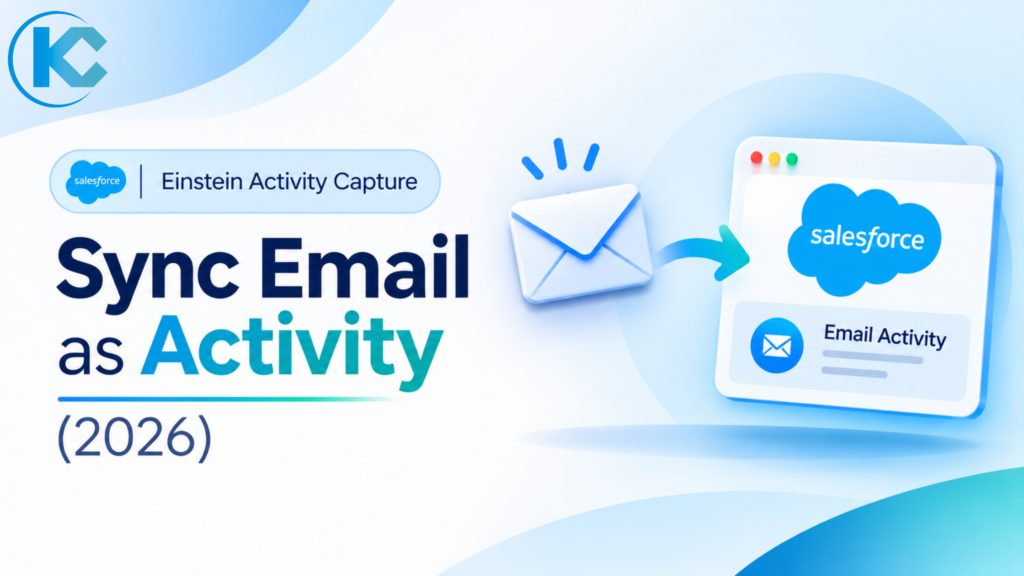
Einstein Activity Capture is a Salesforce feature that syncs emails, calendar events and contacts between Salesforce and Microsoft or Google accounts. With the Sync Email as Salesforce Activity setting, introduced in Summer ’25, captured emails are stored as Task and EmailMessage records, so standard activity reports, Salesforce Flow and the Activity Timeline can all use them. Note that email sync is also switched on automatically for many orgs since Spring ’26, so check your data storage early.
What Is Einstein Activity Capture in Salesforce?
Einstein Activity Capture (EAC) syncs activities from connected Microsoft or Google accounts to related Salesforce records. Admins control which data each user group syncs, including emails, events and contacts.
Sales reps save time, operations teams get better activity data, and admins manage access and exclusions. Involving all three groups ensures a smoother rollout.
| Data type | What EAC does | Where it appears |
|---|---|---|
| Emails | Captures sent and received messages and links them to related records. | Activity timeline |
| Events | Syncs calendar events; the admin chooses the sync direction. | Timeline and calendar |
| Contacts | Syncs contacts with the connected Microsoft or Google account. | Salesforce Contact records |
Related Read
Planning a Salesforce release? Review the admin features worth checking before your next upgrade.
Salesforce Winter ’27 Admin Checklist: 14 Features to Review →
Einstein Activity Capture Licensing: Standard vs Full Access
EAC comes in two versions. EAC Standard is bundled with Sales Cloud Starter, Professional and Enterprise editions and can be enabled for up to 100 users. Unlimited Edition and above include additional licences, while add-ons such as Sales Engagement unlock the complete EAC feature set for every user in the org. Entitlements change between releases, so confirm yours in Salesforce Help or with your account executive. For a wider view of how editions, add-ons and user licences fit together, read our guide to Salesforce licenses and types.
| Option | Who it suits | What to check |
|---|---|---|
| EAC Standard | Teams on Starter, Professional or Enterprise Sales Cloud | User cap (up to 100) and which features are included |
| Unlimited Edition and above | Larger sales organisations | Extra included licences and feature scope |
| Sales Engagement add-on | Orgs that need full EAC access for all users | Add-on cost against the value of complete activity data |
How Einstein Activity Capture Works: Sync Email as Salesforce Activity
Sync Email as Salesforce Activity changes where EAC keeps email. Captured emails become native Task and EmailMessage records instead of data held outside the core Salesforce database.
| Factor | Legacy email capture | Sync Email as Salesforce Activity |
|---|---|---|
| Storage | Held outside the Salesforce database. | Task and EmailMessage records. |
| Reporting | Not in standard reports; Activities dashboard and Activity Metrics. | Standard activity reports and Last Activity Date. |
| Automation | No email records for triggers or Flow to read. | Records can feed Flow and other record-based automation. |
| Who needs to act | Orgs that enabled EAC before Summer ’25. | Orgs that enabled EAC after Summer ’25 already sync this way. Since Spring ’26, practitioners report it is switched on automatically for new EAC orgs and for existing orgs without email sync. |
Pre-Summer ’25 orgs can keep legacy reports until retirement, but Salesforce says those features are being retired. As of that guidance, self-service enablement was still pending, so admins contact Salesforce Customer Support.
How to Configure Einstein Activity Capture: Settings, Configurations and Permissions
After you enable EAC, Salesforce prompts you to create a configuration. This is where you decide how Salesforce connects to your Microsoft 365 / Exchange or Google Workspace email and calendar service. Several authentication options exist, including user-level authentication, so pick the one that matches your security policy.
Org-level settings and excluded addresses
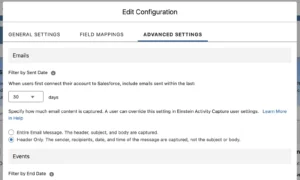
The EAC Settings page controls most organisation-wide behaviour. Use its Excluded Addresses tab on day one to keep internal domains and other addresses out of the sync.
What a configuration controls
- Which data types sync: emails, events, contacts, or any combination.
- How many days of history the first sync should bring in.
- Which users and profiles the configuration applies to.
The one-time user connection
With user-level authentication, each rep connects their own email and calendar once. Confirm beforehand that users can complete multi-factor authentication on their Salesforce and Microsoft or Google accounts, because sign-in problems are a common reason pilots stall. Users can later change their privacy options, so brief them on any new choices after a release.
Einstein Email Insights
Found on its own Setup page under Einstein Activity Capture, Einstein Email Insights lets admins show insights drawn from email content on records and the Activity Timeline. Standard insights such as Commitment Made flag promised follow-ups, and you can add up to 10 custom insights based on your own keywords.
Record Matching and Header-Only Email Capture
Flow-based record matching
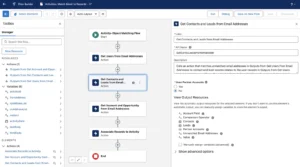
EAC now matches emails to records through Salesforce Flow, which gives admins far more control. The standard Activities: Match Email to Records flow reads the recipients, matches Leads and Contacts first, then Accounts and Opportunities, and finally updates the activity. If the default Apex actions do not fit your logic, you can customise the flow, including criteria for identifying Partner Accounts.
Header-Only Email Capture
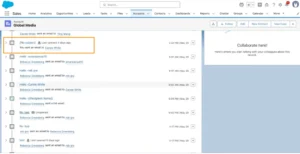
Header-Only Capture lets an admin or user choose not to store the email subject and body in Salesforce. A record still shows that a conversation with a Lead or Contact took place, and the timeline displays [No subject] so it is easy to spot. Internal and blocked emails you do not want synced are also no longer stored on external AWS infrastructure.
You can also exclude automated messages, such as out-of-office replies, and anything sensitive. Attachments are not captured, so that related list stays empty. Pair these controls with an AI data classification policy so teams know which email is safe to capture.
Reporting on Einstein Activity Capture Data
Synced emails reuse the standard Email Message entity, so any custom report type you already built on that object also works for EAC emails. Every email message has an associated task, which means the standard activity-related report types can show the full activity history for an account or other record.
- The Email Insights object can be reported on through a custom report type, although its fields are still basic.
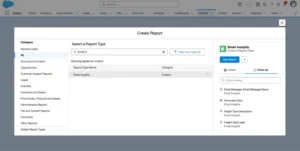
- The Unified Activities object is discontinued for emails and meetings. It remains for calls synced through Einstein Conversation Insights.
- Larger orgs no longer face the old Activity 360 record-count ceiling.
- Activity data is available through the API, so it can feed tools such as Power BI.
On the Activity Timeline, emails open in the standard Email Message view, and the Related To list uses the WhatId field. The timeline itself looks much as it always has.
Einstein Activity Capture Data Storage Impact (Spring ’26)
Since Spring ’26, Sync Email as Salesforce Activity is reportedly enabled by default for new EAC orgs and existing orgs where it was previously off. Synced emails create Task and EmailMessage records, consuming Salesforce data storage.
This may quickly affect mature orgs with limited storage. No built-in off switch has been reported, and Salesforce’s potential migration plan remains unconfirmed.
What to do now
- Check current data storage usage in Setup before email volume grows.
- Estimate monthly synced email volume per user group.
- Agree an archival and deletion policy, as part of your data foundation work.
- Consider Header-Only Capture for sensitive groups, and verify its storage effect in a sandbox.
Related Read
Activity data is only useful if it moves cleanly between systems. See how Salesforce data sync works with SAP.
SAP Salesforce Integration: Benefits, Methods, and Best Practices →
Einstein Activity Capture Setup, Limitations and Best Practices
A safe EAC setup starts with a pilot group, not an org-wide switch. Follow this sequence, based on the Salesforce Admins rollout guidance:
- Define the business goal. Name the reports or automations that need activity data.
- Create configurations. Choose emails, events and contacts for each user group.
- Set exclusions. Add internal domains and personal addresses you do not want captured.
- Pilot with a small group. Users connect their Microsoft or Google accounts and confirm results.
- Expand and report. Roll out to more teams, then build reports on the synced records.
Kizzy’s suggested starting point for configurations (adjust to your own policies):
| User group | Suggested data types |
|---|---|
| Sales reps (pilot) | Emails, events and contacts |
| Executives | Events only, to limit sensitive email |
| Support or legal | Hold until a data policy is approved |
Before go-live, test four things in a sandbox: email matching to the right contacts, the exclusion list, who can see synced records, and the report output you planned.
Einstein Activity Capture FAQs
1. What is Einstein Activity Capture used for?
EAC syncs emails, calendar events and contacts between Salesforce and a rep’s Microsoft or Google account. It adds that activity to related Salesforce records, so reps spend less time logging meetings and managers see engagement without manual entry. Admins control which data types each user group syncs.
2. How do I sync email as activity in EAC?
Turn on the Sync Email as Salesforce Activity setting in EAC, then choose which users capture email. Orgs that enabled it before Summer ’25 need Salesforce’s migration; Salesforce’s September 2026 guidance says to contact Customer Support until self-service is available.
3. Can I report on Einstein Activity Capture emails?
Yes, when Sync Email as Salesforce Activity is on. Captured emails become Task and EmailMessage records, so you can use standard activity reports, Last Activity Date, or EmailMessage as the primary report object. Legacy Activity Metrics and Activities dashboards are being retired for pre-Summer ’25 orgs.
4. What are the main Einstein Activity Capture limitations?
Legacy email capture is not available in standard reports, and older Activity 360 and dashboard reporting is being retired. Synced emails are standard records, so review data storage and sharing before rollout. Test in a sandbox first, because editions and migration timing vary by org.
5. Does EAC work with Gmail and Outlook?
Yes. EAC connects Salesforce to Microsoft and Google accounts, so reps keep working in Outlook or Gmail while activity flows into Salesforce. Each user connects an account, and admins assign users to configurations that control which emails, events and contacts sync.
Einstein Activity Capture: Key Takeaways
- Turn on Sync Email as Salesforce Activity if you need reports, Flow or AI to use email data.
- Configure by user group, with exclusions and a pilot before wider rollout.
- Plan the migration if you enabled EAC before Summer ’25.
- Watch data storage: synced emails count against your limit, so agree an archival policy early.
- Customise record matching and privacy: tune the matching Flow and use Header-Only Capture for sensitive email.
Kizzy Consulting helps teams make these choices, from licensing to storage planning, alongside their Agentforce consulting roadmap.
Plan Your Einstein Activity Capture Rollout
Get help choosing capture settings, migrating to Sync Email as Salesforce Activity, planning data storage and preparing activity data for AI agents.