Salesforce Service Cloud Voice: Features, Benefits and Implementation Guide

⏱ 5 min read
SALESFORCE SERVICE CLOUD · CUSTOMER EXPERIENCE
Discover how Salesforce Service Cloud Voice connects telephony, customer data, Omni-Channel routing and AI-powered assistance to help service teams deliver more connected customer experiences.
A practical guide by Kizzy Consulting
In today’s multi-channel world, customers expect seamless, connected support no matter how they reach out. Salesforce Service Cloud Voice helps organizations bring phone support into the Salesforce service environment, connecting customer information, call handling and service workflows in a unified workspace.
By combining voice capabilities with Salesforce customer records, Omni-Channel routing and AI-assisted features, businesses can help agents access relevant information, reduce repetitive tasks and manage customer conversations with greater context.
In this guide, we explore how Salesforce Service Cloud Voice works, its key features, business benefits, differences from traditional Computer Telephony Integration (CTI), and the considerations involved in getting started.
Executive Quick Answer
Salesforce Service Cloud Voice is a telephony capability that integrates phone interactions with Salesforce Service Cloud. It can bring calls, customer records, routing, call transcripts and supported AI assistance into the service workflow. The result is a more connected workspace where agents can access customer context and handle voice interactions alongside other supported service channels.
What Is Salesforce Service Cloud Voice?
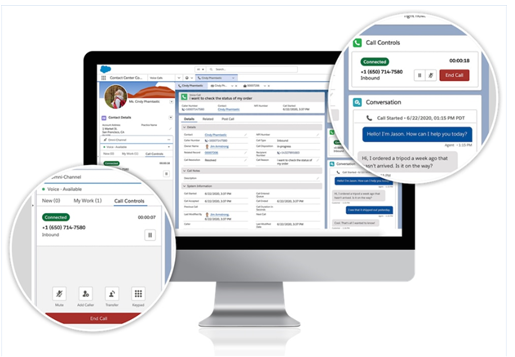
Salesforce Service Cloud Voice connects telephony capabilities with Salesforce’s customer service environment. Instead of requiring agents to manage every call entirely outside their CRM workspace, it brings supported phone interactions closer to customer records, case information and service processes.
Traditional voice support can involve separate phone applications, manually recorded notes and repeated searches for customer information. Integrating telephony with Salesforce can help reduce this fragmentation by making relevant information available within the agent’s service workflow.
Depending on the telephony architecture, licensing and enabled capabilities, Salesforce Service Cloud Voice can support features such as:
- Integrated call controls within the Salesforce service workspace.
- Access to customer and case information during calls.
- Call routing and agent workload management.
- Voice transcription and supported AI-assisted recommendations.
- Call records, service analytics and performance monitoring.
Organizations should assess their telephony provider, Salesforce edition, licensing and required features before selecting an implementation approach.
Why Does Salesforce Voice Matter?
Phone support remains important for resolving complex issues, assisting customers who prefer speaking to a representative and handling conversations that require immediate attention. However, agents can lose valuable time when they need to switch between a phone system, CRM records, knowledge resources and case management tools. Salesforce Voice can help address these operational challenges by connecting call handling with the broader service environment. Agents can work with available customer context while supervisors gain better visibility into service operations. The business value depends on implementation quality, process design, data availability, agent adoption and the specific capabilities enabled in the organization.
Key Features and Benefits of Salesforce Service Cloud Voice
Salesforce Service Cloud Voice brings several capabilities together to support connected customer service. The exact functionality available depends on the selected telephony solution, Salesforce licensing and configuration.
01
Integrated Telephony
Bring supported call controls and voice interactions into the Salesforce service workspace, reducing reliance on disconnected applications.
02
Omni-Channel Routing
Coordinate supported service channels and route interactions according to configured queues, skills, availability and business rules.
03
AI-Assisted Service
Use supported transcription and AI capabilities to help agents access relevant information, recommendations and next steps.
04
Performance Visibility
Monitor available call, routing and service metrics to identify operational issues and improvement opportunities.
1. Deliver a More Connected Customer Experience
Customers expect service teams to understand their history and requirements without asking them to repeat the same information at every interaction.
Salesforce Service Cloud Voice can make relevant customer details, case history and available service information accessible within the agent’s workspace. This allows agents to approach conversations with more context and helps them follow established service processes.
When configured appropriately, Omni-Channel capabilities can also help coordinate interactions across supported service channels. Routing rules can direct work based on factors such as agent availability, skills, queue configuration and business priorities.
Example: A customer calls about an unresolved service request. The agent accesses the associated customer record and case, reviews previous interactions and follows the appropriate resolution workflow without manually searching multiple disconnected systems.
For more on channel routing, read our related guide: An Admin’s Guide to Salesforce Omni-Channel.
2. Improve Agent Productivity With Salesforce Voice
Agents often handle several responsibilities during a single conversation: listening to customers, searching for information, updating records and documenting the resolution.
Salesforce Voice can help connect these activities by bringing supported telephony controls and customer information into the service workspace.
How the Agent Experience Can Improve
- Less application switching: Agents can access supported voice functionality from their Salesforce workspace.
- Better customer context: Relevant customer records and case information can be available during the call.
- Reduced repetitive documentation: Supported transcription and automation capabilities can assist with call documentation.
- More consistent workflows: Agents can follow configured service processes while handling customer interactions.

These improvements are not automatic in every environment. Teams should configure the workspace, data access, routing, documentation processes and agent training to match their actual support operations.
3. Use AI-Powered Assistance and Automation
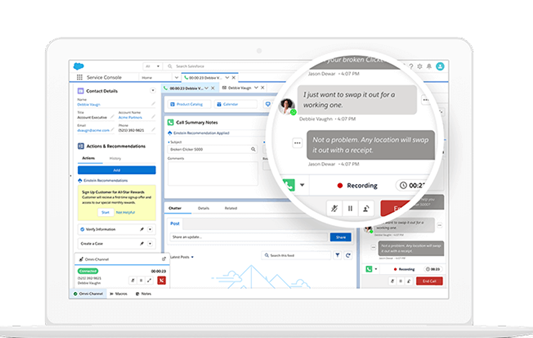
AI can help service teams find information, summarize interactions and identify useful next steps. Within a supported Salesforce Service Cloud Voice implementation, transcription and AI-assisted capabilities can make relevant conversation details easier to review.
Depending on the products and configuration in use, AI-enabled workflows may help agents identify knowledge articles, prepare call summaries, recommend actions or reduce repetitive documentation.
Organizations can also evaluate bots and other automation options for common, well-defined requests, while maintaining appropriate escalation paths for complex or sensitive cases.
Implementation consideration: Confirm which capabilities require additional Salesforce products, licenses, telephony integrations or specific configurations. AI outputs should be evaluated for accuracy, data access and suitability for the intended workflow.
4. Strengthen Supervisor Monitoring and Agent Support
Service managers need visibility into call queues, workload distribution, agent availability and customer service performance. Supported supervisor capabilities can help teams understand where demand is increasing and where additional support may be needed.
Depending on the telephony and routing configuration, supervisors may be able to monitor available operational information, review performance indicators and support agents through established contact-center workflows.
These capabilities can help organizations:
- Identify service queues experiencing increased demand.
- Review agent workload and available performance metrics.
- Investigate routing or call-handling issues.
- Identify coaching and training opportunities.
- Make better-informed staffing and operational decisions.
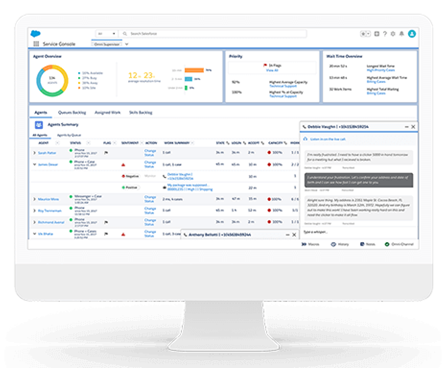
5. Monitor Voice Performance and Reliability
Monitoring helps teams detect problems that affect call handling, data synchronization and the customer experience. The available metrics and alerts depend on the selected telephony integration and monitoring tools.
Areas worth reviewing include:
- Disconnected or missed calls.
- Agent availability and status synchronization.
- Call quality and service degradation.
- Voice routing errors.
- Transcript availability, where transcription is enabled.
- Voice call record synchronization and field-value errors.
- Time taken to assign calls to agents.
Establish operational baselines and investigate recurring issues. Do not assume every listed metric is available as a standard dashboard or alert in every Service Cloud Voice deployment.
6. Build a Scalable Voice Architecture
Contact centers must be able to accommodate changes in call volume, business hours, service demand and support workflows. Salesforce Service Cloud Voice can be part of a scalable architecture when the telephony solution, Salesforce configuration and operational processes are designed together.
Depending on the selected architecture, organizations may need to consider:
- Telephony provider capabilities and supported integrations.
- Call routing, queues and agent capacity.
- Network performance and voice quality.
- Data synchronization and error handling.
- Security, permissions and customer data access.
- Business continuity, monitoring and support ownership.
Amazon Connect is one telephony option associated with Salesforce Service Cloud Voice. Other supported partner telephony options may be available depending on the product offering and requirements. Confirm current compatibility and licensing before selecting a provider.
Salesforce Service Cloud Voice vs. Traditional CTI
Computer Telephony Integration (CTI) connects a telephone system with a computer application such as Salesforce. Salesforce Service Cloud Voice is designed to integrate supported telephony capabilities more closely with the Salesforce service environment.
| Capability | Traditional CTI | Service Cloud Voice |
|---|---|---|
| Telephony integration | Connects an external phone system with Salesforce. | Integrates supported voice capabilities into the Salesforce service experience. |
| Customer context | Depends on the CTI connector and implementation. | Connects supported voice workflows with Salesforce customer data. |
| Transcription and AI | Depends on the telephony solution and additional integrations. | Supported transcription and AI features may be available with the appropriate products and configuration. |
| Routing and reporting | Depends on the phone system and integration. | Can integrate with supported Salesforce service workflows and routing capabilities. |
| Implementation | Requirements vary by CTI provider and connector. | Requires compatible telephony, Salesforce licensing and configuration. |
The main distinction is the depth of integration and the capabilities supported by the chosen solution. Traditional CTI is not necessarily limited to basic screen pops or call logging; modern CTI products can also offer advanced routing, transcription and AI. Compare actual product capabilities rather than relying on the label alone.
For Salesforce integration planning, explore Kizzy Consulting’s Salesforce Integration Services.
How to Get Started With Salesforce Service Cloud Voice
Implementing Salesforce Service Cloud Voice requires more than enabling phone controls. Organizations should assess their current contact-center operations, integration requirements, security needs and desired customer experience.
Step 1: Define Requirements
Document call volumes, service channels, routing rules, agent workflows and reporting requirements.
Step 2: Assess Compatibility
Confirm Salesforce licensing, telephony compatibility, supported features and any additional product requirements.
Step 3: Design the Integration
Plan customer data access, call routing, case workflows, authentication and error handling.
Step 4: Test and Optimize
Validate call flows, permissions, call quality, agent workflows and reporting before wider deployment.
Check Licensing and Product Availability
Service Cloud Voice availability and prerequisites depend on the Salesforce offering, edition, telephony architecture and current licensing terms. Do not assume that every Enterprise or Performance organization automatically includes the required functionality.
Before implementation, review the latest Salesforce product documentation and confirm requirements with your Salesforce account team or implementation partner.
Security and Data Access Considerations
Voice integrations may expose customer records, case information, call transcripts and other sensitive data to service workflows. Access should be designed around users’ responsibilities and the organization’s security requirements.
- Review profiles, permission sets and access to customer records.
- Determine how call recordings and transcripts are stored, accessed and retained.
- Apply appropriate consent, privacy and data-handling requirements.
- Validate integration authentication and external system permissions.
- Monitor errors and review access as team responsibilities change.
Related reading: Salesforce Scoping Rules and Restriction Rules.
KIZZY CONSULTING
Planning a Salesforce Service Cloud Voice Implementation?
Kizzy Consulting helps organizations design and implement Salesforce solutions across CRM development, integrations, automation and AI. We can help you evaluate your service workflows, integration requirements and technical architecture to identify an approach aligned with your business needs.
Whether you’re modernizing an existing Salesforce environment or planning a connected customer service solution, start with a conversation about your requirements.
Discuss Your Salesforce Requirements
Talk to our team about Salesforce Service Cloud, telephony integrations and service automation.
Email: [email protected]
Related Salesforce Resources
Explore more Salesforce resources from Kizzy Consulting to plan your CRM implementation, integration and automation strategy.
Salesforce Integration
Connect Salesforce with enterprise applications and business systems.
Salesforce Development
Explore custom Salesforce development and platform enhancements.
Salesforce Managed Services
Plan ongoing Salesforce maintenance, support and optimization.
Salesforce AI and Agentforce
Explore AI-enabled Salesforce workflows and agent implementation.
Frequently Asked Questions About Salesforce Service Cloud Voice
1. What is Salesforce Service Cloud Voice?
Salesforce Service Cloud Voice is a telephony capability integrated with Salesforce Service Cloud. It brings supported voice interactions into the service workspace and can connect them with customer data, service workflows, routing and supported AI features.
2. What is Salesforce Voice used for?
Salesforce Voice helps service organizations manage phone interactions alongside relevant Salesforce customer information. Depending on the implementation, it can support call handling, routing, transcription, agent assistance and service performance monitoring.
3. How does Salesforce Service Cloud Voice improve agent productivity?
It can reduce the need to switch between separate systems by bringing supported telephony controls and customer context into the Salesforce service environment. Transcription and AI-assisted features may also help reduce repetitive documentation and information searches.
4. Does Salesforce Service Cloud Voice support AI?
Supported implementations may offer transcription, AI-assisted recommendations and other service intelligence capabilities. Availability depends on the relevant Salesforce products, licensing, telephony integration and configuration.
5. What is the difference between Salesforce Service Cloud Voice and CTI?
CTI is a broad term for integrating telephony with computer applications. Service Cloud Voice is designed to integrate supported voice functionality with Salesforce’s service environment. The capabilities of a specific CTI product and Service Cloud Voice deployment should be
Conclusion
Salesforce Service Cloud Voice helps bring telephony into the wider Salesforce service experience, connecting customer context, supported routing capabilities and AI-assisted workflows. When implemented around clear business requirements, it can help service teams improve visibility, reduce fragmented workflows and deliver more consistent customer support.
The key is to select the right telephony architecture, configure the platform carefully and measure the outcomes that matter to your service organization. Kizzy Consulting can help you assess Salesforce development and integration requirements as part of that journey.