Salesforce Flow Limitations [2026]
⏱ 5 min read
Salesforce Flow limitations are important to understand before designing complex Salesforce automation. Because Salesforce operates on a multitenant architecture, the platform uses governor limits to control resource consumption and maintain performance across organizations. Flow interviews are therefore subject to limits involving executed elements, records retrieved, data operations, SOQL queries, and transaction processing time. Understanding these Salesforce Flow governor limits can help teams design more efficient and scalable automation.
What are Salesforce Flow limitations?
Salesforce Flow limitations are platform and transaction-level restrictions that control how much processing a Flow can perform during execution. These limits help protect shared Salesforce resources and can affect the number of elements executed, records queried, records processed, data operations performed, and the amount of time available for a transaction.
As Salesforce Flow becomes increasingly central to Salesforce automation, understanding its limitations is just as important as understanding its capabilities. A Flow may work correctly with a small number of records but encounter errors when the same automation processes larger data volumes or more complex transactions.
Salesforce operates on a multitenant architecture, where computing resources are shared across multiple organizations. To prevent a single organization or transaction from consuming excessive resources, Salesforce enforces governor limits and transaction limits.
This guide explains important Salesforce Flow limitations, Flow governor limits, transaction limits, record-processing limits, and Flow design considerations that Salesforce administrators and developers should understand when building automation.
Contents
hide
Salesforce Flow Limitations: Quick Answer
Salesforce Flow is subject to platform governor limits because Flow runs within Salesforce transactions and shares platform resources. Important limits include the number of elements executed at runtime, records retrieved through data elements, data operations, SOQL queries, records processed, and transaction processing time. Limits can vary by Flow type, Salesforce release, execution context, and platform configuration, so teams should always verify current limits in official Salesforce documentation before designing or optimizing production automation.
Need Help Designing Scalable Salesforce Flows?
Complex Salesforce automation requires careful Flow architecture, bulkification, transaction planning, and testing. Kizzy Consulting can help review and optimize Salesforce automation around your business requirements.
1. Why Does Salesforce Have Flow Governor Limits?
The primary reason behind Salesforce Flow governor limits is Salesforce’s multitenant architecture. Salesforce hosts many organizations on shared infrastructure, which means platform resources must be managed carefully.
Without resource controls, a single organization could potentially consume excessive database, CPU, or processing resources and affect other organizations operating on the same platform.
Governor limits therefore establish boundaries around how much processing a transaction can perform. These limits apply to Salesforce automation and development mechanisms, including Flows, Apex, and other platform operations depending on the execution context.
Why Salesforce Governor Limits Matter
- Protect shared Salesforce platform resources.
- Prevent excessive resource consumption by individual transactions.
- Maintain platform stability across multiple organizations.
- Encourage efficient Salesforce automation architecture.
- Help developers and administrators design automation that scales with data volume.
2. Salesforce Flow Runtime Element Limit
One important consideration when designing Salesforce Flow automation is the number of elements that can be executed during a Flow interview. Salesforce documentation has historically specified a maximum of 2,000 executed elements at runtime per Flow interview.
This becomes particularly important when a Flow contains a Loop. Elements inside a loop can execute repeatedly for each item in the collection. As the number of records increases, the number of executed elements can therefore increase rapidly.
Example of Salesforce Flow Loop Processing
Imagine a Flow processes 1,000 records and executes three Flow elements inside or as part of the loop for each record.
The loop could result in approximately 1,000 × 3 = 3,000 element executions, before accounting for elements outside the loop. This illustrates why large loops should be carefully designed and tested.
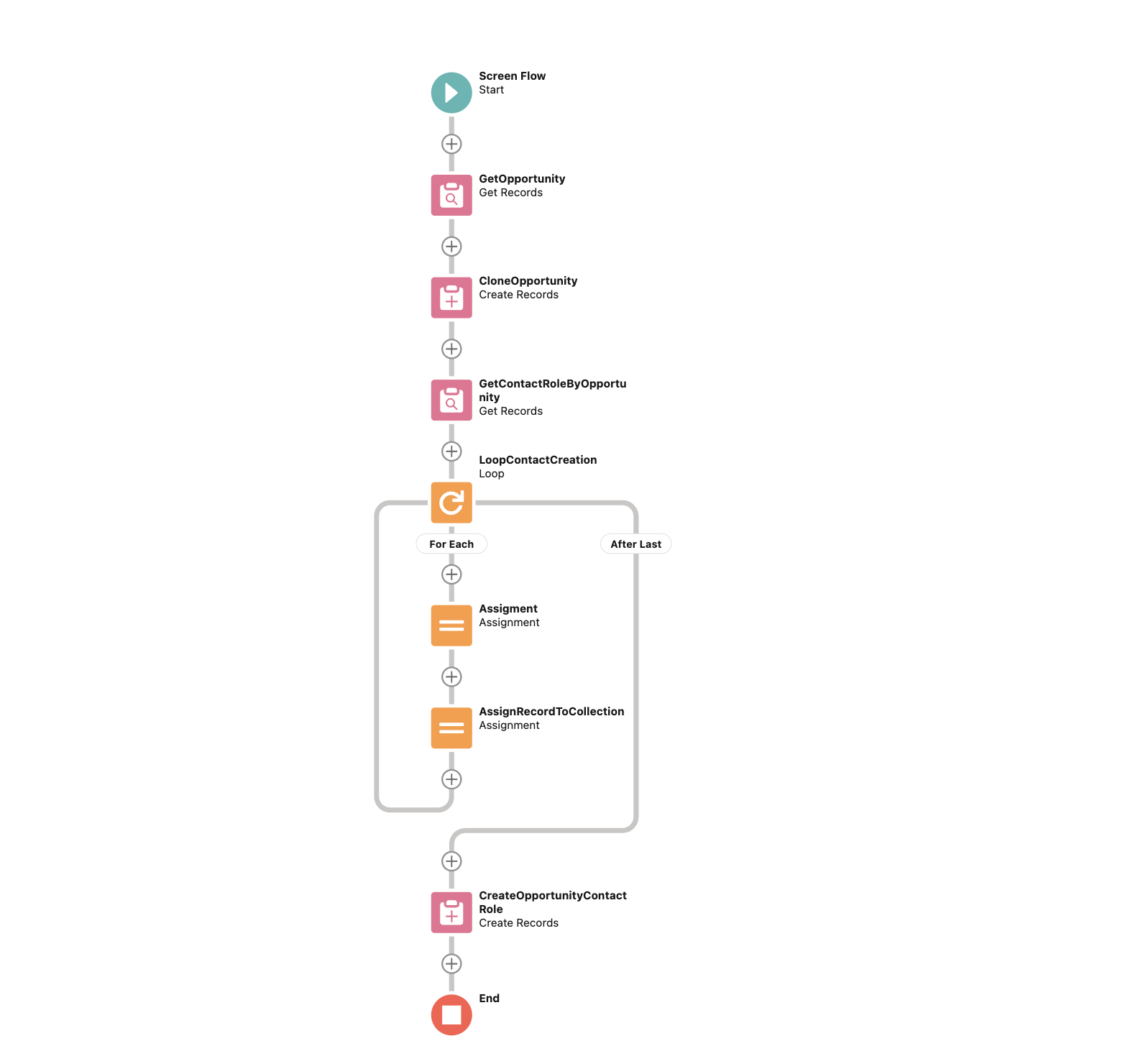
When building high-volume automation, administrators should avoid unnecessary operations inside loops and consider whether the same outcome can be achieved through collection-based processing or more efficient Flow architecture.
3. Salesforce Flow Get Records and SOQL Query Limits
Get Records elements allow Salesforce Flows to retrieve data from Salesforce objects. However, data retrieval is subject to transaction-level limits.
The commonly referenced limit is 50,000 records retrieved per transaction. Salesforce transactions can include multiple types of automation, so the overall transaction context is important when analyzing data retrieval behavior.
Flow designs that retrieve large amounts of data unnecessarily can increase transaction processing and make automation more difficult to scale. Administrators should therefore retrieve only the records and fields required for the process.
Salesforce Flow Data Retrieval Best Practices
- Use precise filter conditions in Get Records elements.
- Avoid retrieving records that the Flow does not need.
- Store and reuse retrieved collections when possible.
- Avoid repeated Get Records operations inside loops.
- Consider the complete transaction when multiple automations execute together.
4. Salesforce Flow Data Element and DML Limits
Salesforce Flow also performs data operations through elements such as Create Records, Update Records, Delete Records, and related data elements. These operations contribute to the transaction’s overall processing requirements.
A commonly referenced Salesforce platform limit is 150 DML statements per transaction in Apex execution contexts. Flow’s data elements should therefore be designed carefully, particularly when they are executed repeatedly inside loops or interact with other automation.
How to Reduce Excessive Salesforce Flow Data Operations
- Prefer collection-based updates instead of updating records individually.
- Avoid Create, Update, or Delete Records elements inside loops whenever possible.
- Build collections and perform data operations after the loop.
- Review other automation that may run when records are created or updated.
- Test automation with realistic record volumes.
For a broader understanding of Salesforce Flow architecture and automation, explore Kizzy Consulting’s Salesforce Flow vs. Process Builder and Workflow Rules.
5. Salesforce Flow Transaction Processing Time Limit
Salesforce transactions are also subject to processing-time limits. A Flow that performs too many operations, retrieves excessive data, or triggers multiple layers of automation can increase transaction complexity and processing time.
The exact limits and behavior depend on the execution context and Salesforce platform architecture. Rather than designing automation around a single time figure, organizations should focus on reducing unnecessary processing and ensuring that transactions complete efficiently.
Ways to Improve Salesforce Flow Transaction Performance
- Reduce unnecessary Get Records operations.
- Minimize repeated processing inside loops.
- Use collection-based operations where appropriate.
- Review automation triggered by Flow updates.
- Remove redundant decision and assignment elements.
- Monitor complex transactions for performance bottlenecks.
6. Salesforce Flow Limits When Using Loops
Loops are powerful Flow elements, but they can become a significant source of performance problems when processing large collections. Every element executed within a loop can execute repeatedly for each record in the collection.
For example, retrieving 1,000 records and performing multiple operations on every record can quickly increase the number of executed elements and data operations. If those operations also trigger other Salesforce automation, the overall transaction can become even more complex.
Salesforce Flow Loop Best Practices
- Do not place unnecessary Get Records elements inside loops.
- Avoid individual record updates inside loops.
- Use Assignment elements to build record collections.
- Perform collection-based updates after processing the loop.
- Test loops using realistic data volumes.
- Consider whether the process can be redesigned without a loop.
7. Salesforce Flow Governor Limits and Other Automation
A Flow does not necessarily execute in isolation. A record update can trigger additional Salesforce automation, including other Flows, Apex triggers, validation rules, or integrations depending on the configuration.
This means a Flow that appears simple when viewed independently can contribute to a much more complex transaction when combined with the rest of the Salesforce automation architecture.
Review the Complete Salesforce Automation Transaction
- Record-triggered Flows.
- Apex triggers and custom code.
- Additional Flow automation.
- Validation and business rules.
- Integration and external system activity.
- Automation triggered by downstream record updates.
Understanding the entire automation chain is therefore important when troubleshooting Salesforce Flow governor limit errors or unexpected transaction behavior.
8. Salesforce Flow Limitations: Common Design Problems to Avoid
Many Flow limit problems are caused not by Flow itself but by inefficient automation design. Certain patterns become particularly problematic as data volume increases.
Common Salesforce Flow Design Issues
- Get Records operations repeatedly executed inside loops.
- Individual record updates performed inside loops.
- Retrieving more records than the business process requires.
- Multiple Flows performing overlapping automation on the same object.
- Unnecessary Decision, Assignment, or Loop elements.
- Insufficient testing with bulk record volumes.
- Ignoring downstream automation triggered by Flow updates.
- Building automation without considering transaction-level resource consumption.
9. Salesforce Flow Best Practices for Avoiding Governor Limit Errors
Designing scalable Flow automation requires more than making the process work for a single record. The automation should be evaluated against realistic record volumes, transaction complexity, and interactions with other Salesforce automation.
Salesforce Flow Optimization Checklist
- Design for bulk processing rather than single-record scenarios.
- Retrieve only the data required by the Flow.
- Avoid database operations inside loops when possible.
- Use collections to process multiple records efficiently.
- Reduce redundant automation on the same object.
- Review Flow-triggered downstream automation.
- Test with realistic and high-volume datasets.
- Monitor Flow errors and transaction behavior.
- Document complex automation dependencies.
- Review current Salesforce documentation because platform limits and capabilities can change between releases.
If you are modernizing Salesforce automation, read our guide on Salesforce Flow vs. Process Builder and Workflow Rules to understand how Salesforce has moved from legacy automation tools toward Flow Builder.
Want to Understand Salesforce Flow in More Detail?
Explore our detailed comparison of Salesforce Flow, Process Builder, and Workflow Rules to understand the differences between Salesforce automation tools, their capabilities, and the transition toward Flow Builder.
Frequently Asked Questions About Salesforce Flow Limitations
What are Salesforce Flow limitations?
Salesforce Flow limitations are platform and transaction-level restrictions that control how much processing a Flow can perform. They can involve executed elements, records retrieved, data operations, SOQL queries, transaction resources, and processing time.
Why does Salesforce have Flow governor limits?
Salesforce uses a multitenant architecture where platform resources are shared across organizations. Governor limits help control resource consumption, protect platform performance, and prevent individual transactions from using excessive shared resources.
How many elements can a Salesforce Flow execute?
Salesforce documentation has historically specified a maximum of 2,000 executed elements at runtime for a Flow interview. Loops can cause elements to execute repeatedly, so large collections can consume the available execution budget quickly.
How many records can Salesforce Flow retrieve?
A commonly referenced Salesforce platform limit is 50,000 queried records per transaction. The applicable limit can depend on the execution context, so current Salesforce documentation should be checked when designing high-volume automation.
How can I avoid Salesforce Flow governor limit errors?
Avoid unnecessary database operations, minimize Get Records and data updates inside loops, use collection-based processing, retrieve only required records, reduce overlapping automation, and test Flows with realistic record volumes.
Why are loops a problem in Salesforce Flow?
Flow elements inside a loop can execute repeatedly for every record in a collection. When the collection is large, this can increase element executions and data operations significantly and may contribute to governor limit or performance issues.
Can Salesforce Flow process large volumes of records?
Salesforce Flow can support many business automation scenarios, but high-volume processing requires careful architecture. Record volume, loops, data operations, transaction context, and other automation should all be considered when designing a scalable Flow.
What is the Salesforce Flow limit for data operations?
Data operations contribute to Salesforce transaction limits. A commonly referenced Apex transaction limit is 150 DML statements, while Flow behavior depends on how Flow data elements are executed and the overall transaction context. Collection-based operations can help reduce unnecessary database operations.
How do Salesforce Flow limits affect performance?
Complex Flows can require more database operations, element executions, and transaction processing. Poorly optimized automation can therefore increase processing time and create governor limit errors. Efficient queries, collection processing, reduced loops, and streamlined automation can improve Flow scalability.
How can Kizzy Consulting help with Salesforce Flow limitations?
Kizzy Consulting can help organizations design, implement, review, and optimize Salesforce Flow automation. This can include Flow architecture, automation optimization, legacy automation migration, Salesforce development, integrations, testing, and performance-focused Salesforce implementation.
Need Help With Salesforce Flow Automation?
Salesforce Flow can automate sophisticated business processes, but scalable implementation requires careful attention to governor limits, transaction behavior, record volumes, loops, data operations, and interactions with other Salesforce automation.
If you are experiencing Salesforce Flow governor limit errors, Flow performance issues, complex automation requirements, or legacy automation migration challenges, Kizzy Consulting can help review and optimize your Salesforce environment.
Email:
[email protected]
Related Salesforce Flow & Automation Resources
Salesforce Automation
Salesforce Flow vs. Process Builder and Workflow Rules
Compare Salesforce Flow with Process Builder and Workflow Rules and understand Salesforce’s transition toward Flow Builder.
Salesforce Flow
Salesforce Flow: A Guide to Automating Business Processes
Learn how Salesforce Flow can automate business processes and how organizations can approach Flow design and implementation.
Salesforce Implementation
Salesforce Implementation Services
Explore Salesforce implementation, automation, integrations, customization, and architecture services for different business requirements.
Salesforce Development
Salesforce Development Services
Explore Salesforce development, Flow automation, Apex, integrations, custom functionality, and enterprise Salesforce architecture.
Build Salesforce Flows That Scale
Salesforce Flow limitations should be considered from the beginning of an automation project rather than after a Flow reaches a governor limit error.
By designing around bulk processing, efficient data retrieval, collection-based updates, optimized loops, transaction behavior, and the wider Salesforce automation architecture, organizations can build Flows that are easier to maintain and better prepared for changing data volumes.
If you are evaluating Salesforce Flow implementation, Flow optimization, Salesforce automation architecture, or Flow migration, Kizzy Consulting can help you design and implement automation aligned with your business requirements.
Email Kizzy Consulting:
[email protected]