How to Develop a Custom Salesforce AppExchange App: Step-by-Step Guide
⏱ 3 min read
SALESFORCE APPEXCHANGE DEVELOPMENT
Building a custom Salesforce AppExchange app involves more than developing functionality. You need to validate the idea, design the user experience, choose the right packaging strategy, build securely, prepare for Salesforce Security Review, create an effective listing, and maintain the app after launch.
Contents
hide
Quick Answer: How Do You Build a Salesforce AppExchange App?
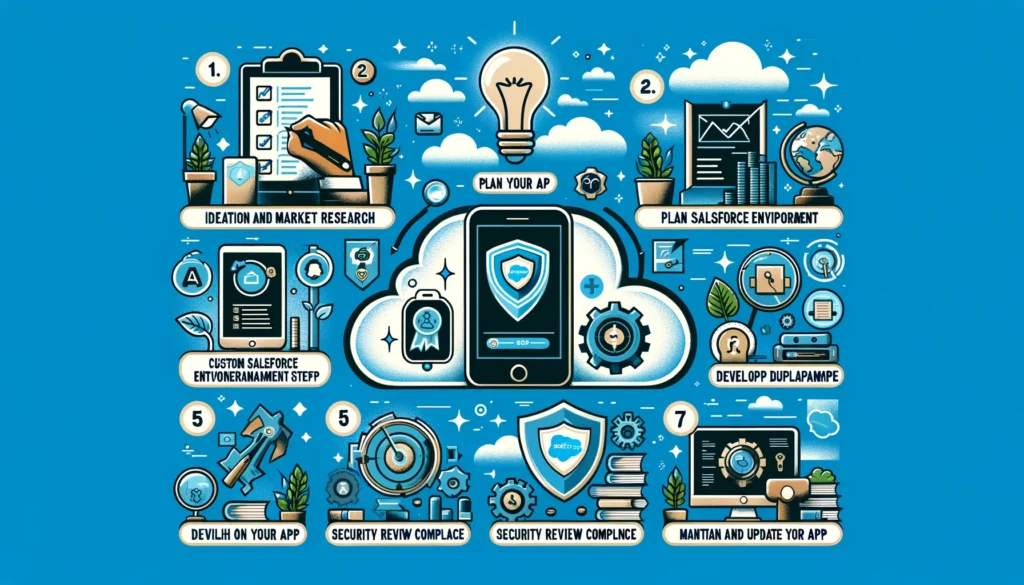
A typical Salesforce AppExchange development journey starts with identifying a market need, validating the idea, defining the product and user experience, setting up the Salesforce development environment, building and testing the application, packaging it for distribution, completing Salesforce Security Review, creating the AppExchange listing, and establishing a process for updates and ongoing security.
What Is a Salesforce AppExchange App?
Salesforce AppExchange is Salesforce’s marketplace for business applications, components, and solutions that extend the Salesforce platform. For organizations and independent software vendors, developing an AppExchange app can turn a Salesforce-specific business problem into a reusable product.
However, a successful AppExchange application needs to address more than functionality. It needs a clear target audience, secure architecture, reliable packaging, strong documentation, an intuitive user experience, and a sustainable release process.
Salesforce’s modern AppExchange development guidance recommends planning the development and packaging architecture early, including the use of second-generation managed packages (2GP) for appropriate partner applications.
01
Ideation and Market Research
Start with the problem, not the technology.
Identify a Specific Problem
Look for a recurring business or Salesforce workflow problem that can be solved through a productized application. The opportunity may involve automation, reporting, data management, integrations, productivity, industry-specific functionality, or another capability that customers need.
Research the AppExchange
Analyze existing AppExchange solutions, their functionality, target audiences, pricing models, reviews, limitations, and positioning. The objective is not simply to create another app, but to understand where your proposed solution fits and what differentiates it.
02
Plan Your Custom Salesforce App
Convert the product idea into a clear technical and product plan.
Define Core Features
Document what the app does, which Salesforce users it serves, what business problems it solves, and which Salesforce objects, APIs, automation, or platform capabilities it depends on.
Design the User Experience
Map the user journey before development begins. Keep navigation, setup, permissions, configuration, and everyday workflows intuitive for Salesforce administrators and end users.
Plan the Architecture
Decide whether the application is Salesforce-native, requires external services, uses APIs, or needs additional infrastructure. Security, scalability, packaging, and upgradeability should be considered from the beginning.
See a Salesforce AppExchange App in Action
Kizzy Consulting has developed Salesforce solutions for real-world business workflows, including email-to-lead automation.
03
Set Up Your Salesforce Development Environment
Establish a development and release foundation before building the product.
Join the Salesforce Partner Ecosystem
Organizations planning to distribute commercial Salesforce solutions through AppExchange need to follow Salesforce’s partner and publishing requirements. The Partner Community provides access to partner resources and publishing workflows.
Establish Your Development Orgs
Use appropriate Salesforce development environments for building, testing, packaging, and validating your application. Keep development and production concerns separated and establish a repeatable deployment process.
Plan Packaging Early
Packaging should not be an afterthought. Salesforce’s current AppExchange development guidance recommends considering second-generation managed packaging early because the packaging model affects the development and release workflow.
04
Develop and Test the App
Build the product around both functionality and security.
Build the Core Functionality
Develop the application using the Salesforce Platform and the technologies appropriate to the product, such as Apex, Lightning Web Components, APIs, Flow, and supported Salesforce development tooling.
Test Business Workflows
Validate installation, configuration, permissions, integrations, user journeys, edge cases, upgrades, and expected behavior across supported Salesforce environments.
Test for Security
Security should be part of development rather than something performed immediately before submission. Salesforce recommends using security scanning, manual reviews, threat modeling, and secure development practices throughout the lifecycle.
05
Prepare for Salesforce Security Review
Security review is a critical part of the AppExchange publishing journey.
Salesforce requires eligible partner solutions to undergo a security review before they can be distributed through the marketplace. The review is designed to assess whether the solution follows Salesforce security expectations and protects customer data.
Run Security Checks Before Submission
Use Salesforce security tooling and development best practices to identify vulnerabilities before submitting the package. Salesforce specifically recommends tools such as Salesforce Code Analyzer as part of the secure development process.
Review Access and Data Handling
Pay particular attention to authorization, CRUD and field-level security, data access, injection risks, sensitive information, external endpoints, third-party libraries, and error handling.
Submit the Package for Review
Once the package and supporting information are ready, submit it through the appropriate Salesforce partner publishing workflow. Be prepared to address findings and resubmit when necessary. Salesforce notes that automated scanning is not a substitute for deeper security review and manual testing.
Security Should Continue After AppExchange Launch
Passing a security review is not the end of application security. Salesforce recommends continuing security testing throughout development, including scanning, manual reviews, threat modeling, keeping dependencies current, and testing new functionality before release.
06
Create and Publish Your AppExchange Listing
Turn the technical product into a clear marketplace proposition.
Write the Listing
Explain the business problem, target users, core functionality, Salesforce compatibility, implementation requirements, integrations, and measurable value clearly.
Add Strong Product Assets
Use clear screenshots, product visuals, videos, documentation, and other supporting content to help prospective customers understand the solution before installation.
Define Commercial Terms
Establish your pricing, licensing, trial, packaging, and support model based on the type of application and your Salesforce partner requirements.
07
Launch, Monitor, and Maintain the App
AppExchange development continues after publication.
Collect Customer Feedback
Monitor customer feedback, reviews, support requests, feature requests, and adoption patterns. These signals can help prioritize future product improvements.
Release Updates Carefully
Salesforce evolves continuously. Your application should be tested against platform changes, supported Salesforce releases, dependencies, integrations, and security requirements before updates are released.
Maintain Security Throughout the Lifecycle
Continue vulnerability scanning, dependency reviews, manual testing, and security assessments as the application grows. Salesforce specifically recommends treating security as an ongoing development responsibility rather than a one-time activity.
Salesforce AppExchange Development Checklist
✓ Validate the business problem
✓ Research existing AppExchange solutions
✓ Define the target users and use cases
✓ Design the application architecture
✓ Plan packaging and release management
✓ Build and test the application
✓ Perform security testing
✓ Prepare for Salesforce Security Review
✓ Prepare documentation and listing assets
✓ Define pricing and licensing
✓ Publish and promote the solution
✓ Establish ongoing maintenance and security processes
Building a Salesforce AppExchange App?
From Salesforce application architecture and development to packaging, integrations, security preparation, and AppExchange readiness, Kizzy Consulting can help turn a Salesforce product idea into a production-ready solution.
Need Help Developing an App for Salesforce AppExchange?
Tell us about your AppExchange product idea, technical requirements, integrations, or development roadmap.
Frequently Asked Questions About Salesforce AppExchange Development
How do I develop a Salesforce AppExchange app?
Start by validating a business problem, researching the AppExchange, defining the application architecture and user experience, setting up Salesforce development environments, building and testing the solution, packaging it, preparing for Security Review, and creating the AppExchange listing.
What is Salesforce AppExchange Security Review?
Salesforce Security Review is the security assessment required for applicable partner solutions before they can be distributed through AppExchange. Salesforce evaluates the application against its security expectations and provides findings that may need to be addressed before approval.
Should I use a second-generation managed package for an AppExchange app?
Salesforce’s current AppExchange development guidance recommends considering second-generation managed packaging early in the development process. The appropriate packaging strategy depends on the solution architecture, distribution model, and Salesforce requirements.
How long does Salesforce AppExchange Security Review take?
Review timing can vary depending on Salesforce’s current queue, the solution, and whether additional work is required. Because timing can change, teams should check the current Salesforce partner guidance rather than planning around a fixed review duration. Salesforce has specifically advised partners to factor review time into their release planning.
Can a Salesforce AppExchange app integrate with external systems?
Yes. Depending on the architecture, an AppExchange solution can use APIs and supported integration patterns to communicate with external systems. External integrations also introduce additional security, authentication, data-handling, and testing considerations.
Is AppExchange development finished after the app is published?
No. Published apps require ongoing maintenance, Salesforce release compatibility testing, vulnerability management, dependency updates, customer support, and product improvements. Salesforce recommends maintaining security practices throughout the application’s lifecycle.
Conclusion
Developing a custom Salesforce AppExchange app requires a combination of product strategy, Salesforce development expertise, secure architecture, packaging, testing, and marketplace readiness.
The strongest AppExchange development processes treat security, scalability, user experience, and maintainability as part of the product from the beginning rather than as final launch requirements. Salesforce’s current guidance also emphasizes modern packaging and continuous security practices throughout the application lifecycle.