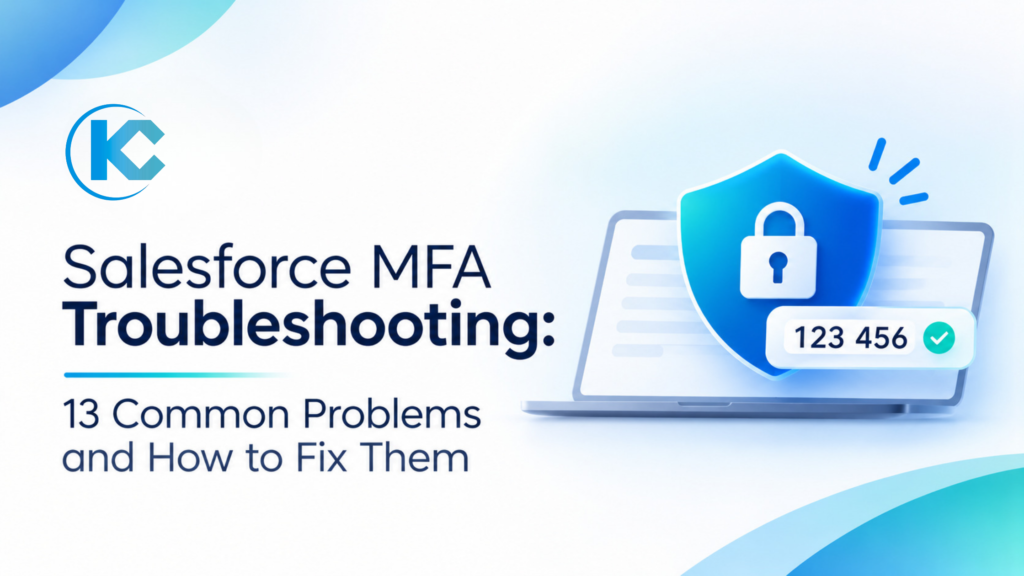
Salesforce MFA Troubleshooting: 13 Common Problems and How to Fix Them
⏱ 4 min read
SALESFORCE SECURITY • MFA • ADMIN GUIDE 2026
Salesforce’s evolving Multi-Factor Authentication (MFA) requirements and passkey enforcement have introduced new challenges for administrators and users. From unexpected passkey prompts and SSO failures to Data Loader errors and locked accounts, even correctly configured orgs can face login disruptions.
Executive Quick Answer
Most Salesforce MFA problems come from verification method registration, passkey eligibility, identity provider signals, device migration, permissions, or session settings. Start by checking whether the user is privileged, which method is registered, and what Login History shows. Avoid disabling security controls as a first response; use approved recovery methods and Salesforce Support when admin access cannot be restored safely.
Key Takeaways
Passkey Prompts
A passkey prompt does not mean every user must register one. Privileged permissions decide.
SSO Configuration
Identity providers must send authentication signals Salesforce recognizes.
Device Management
A new phone or browser needs proper verification method migration.
Integration Impact
UI logins and API authentication are treated differently.
1. Why Are Standard Salesforce Users Being Asked to Create a Passkey?
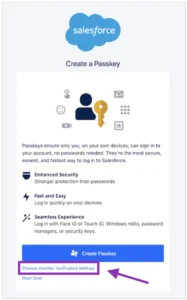
Many users without administrator privileges suddenly see a Create a Passkey screen. Salesforce shows it by default when no verification method is registered, but that does not mean every standard user must use a passkey. Non-privileged users may see Choose Another Verification Method below the main button.
Why this happens
Salesforce promotes passkeys as the stronger option, so the default screen can appear even when another supported method is available.
How to Fix It
- Ask the user to review the options on the registration screen.
- Select Choose Another Verification Method.
- Register Salesforce Authenticator or another supported method.
- If the option is missing, review the user’s profile and permission sets.
2. Which Salesforce Users Actually Need Passkeys?
Phishing-resistant requirements depend on assigned permissions, not job title. A standard employee with elevated Salesforce permissions may still count as privileged. According to the Salesforce Ben guide, these permissions are relevant:
| Profile or Permission | What to Check |
|---|---|
| System Administrator | Assigned profile |
| Modify All Data / View All Data | Profile and permission set assignments |
| Customize Application | Application customization access |
| Author Apex | Development-level privileges |
How to Fix It
- Open the affected user’s record in Setup.
- Review the profile and permission sets for the permissions above.
- Have privileged users register a phishing-resistant method.
- For others, verify which alternative methods are supported.
3. Why Are SSO Users Still Getting Salesforce MFA Prompts?
Organizations using Okta, Microsoft Entra ID, or ADFS may assume MFA at the identity provider satisfies Salesforce. But Salesforce must receive authentication information confirming that verification occurred. Without recognized signals, it may treat the login as not MFA-complete.
AMR
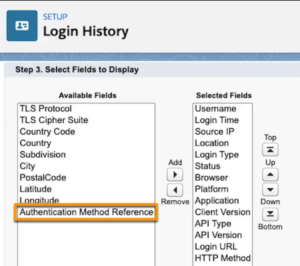
Authentication Method Reference – the method used, such as password, hardware key, or biometrics.
ACR
Authentication Context Class Reference – the overall assurance level of the login.
How to Fix It
- Identify whether your provider uses SAML or OpenID Connect.
- Open Login History and inspect the AMR and ACR columns.
- Compare values with Salesforce’s Authentication Strength Tiers documentation.
- Work with your identity provider administrator to correct the claims.
A successful MFA challenge at the identity provider does not automatically satisfy every Salesforce authentication tier.
4. Why Are Passkey Management Options Missing from Salesforce Setup?
Some admins find that users can register passkeys but cannot see options to manage or remove them. This happens when MFA enforcement and passkey management settings are not configured the same way.
How to Fix It
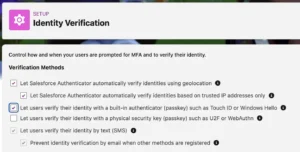
- Open Setup and go to Identity Verification.
- Find Let users verify their identity with a built-in authenticator (passkey) such as Touch ID or Windows Hello and confirm it is enabled.
- Check whether the Built-in Authenticators related list appears on user detail pages.
- Ask users to look for passkey options in their personal settings.
5. Why Can’t I Remove or Replace a User’s Passkey?
Passkeys are tied to the device or password manager where they were registered. After switching devices, browsers, or password managers, an existing passkey may not carry over.
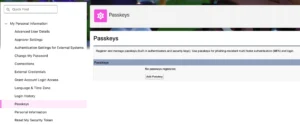
Option 1: User Self-Service
Profile picture → My Personal Information → Passkeys.
Option 2: Admin Assistance
Check the Built-in Authenticators related list on the user record, if the Identity Verification setting is enabled.
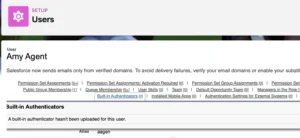
Option 3: Salesforce Support
If the passkey cannot be managed with available controls, contact Support.
Important: Do not delete a verification method until the user has a safe recovery path. For Salesforce Authenticator migration, complete the backup or reconnection process before deleting the app from the old device.
6. Can Organizations Request an MFA Extension from Salesforce?
Organizations needing more time to prepare users and update identity provider configuration may request a temporary extension through Salesforce Support, according to Salesforce Ben. This is not a permanent exemption or guaranteed approval.
How to Fix It
- Identify the affected orgs and user groups.
- Determine whether the requirement is MFA for all employees or phishing-resistant MFA for privileged users.
- Open a Support case describing the extension needed, then follow Salesforce’s timeline.
7. Why Do Passkey Prompts Continue Even After an MFA Extension?
An extension does not necessarily stop all prompts. The result depends on the extension type, whether users are privileged, and your Identity Verification configuration.
| User Category | Relevant Considerations |
|---|---|
| Non-Privileged Users | The MFA For All Employees Extension must cover them, and the direct UI MFA setting must match Salesforce’s instructions. |
| Privileged Users | The Phishing-Resistant MFA (Passkeys) Extension applies; Identity Verification settings shape registration. |
How to Fix It
- Confirm the exact extension Support approved and which users and orgs it covers.
- Review Setup → Identity Verification and the direct UI MFA setting.
- Test with an affected account before changing enforcement settings.
8. Why Is Salesforce Asking for a Passkey When We Already Use YubiKeys?
A hardware key does not guarantee Salesforce received the right authentication information, especially when users sign in through an external identity provider.
How to Fix It
- Confirm whether users sign in directly or through SSO.
- Verify the YubiKey is part of the actual authentication process.
- Review the AMR and ACR values Salesforce receives against the current Authentication Strength Tiers.
- Work with the identity provider team to fix any mismatch.
Authentication problems often start with configuration gaps.
Review your security architecture, identity provider configuration, and user permissions before rolling out changes.
9. Will Salesforce MFA Enforcement Break Existing Integrations?
Impact depends on the authentication flow. Salesforce Ben explains the enforcement targets UI-based employee logins, so API flows without a Salesforce login screen are treated differently.
| Authentication Flow | MFA Consideration |
|---|---|
| JWT Bearer / Client Credentials | API-based, no UI login; not directly targeted by the UI enforcement. |
| OAuth Web Server / Hybrid | Involves a UI login, so applicable MFA requirements apply. |
How to Fix It
- List all Connected Apps and External Client Apps.
- Identify each app’s flow and whether it needs a UI login.
- Test in a sandbox before production rollout.
- Monitor integration failures afterward.
10. Why Am I Suddenly Being Asked for MFA When Exporting Salesforce Reports?
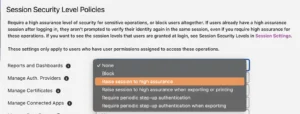
Users may face extra verification on report export even after completing MFA at login. This relates to Step-Up Authentication (Setup → Identity Verification → Session Security Level Policies) and Transaction Security Policies, which apply to qualifying Shield or Event Monitoring setups. Salesforce Ben describes a default policy triggering step-up above 10,000 records.
How to Fix It
- Confirm whether the prompt occurs on viewing or only on export.
- Review Session Security Level Policies and any IP range restrictions.
- Check whether Lock sessions to the IP address from which they originated is enabled.
- If you have Shield or Event Monitoring, review Transaction Security Policies and the permissions needed to manage them.
11. Why Did My Salesforce Health Check Score Suddenly Drop After MFA Changes?
Admins have reported unexpected Health Check score drops around the MFA rollout without any intentional change. Salesforce Ben describes this as a reported false negative with no confirmed general workaround at publication.
How to Fix It
- Open Health Check in Setup and see which settings changed the score.
- Confirm whether any real configuration changes occurred.
- Review Salesforce Known Issues and follow Support guidance if it matches.
12. Why Did Salesforce Data Loader Stop Working After Security Changes?
Data Loader users may hit an unresponsive Verify Your Identity pop-up, which interrupts imports and exports when the version does not handle the current authentication process.
How to Fix It
- Check your installed Data Loader version.
- Upgrade; Salesforce Ben cites version 66 as the minimum for this issue, so verify the latest release first.
- Restart Data Loader and retry authentication.
- Test before large production imports.
13. Why Do I Have to Clear My Browser Cache or Reset My Password Every Morning to Log In?
Salesforce Ben highlights a reported issue where stale Lightning Login sessions conflict with newer passkey and MFA flows. Symptoms include a “contact your administrator” error and failed attempts missing from Login History.
How to Fix It
- Try a private or incognito window, or the password-reset flow.
- Once in, open Advanced User Details and check whether Lightning Login User is enabled via profile or permission set.
- If the issue applies, consider disabling Lightning Login for that user as a troubleshooting step, then monitor.
Frequently Asked Questions about Salesforce MFA Troubleshooting
1. Why is Salesforce asking me to create a passkey?
Salesforce may display a passkey registration prompt when a user has not registered an MFA method. For eligible non-privileged users, an alternative verification method may be available through the Choose Another Verification Method option.
2. Which Salesforce users are required to use phishing-resistant MFA?
The privileged-user requirements discussed in the 2026 guidance include System Administrators and users with permissions such as Modify All Data, View All Data, Customize Application, and Author Apex. Always verify the current Salesforce requirements and the user’s actual permissions.
3. Why does Salesforce ask for MFA when my organization already uses SSO?
Salesforce needs to receive recognized authentication signals from the identity provider. If the SSO assertion does not contain acceptable AMR or ACR values, Salesforce may not recognize the MFA performed at the identity provider.
4. Can standard Salesforce users use an authenticator app instead of a passkey?
Eligible non-privileged users may be able to select an alternative supported verification method, such as Salesforce Authenticator or a supported third-party TOTP application. Availability depends on the applicable Salesforce requirements and configuration.
5. Does Salesforce MFA enforcement affect integrations?
It depends on the authentication flow. The UI-based enforcement discussed in the 2026 guidance treats API authentication flows without a UI login differently from OAuth flows that require users to authenticate through a Salesforce login screen.
SALESFORCE CONSULTING & SECURITY
Need Help Resolving Salesforce Authentication and Security Issues?
MFA issues can affect user access, SSO configurations, integrations, and critical business operations. Kizzy Consulting helps organizations evaluate Salesforce environments, troubleshoot complex configurations, improve integrations, and build secure, scalable Salesforce solutions.