7 Best Practices to Organize CRM Data in 2026
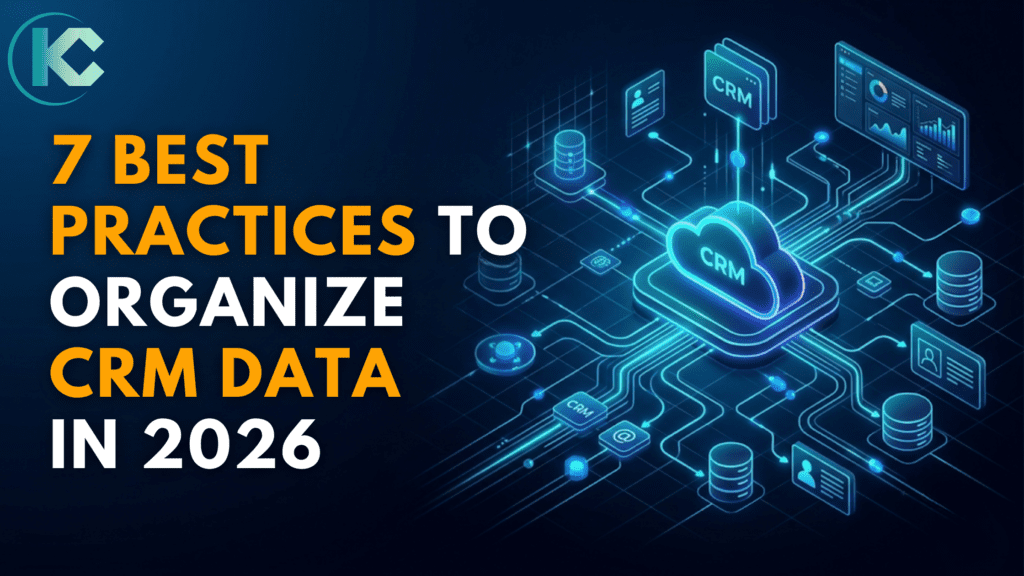
In the age of AI-driven search and answer engines, your CRM data is no longer just a database – it’s the brain of your business.
Cloud CRM platforms like Salesforce help businesses centralize and organize customer data, but the real value comes from implementing CRM data organization best practices.
CRM data organization best practices are the difference between a CRM that drives revenue and one that creates confusion.
If your sales team wastes time hunting for accurate contact details, your marketing automation sends “New Lead” emails to five-year customers, or your AI forecasting is consistently inaccurate – the root cause is almost always disorganized CRM data.
In this guide, we cover seven actionable strategies to improve CRM data quality, reduce data debt, and turn your cloud CRM platform into a genuine competitive advantage in 2026 and beyond.
What Is CRM Data Organization?
CRM data organization is the process of structuring, standardizing, and maintaining customer records within a CRM platform so every team – sales, marketing, and support – works from a single accurate source of truth.
It includes:
- Field standardization
- Deduplication
- Access controls
- Ongoing data governance
When CRM data is organized correctly, teams gain better visibility, automation accuracy, and reliable analytics.
7 CRM Data Organization Best Practices for Cloud CRM
Following CRM data organization best practices ensures that teams can rely on accurate, consistent, and AI-ready customer information.
1. Why CRM Data Organization Is Critical for Business in 2026
In the age of AI-driven search and personalization, dirty CRM data costs businesses money.
Poor CRM data quality leads to:
- Inaccurate AI Forecasts – AI tools like Salesforce Einstein can only deliver accurate predictions when trained on clean historical data. Research shows CRM datasets with 20% incomplete information can skew forecasts by similar margins.
- Automation Failures – Sending onboarding emails to existing customers is a common automation mistake caused by poor lifecycle data.
- Team Misalignment – When departments see different versions of customer records, collaboration breaks down. Clean data is also essential when implementing unified data platforms like Salesforce Data Cloud.
For deeper insights, read our guide:
Salesforce Data Cloud Implementation Do’s and Don’ts
https://kizzyconsulting.com/salesforce-data-cloud-implementation-dos-and-donts/
2. Standardizing CRM Data Entry
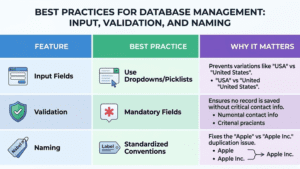
To maintain CRM data quality, organizations must standardize how data enters the system.
Key practices include:
- Make critical fields mandatory (email, industry, lead source)
- Replace free-text fields with picklists
- Define company naming conventions
- Use validation rules to prevent incomplete records
Standardization ensures your CRM remains structured, searchable, and AI-ready.
3. Build a Data Hygiene Lifecycle
Even with perfect data entry standards, CRM data decays naturally. People change jobs. Emails go inactive. Companies merge. Maintaining data quality requires a continuous hygiene process.
Three-Stage Data Hygiene Framework
- AI-Powered Deduplication –Tools like Salesforce Einstein Duplicate Management detect and merge duplicate records automatically. Run deduplication every 30 days.
- Strategic Archiving – Move inactive leads (18+ months) into cold storage lists to keep active datasets clean.
- Real-Time Verification – Use APIs to verify emails and phone numbers as data enters your CRM.
5-Minute CRM Data Audit Checklist
| Audit Check | Status |
| Are critical fields (Email, Source, Industry) set as mandatory? | ☐ Yes ☐ No |
| Is two-factor authentication (2FA) enabled for all CRM users? | ☐ Yes ☐ No |
| Have duplicate records been merged in the last 30 days? | ☐ Yes ☐ No |
| Are picklists used for location, industry, and lead source fields? | ☐ Yes ☐ No |
| Is email and calendar sync active for automatic activity logging? | ☐ Yes ☐ No |
| Has cold storage archiving been run for contacts inactive 18+ months? | ☐ Yes ☐ No |
Pro Tip: If your CRM data is more than 20% “dirty” (missing or incorrect info), your AI sales forecasting will likely be off by a similar margin.
Get a Free Salesforce Audit and uncover what’s holding your growth back.
4. Use CRM Data for Smarter Customer Segmentation
Once your CRM data quality is high, you can unlock one of the platform’s most powerful capabilities: granular customer segmentation. Move beyond basic contact lists and build dynamic segments based on multiple data dimensions.
The Four Segmentation Layers in a Well-Organised CRM:
- Demographics: Age, location, or job seniority.
- Firmographics: Company size, industry, and annual revenue.
- Psychographics: Buying patterns, brand loyalty, and feature preferences.
- Lifecycle Stage: Lead $\rightarrow$ MQL $\rightarrow$ SQL $\rightarrow$ Customer $\rightarrow$ Advocate.
5. CRM Data Security and Compliance
Data organization and security go hand in hand. Protect your CRM’s “Source of Truth” using the following practices:
- Role-Based Access (RBAC): Restrict sensitive financial or personal data to only relevant team members.
- Two-Factor Authentication (2FA): Require additional authentication for all users.
- End-to-End Encryption: Ensure data is encrypted both in transit and at rest.
6. Use Automation and AI for Data Management
CRM data organization and data governance are inseparable. Without security controls, even a perfectly organized CRM becomes a liability. In 2026, with stricter data privacy regulations across global markets, governance isn’t optional.
Key CRM Automation Use Cases:
- Automated lead scoring: Use AI models to rank inbound leads by conversion probability based on demographic fit and behavioral signals – without a rep manually reviewing each one.
- Continuous data cleansing: Set automated rules to flag records missing required fields, standardize formatting inconsistencies, and route suspect records to a review queue.
- Duplicate detection at entry: Prevent duplicates from being created in the first place with real-time matching rules that fire when a new record is saved.
- Predictive analytics: Use historical CRM data to forecast pipeline, identify churn risk, and surface upsell opportunities – only possible with clean, well-structured data.
By leveraging automation, organizations can reduce manual work while improving data accuracy and insights.
7. Prepare Your CRM Data for AI Readiness
In 2026, AI integration is no longer a future consideration – it’s a current competitive requirement. Whether you’re using native AI tools like Salesforce Einstein or connecting third-party models like GPT-4o or Gemini, your CRM must be structured for machine readability.
How to Make Your CRM AI-Ready:
- Assign a unique Customer ID to every record and ensure every touchpoint — emails, support tickets, web interactions, purchase history – is linked to it. This creates a complete, connected data graph for AI analysis.
- Eliminate free-text fields from reportable data: AI models perform significantly better on structured inputs (dropdowns, checkboxes, date fields) than on unstructured text blobs. Reserve free text for notes only.
- Establish a Single Source of Truth (SSOT): Every department must work from one authoritative CRM record. Data silos between sales and support systems, for example, produce conflicting signals that confuse AI models.
- Maintain data freshness: Stale data is as harmful to AI as missing data. Build automated processes to flag and update records that haven’t been touched in 90+ days.
Businesses preparing their CRM for AI integrations should also understand how unified customer data platforms work. Our guide on Salesforce Data 360: The 3 Pillars of Implementation explains how consistency, connectivity, and cost management shape a successful Data Cloud strategy.
Take the 5-minute CRM health check and uncover hidden gaps
Real-World Use Case: University Management with Salesforce
To illustrate what effective CRM data organization looks like at scale, consider this case study from a large U.S. university operating across 55 departments.
The Problem:
The university managed student data across multiple disconnected systems. Admissions, academic records, financial planning, and student services each used separate tools, resulting in duplicate records, inconsistent data, and limited visibility for advisors.
The Solution:
The university implemented Salesforce Education Cloud to centralize and standardize all student data within a single platform. A secure student portal built on Salesforce Experience Cloud gave students direct access to academic and financial information, and enabled two-way communication with advisors.
The Result:
| Outcome | Improvement |
| Data management efficiency | ↑ 20% |
| Speed of student case resolution | ↑ 30% faster |
| On-time task completion rate | ↑ 25% |
| Reduction in defaulting student accounts | ↓ 15% |
This case highlights how organized CRM data can transform complex institutional operations into a streamlined, data-driven ecosystem.
Read the full case study – Salesforce-Powered University Management Solution
Conclusion:
CRM data organization best practices are not a one-time project – they’re an ongoing discipline. By standardizing data entry, enforcing governance controls, running regular data hygiene cycles, and leveraging AI and automation, you transform your CRM from a passive database into an active business intelligence engine.
The companies that will win in 2026 are the ones treating their CRM data as a strategic asset. Start with one practice from this list, measure the impact, and build from there.
Turn Your CRM Data into a Competitive Advantage
FAQs:
Q1. How do I organize customer data for AI readiness?
To prepare for AI (like Gemini or GPT-4o integration), focus on Structured Data. Use clear categories, eliminate duplicates, and ensure every touchpoint – from emails to support tickets – is linked to a unique Customer ID.
Q2. What is a “Single Source of Truth” (SSOT)?
A Single Source of Truth is a state where all departments in a company use the same central CRM record as the final authority on a customer’s status. This prevents data silos and conflicting information between sales and support.
Q3. Should I use free-text fields in my CRM?
No. Free-text fields should be kept to a minimum (reserved for specific “Notes”). For data you want to report on or use in AI analysis, always use structured fields like checkboxes, date pickers, or dropdown menus.
Q4: How often should CRM data be cleaned?
Ideally every 30–60 days, depending on data volume and team size.
Q5: Why are picklists better than free text fields?
Picklists enforce consistent data formatting, which improves reporting accuracy and AI-driven insights.