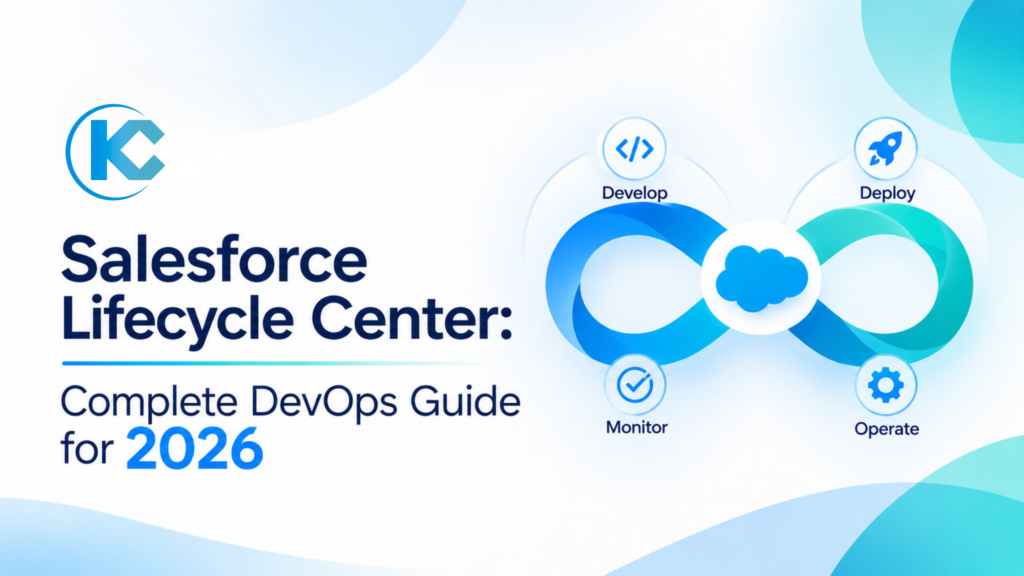
Salesforce Lifecycle Center: Complete DevOps Guide for 2026
⏱ 4 min read
SALESFORCE DEVOPS • LIFECYCLE CENTER • ADMIN GUIDE 2026
Salesforce development is no longer limited to building features inside an org and moving them between environments with change sets. As Salesforce applications become more connected, customized, and business-critical, teams need a structured way to manage changes, track versions, test deployments, and coordinate releases.
Salesforce Lifecycle Center, previously known as Next-Generation DevOps Center, brings change management, release management, source control, AI-assisted workflows, and governance into a native Salesforce experience. This guide explains how it works, why Git and CI/CD matter, how sandbox pipelines fit into the process, and what Salesforce admins and developers should consider before adopting it.
Executive Quick Answer
Salesforce Lifecycle Center is the native platform experience for managing application changes and releases through a structured DevOps process. Formerly called Next-Generation DevOps Center, it helps admins, developers, and release managers coordinate work items, environments, source control branches, deployments, and quality checks. By connecting Salesforce environments to a shared Git repository, teams can track changes, review conflicts, maintain a single source of truth, and move releases through a planned pipeline. It is designed to make Salesforce DevOps more accessible while supporting structured release management and AI-assisted development workflows.
Key Takeaways
Native Salesforce Experience
Lifecycle Center is built into the Salesforce platform and does not require installing the old managed package.
Git-Based Version Control
A shared repository tracks configuration and code changes across development environments.
Structured Release Pipelines
Teams can move work through development, integration, testing, staging, and production environments.
AI and Governance
AI-powered assistance and governance capabilities support conflict resolution and controlled development workflows.
First, What Happened to Salesforce DevOps Center?
Salesforce DevOps Center originally became available as a managed package. It provided a point-and-click interface for managing development work, connecting environments, tracking changes, and promoting releases through a pipeline.
Over time, Salesforce expanded its DevOps capabilities and introduced a native, next-generation experience. This reduced the separation between Salesforce development tools and the broader application lifecycle management process.
There is an important naming update to understand: Salesforce renamed Next-Generation DevOps Center to Lifecycle Center in October 2026. The original managed-package product retains the name DevOps Center (Managed Package).
| Product name | What it means |
|---|---|
| DevOps Center (Managed Package) | The original package-based Salesforce DevOps experience. |
| Next-Generation DevOps Center | The newer native Salesforce experience, before its October 2026 rename. |
| Lifecycle Center | The current name for the native change and release management experience. |
This distinction matters when searching Salesforce documentation, planning a migration, or discussing Salesforce DevOps tools with your team. Some Setup pages and product references may still show the previous name during the transition.
In this guide, Lifecycle Center refers to the native next-generation product. DevOps Center is used when discussing the original managed package or the broader DevOps approach.
Why Salesforce Teams Should Use Sandboxes
A Salesforce sandbox is a copy of a production org that provides a separate environment for development, configuration, testing, and training. It allows teams to validate changes without immediately affecting the live Salesforce environment.
Consider a simple example: a team wants to update a sales process by modifying a Salesforce Flow, adding fields, changing page layouts, and updating automation. Making all these changes directly in production can create unexpected issues for users and connected processes.
A sandbox provides a controlled environment where the team can build the changes, test different scenarios, identify dependencies, and resolve errors before deployment.
Common Salesforce Sandbox Types
| Sandbox type | Typical purpose |
|---|---|
| Developer | Individual development and unit testing. Contains metadata without a production data copy. |
| Developer Pro | Development and integration testing with greater data storage capacity. |
| Partial Copy | Testing and user acceptance activities using a selected subset of production data. |
| Full Copy | Staging, performance testing, and final pre-release validation using a full copy of production data and metadata. |
Sandbox selection depends on the size of the project, the type of testing required, data sensitivity, storage requirements, and available Salesforce licenses.
Important Consideration
A sandbox is not automatically a safe place for unrestricted production data. Apply appropriate data masking, access controls, and security policies when copying or using sensitive information in non-production environments.
Why Salesforce DevOps Matters: From Risky Deployments to Repeatable Releases
Moving a Salesforce change from a development environment into production involves more than transferring metadata. A new field can affect page layouts, permission sets, reports, Flows, integrations, and Apex logic. A change that appears small in isolation can have a wider impact across the org.
Without a structured release process, teams may face incomplete testing, missing dependencies, conflicting changes, deployment failures, and difficulty restoring a previous working version.
Salesforce DevOps brings development and operations practices together to make application delivery more predictable. It establishes repeatable processes for planning, building, reviewing, testing, deploying, monitoring, and improving Salesforce applications.
Understanding Salesforce Application Lifecycle Management (ALM)
Application Lifecycle Management, or ALM, is the process of managing an application from its initial planning and development through testing, deployment, maintenance, and future improvements.
In Salesforce, ALM includes the people, environments, tools, and processes used to manage changes to the platform. It connects business requirements with development work and ensures that updates are tested and released in a controlled way.
1. Plan
Requirements and user stories
2. Develop
Configuration and code
3. Test
Validation and QA
4. Release
Promotion and deployment
5. Operate
Monitor and maintain
6. Improve
Feedback and iteration
ALM is a continuous cycle. Production feedback, new business requirements, platform updates, and technical improvements feed into the next round of planning.
Where CI/CD Fits Into Salesforce ALM
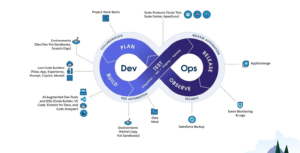
Continuous Integration and Continuous Delivery or Deployment (CI/CD) are practices that automate parts of the application delivery process.
Continuous Integration
Changes are regularly integrated into a shared repository and validated through checks such as builds, tests, and code analysis.
Continuous Delivery
Changes are kept in a release-ready state after passing the required validation and approval stages.
Continuous Deployment
Validated changes are automatically deployed to the target environment when the configured conditions are met.
Not every Salesforce team needs fully automated production deployment. Some organizations require manual approvals, scheduled release windows, or additional compliance checks. The right CI/CD approach depends on the organization’s release risk and governance requirements.
How a Salesforce Sandbox Pipeline Works
A Salesforce deployment pipeline organizes environments into stages. Changes move through the pipeline after they meet the validation and approval requirements for each stage.
A practical pipeline may include five stages. The exact design should reflect the team’s size, application complexity, release frequency, and testing requirements.
| Pipeline stage | Typical environment | Purpose |
|---|---|---|
| Development | Developer sandbox or scratch org | Build individual features, configure components, and perform initial testing. |
| Integration | Developer Pro sandbox | Combine work from multiple developers and validate dependencies and compatibility. |
| UAT | Partial Copy sandbox | Allow business users to validate requirements, workflows, and usability. |
| Staging | Full Copy sandbox | Perform final release validation and production-like testing. |
| Production | Production org | Deploy approved changes for live business use. |
What Is Salesforce Lifecycle Center?
Salesforce Lifecycle Center is a native application lifecycle and release management experience that helps teams coordinate changes across Salesforce environments and source control.
It provides a central interface for managing work items, connecting environments, organizing development branches, tracking changes, and promoting releases. It is designed to support both declarative development by Salesforce admins and programmatic development by engineers.
In simple terms
Lifecycle Center helps Salesforce teams coordinate what is changing, who is working on it, where the changes are stored, how they are tested, and when they are ready to move to the next environment.
Rather than relying on disconnected deployment methods, teams can use a shared release workflow that connects work items, Git version control, Salesforce environments, and quality checks.
Salesforce Source Control and Git Fundamentals
Source control, also called version control, records how files change over time. In Salesforce development, it helps teams track metadata and code, compare versions, review contributions, and coordinate work across multiple developers and environments.
Git is a widely used distributed version control system. Platforms such as GitHub and Bitbucket provide hosted repositories and collaboration features that teams can use alongside their Salesforce development workflows.
Important Git Terms for Salesforce Teams
Repository
The central location where project files, metadata, code, and change history are stored.
Branch
An isolated line of development where a team member can work without directly changing the main branch.
Commit
A recorded snapshot of changes made to project files.
Pull Request
A request to review and merge changes from one branch into another.
Merge
The process of combining changes from different branches.
Conflict
A situation where overlapping changes need to be reviewed and reconciled before they can be combined.
How Git Fits Into a Salesforce Project
- A developer or admin receives a work item, such as a feature request or bug fix.
- The team creates or uses a feature branch for that work.
- Changes are made in a Salesforce sandbox, scratch org, IDE, or supported development tool.
- The completed changes are committed to the branch.
- The team reviews the proposed changes through its pull request or approval process.
- Approved changes are merged into the shared branch.
- The release workflow promotes the changes to the next environment.
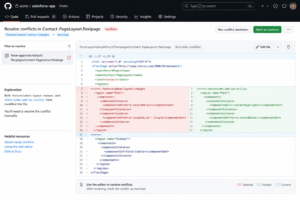
Salesforce metadata is represented in files such as XML, JSON, HTML, and other source formats. These files are organized within a Salesforce DX project structure so they can be tracked and managed using source control.
How Salesforce Lifecycle Center Handles Merge Conflicts
Merge conflicts are a normal part of collaborative development. They do not necessarily indicate that something is wrong with Salesforce or Git. They mean that changes from different contributors need to be reviewed before they can be combined safely.
For example, an admin may update the fields displayed on a record page while a developer adds a Lightning Web Component to the same page. If both branches modify the same metadata file, the team may need to reconcile those changes.
Frequently Asked Questions About Salesforce Lifecycle Center
1. What is Salesforce Lifecycle Center?
Salesforce Lifecycle Center is the native Salesforce experience for managing application changes and releases. It supports work item management, source control, environment pipelines, testing, governance, and AI-assisted development workflows.
2. Is Lifecycle Center the same as Salesforce DevOps Center?
Lifecycle Center is the new name for Next-Generation DevOps Center, the native platform experience. The original package-based product remains known as DevOps Center (Managed Package).
3. When was Next-Generation DevOps Center renamed to Lifecycle Center?
Salesforce announced the name change in October 2026, with the rollout beginning September 28, 2026. Some orgs may continue to display the previous name during the transition.
4. Does Salesforce Lifecycle Center require a managed package?
No. Lifecycle Center is built on the Salesforce platform and is accessed as a native application. The original DevOps Center managed package is a separate product experience.
5. Does Salesforce Lifecycle Center use Git?
Yes. Lifecycle Center uses source control as the shared source of truth for project changes. Teams use repository branches and commits to track, review, and coordinate development work.
6. Can Salesforce admins use Lifecycle Center without coding?
Lifecycle Center provides a point-and-click interface intended to make release management more accessible to admins and other team members. Users still need to understand their organization’s work item, source control, testing, and release processes.
7. What is the difference between Salesforce DevOps and CI/CD?
DevOps is the broader set of practices that connects development and operations. CI/CD refers to practices for integrating, validating, and delivering or deploying changes through automated workflows.
SALESFORCE CONSULTING & IMPLEMENTATION
Need Help Building a Reliable Salesforce DevOps Strategy?
A successful Salesforce DevOps process requires more than a deployment tool. Your team needs the right environment strategy, source control practices, release pipeline, testing approach, and governance model.
Kizzy Consulting helps organizations plan and improve Salesforce implementations, integrations, automation, and enterprise platform architecture. We can help you evaluate your current release process and identify practical ways to make Salesforce development more structured, scalable, and reliable.