Salesforce Field Service Lightning Functional Data Model [2026]
In our previous article, we explored the capabilities of Salesforce Field Service and how it transforms service operations.
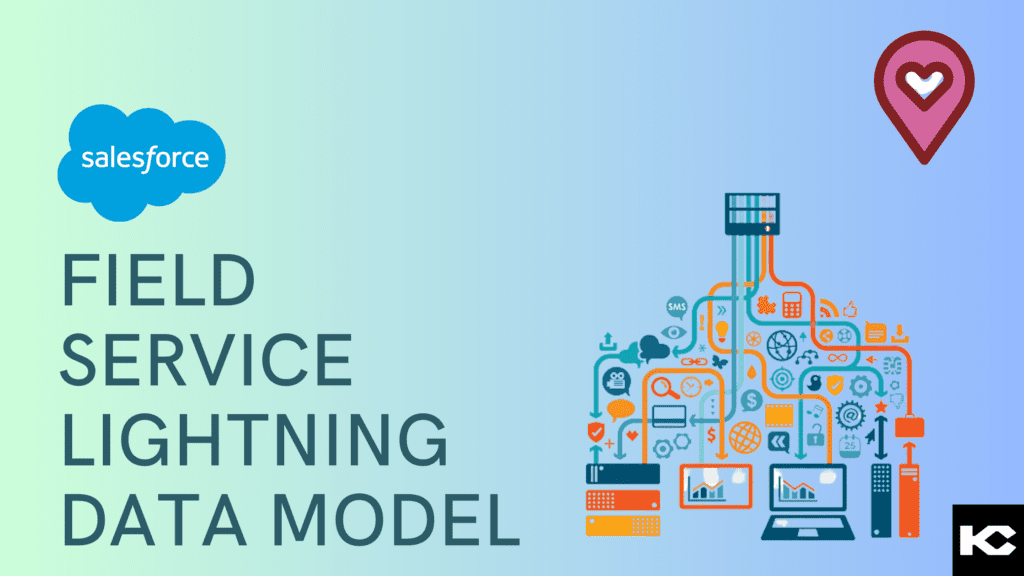
In this guide, we break down the Salesforce Field Service Lightning Functional Data Model (2026) – the architecture that powers scalable, intelligent field service execution.
If you’re looking to understand how Salesforce FSL works, this article gives you a clear, structured view of the FSL data model, objects, and architecture.
Contents
hide
Salesforce Service Life Cycle
To understand the service cloud data model of Salesforce FSL and to get a complete gist of the system, let us first walk through a brief demonstration of the Salesforce Service Cycle.
Salesforce Service Cloud is implemented for catering to the service industry.
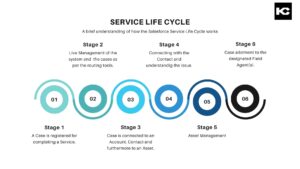
At the core of Salesforce Service Cloud, every service request begins with a Case.
With Field Service Lightning (FSL), this lifecycle extends into real-world operations through a structured flow:
Case → Work Order → Service Appointment
This is the foundation of the Salesforce FSL data model.
- Case – Captures the customer issue
- Work Order – Defines the required service task
- Service Appointment – Schedules and executes the field visit
This Case to Work Order to Service Appointment flow in Salesforce ensures every request becomes an actionable task.
Salesforce Field Service Lightning Data Model Explained
The Salesforce Field Service Lightning Functional Data Model is designed to connect planning, scheduling, and execution.
1. Work Order Object (Salesforce)
The Salesforce Work Order object defines:
- Scope of work
- Priority
- Required skills
It acts as the operational layer between Case and execution.
2. Service Appointment (Salesforce)
The Service Appointment object in Salesforce represents the scheduled visit.
It includes:
- Date and time
- Location
- Assigned technician
This is where field service scheduling in Salesforce happens.
3. Service Resources
Service Resources in Salesforce FSL are the field technicians.
They are configured based on:
- Skills
- Availability
- Territory
This enables intelligent resource allocation in Salesforce Field Service.
4. Service Territories & Operating Hours
Service Territories in Salesforce define where services are delivered.
Operating Hours ensure:
- Time zone alignment
- Business hour constraints
This supports constraint-based scheduling in Salesforce FSL.
5. Dispatcher Console (Salesforce FSL)
The Dispatcher Console in Salesforce Field Service Lightning is the control center for operations.
Dispatchers use it to:
- Assign Service Appointments
- Optimize routes and schedules
- Manage real-time field activity
This is key to Salesforce Field Service scheduling and dispatching.
End-to-End Salesforce Field Service Process Flow
Here’s how the Salesforce Field Service data model works in practice:
- A Case is created in Salesforce Service Cloud
- A Work Order is generated
- A Service Appointment is scheduled
- A Service Resource is assigned
- The field job is completed
- The Work Order and Case are closed or escalated
This structured flow enables:
- Faster service resolution
- Optimized workforce utilization
- Real-time service tracking
Salesforce Field Service Lightning Setup
To enable the Salesforce Field Service Lightning architecture, organizations must:
- Install the FSL Managed Package
- Configure Field Service Lightning Setup
- Assign FSL Permission Sets
- Set up Service Territories, Resources, and Operating Hours
This ensures a complete Salesforce Field Service configuration ready for execution.
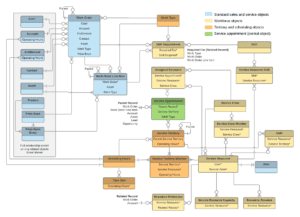
Field Service Lightning Data Model
Why the Salesforce Field Service Data Model Matters in 2026
With the rise of AI in Field Service and Agentforce, the Salesforce Field Service 2026 architecture is evolving rapidly.
A well-implemented FSL data model enables:
- Intelligent scheduling and automation
- Scalable field service operations
- AI-driven service optimization
- Seamless integration with Salesforce ecosystem
This is why understanding the Salesforce Field Service Lightning Functional Data Model is critical for modern service organizations.
Salesforce Field Service Lightning Permissions and Configuration
Post-installation, we enable the Permissions in the Salesforce Field Service App.
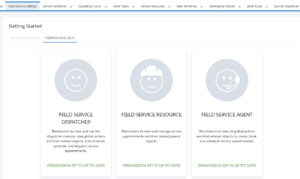
Once enabled, these permissions are applied to our users in the form of permission sets as per the job requirement. For instance, we give our dispatchers access to the Dispatch Console while a Field Agent (Service Resource) gets access to the field service app.
Unleashing the Power of Salesforce: Exploring the Need for Custom Development
Dispatcher Service and Appointment Completion
Do you recall how FSL had a dispatcher console and resource management capabilities in our earlier article? The Dispatcher controls the Service Resources, Operating Hours, and Service Territories using the Dispatcher Console.
In Salesforce FSL, Dispatcher creates a Work Order on the basis of the related Case. The Work Order leads to Service Appointment creation. The Service Appointment is the final record containing information about the Case. Service Appointment determines the Date, time, and Location of the Service Appointment. While this happens, a different story unfolds in another area of FSL.

Service Appointment is connected with Service Territories, Operating Hours, and Service Resources. Operating Hours for Service Territories are configured based on time zones. Service Resources complete the assigned Service Appointments within their operating hours and in their respective service territories. Service Appointments completion leads to the closing of a work order.
Once the field servicing work is completed, the system either closes the case or escalates it. This streamlined process ensures that all service requests are addressed in a timely and efficient manner. Salesforce FSL also offers robust scheduling and dispatching capabilities, enabling businesses to optimize their resources and respond quickly to customer needs.
Hope this technical approach helps in better understanding the Salesforce FSL. Stay Tuned for more such techno-literary pieces!
FAQ Section
1. What is Salesforce Field Service Lightning (FSL)?
Salesforce Field Service Lightning (FSL) is a field service management solution that helps businesses manage scheduling, dispatching, and field operations using Salesforce.
2. What are the key objects in the Salesforce FSL data model?
The main Salesforce FSL objects include:
- Case
- Work Order
- Service Appointment
- Service Resource
- Service Territory
3. How does the Salesforce Field Service data model work?
The Salesforce Field Service data model works through a structured flow:
Case → Work Order → Service Appointment → Resource Assignment → Job Completion
4. What is the role of the Dispatcher Console in Salesforce FSL?
The Dispatcher Console is used to assign, schedule, and optimize service appointments, ensuring efficient field operations.
5. Why is the FSL data model important?
The FSL data model enables:
- Efficient scheduling
- Real-time tracking
- Scalable service operations
- AI-driven automation in 2026
Need help with the Salesforce Field Service Lighting Implementation for your Business?
Kizzy Consulting
Kizzy Consulting is a Salesforce Consulting Partner based in Panchkula, India. Kizzy has successfully implemented 100+ Salesforce projects for 100+ clients across sectors like Financial Services, Insurance, Retail, Sales, Manufacturing, Real estate, Logistics, and Healthcare in countries like the US, Europe, Germany, and Australia. Get a free consultation now by emailing us at [email protected] or Contact us.