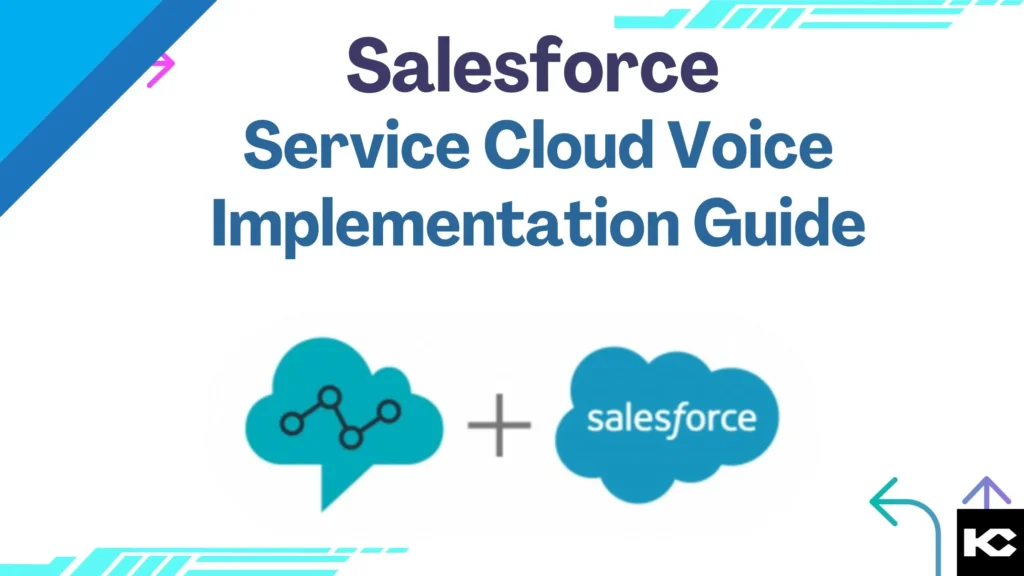
Salesforce Service Cloud Voice Implementation Guide [2026]
⏱ 5 min read
Salesforce Service Cloud Voice Guide 2026
Build a unified customer service experience by connecting voice, digital channels, CRM data, and AI in Salesforce.
Learn the benefits, implementation timeline, setup process, pricing estimates, and real troubleshooting strategies for Service Cloud Voice.
By Sanjeet Mahajan, CEO & Founder, Kizzy Consulting
Executive Quick Answer
Salesforce Service Cloud Voice brings voice communications natively into the Salesforce Service Console. By fully integrating telephony (like Amazon Connect) with your CRM data, omnichannel routing, transcription, and AI-powered insights, it allows your service team to manage all customer interactions from a single, unified workspace.
01
Unified Voice
Calls inside Salesforce
02
AI Insights
Real-time intelligence
03
Transcription
Capture conversations
04
Omni-Channel
Connect every channel
Contents
hide
Service Cloud Voice vs. Agentforce Voice
A common point of confusion is how Service Cloud Voice differs from the newly introduced Agentforce capabilities.
- Service Cloud Voice focuses on integrating enterprise voice capabilities and telephony infrastructure (like Amazon Connect) natively into the Salesforce UI for human agents.
- Agentforce Voice focuses on autonomous AI agents conducting conversational, generative voice interactions directly with customers.
Looking to add autonomous AI-powered voice interactions to your contact center? Explore our complete Agentforce Voice Agent Setup Guide to see how AI can resolve customer issues automatically.
Understanding Service Cloud Voice: Key Benefits and Features
Salesforce Service Cloud Voice integrates telephony with Salesforce Service Cloud, allowing service teams to manage calls and customer information within the same environment. The solution can work with Amazon Connect to deliver an AI-driven voice experience directly inside the Salesforce Service Console.
Unified Agent Experience
Give agents access to calls, chats, cases, customer information, and service workflows from one Salesforce workspace.
Real-Time Transcription
Automatically capture conversations as they happen so agents and supervisors have better context during and after calls.
AI-Powered Insights
Use Salesforce AI capabilities to support recommendations, next-best actions, sentiment analysis, and agent productivity.
Intelligent Call Routing
Route calls based on agent skills, availability, customer requirements, and workload to improve service efficiency.
Service Cloud Voice vs. Other Telephony Solutions
| Feature / Capability | Legacy Telephony | Generic Cloud CCaaS | Service Cloud Voice |
|---|---|---|---|
| CRM Data Integration | ✕ Siloed | ~ Manual sync | ✓ Native / real-time |
| Real-Time Call Transcription | ✕ Not available | ~ Add-on | ✓ Available |
| AI Agent Assist | ✕ | ~ Third-party | ✓ Salesforce AI |
| Omni-Channel Routing | ✕ Voice only | ~ Varies | ✓ Voice + digital |
| Amazon Connect Integration | ✕ | ~ Custom | ✓ Supported |
| Sentiment Analysis | ✕ | ~ Add-on | ✓ AI-enabled |
| Agent Scripting | ~ Basic | ~ Basic | ✓ CRM-aware |
| Enterprise Scalability | ✕ Hardware-bound | ✓ Cloud-native | ✓ Cloud + CRM |
Planning Your Service Cloud Voice Implementation?
Get guidance on Salesforce architecture, Service Cloud configuration, integrations, and deployment planning.
Pre-Implementation Planning
Effective planning is essential for a smooth Service Cloud Voice rollout. Before configuration begins, establish clear objectives, understand your current telephony environment, and involve the right stakeholders.
01. Define Objectives
Identify goals such as improving agent productivity, reducing handling time, increasing first-contact resolution, or improving customer satisfaction.
02. Assess Current Telephony
Review your existing phone systems, workflows, call routing, recordings, integrations, and processes that need to be retained or replaced.
03. Involve Stakeholders
Bring IT, customer service, sales, operations, security, and other stakeholders into the planning process early.
04. Plan Security & Compliance
Review data access, recording policies, storage requirements, and applicable regulations such as GDPR or HIPAA.
Salesforce Service Cloud Voice Pricing
Understanding Service Cloud Voice pricing is important for budgeting and ROI planning. Your overall cost can depend on licensing, voice usage, Amazon Connect infrastructure, storage, transcription, AI capabilities, and implementation requirements.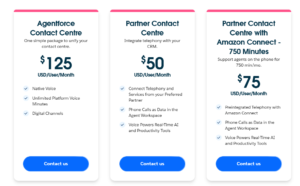
Important:
Pricing can vary based on Salesforce licensing, contract terms, voice usage, Amazon Connect services, storage, AI capabilities, and implementation scope. Confirm current pricing directly with Salesforce before budgeting.
Pricing can vary based on Salesforce licensing, contract terms, voice usage, Amazon Connect services, storage, AI capabilities, and implementation scope. Confirm current pricing directly with Salesforce before budgeting.
Additional Service Cloud Voice Cost Factors
Amazon Connect Infrastructure
Additional AWS costs may apply depending on contact flows, recording, storage, workforce management, and other services.
Call Recording & Storage
Recording retention and Amazon S3 storage requirements can influence the total cost of a voice deployment.
Transcription at Scale
High call volumes can increase processing requirements and make transcription architecture and optimization more important.
AI Enhancements
Advanced AI features, custom models, bots, and additional automation may require separate investments.
How to Implement Service Cloud Voice (Technical Setup)
A successful Service Cloud Voice implementation requires precise configuration between Salesforce, your telephony environment, and Omni-Channel. Here is the technical breakdown of how we execute the setup.
Step 1: Acquire Licenses and Assign Permissions
- Confirm your intended users are provisioned with the Service Cloud Voice add-on license.
- Navigate to Setup → Permission Sets.
- Assign the Contact Center Agent and Contact Center Admin permission sets to the respective users.
- Verify access: Log in as a test agent to confirm the Omni-Channel utility widget displays the voice/phone controls.
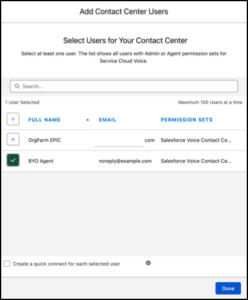
Permission Set Assignments highlighting the “Contact Center Agent” permission set
Step 2: Configure the Contact Center
- Navigate to Setup → Voice → Amazon Setup (or Partner Telephony).
- Follow the guided wizard to spin up a new Amazon Connect instance, or link your existing Amazon Connect instance via single sign-on (SSO).
- Import your agents into the Contact Center definition so Salesforce and your telephony provider recognize the exact same user IDs.
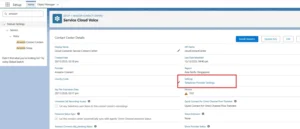
Salesforce Setup → Voice → Contact Centers showing a mapped Amazon Connect instance
Step 3: Customize Omni-Channel Routing
- Navigate to Setup → Omni-Channel → Routing Configurations.
- Create routing configurations specifically mapped to your Voice channels.
- Establish Presence Statuses (e.g., “Available for Voice”, “On Break”) and map these statuses to your telephony provider so state is synced in real-time.
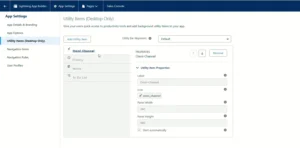
Omni-Channel Presence Status mapping interface
Step 4: Configure Call Routing Flows (Amazon Connect)
- Open the Amazon Connect console via the AWS portal.
- Design your Contact Flows (IVR prompts, press 1 for Support, etc.).
- Embed the Invoke AWS Lambda function block to trigger the generation of a VoiceCall record in Salesforce before the call rings to the agent.
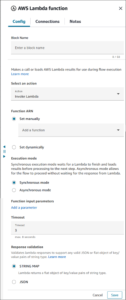
Amazon Connect visual contact flow editor showing a Salesforce Lambda integration block
Step 5: Enable Real-Time Transcription & AI
- Navigate to Setup → Einstein for Service.
- Enable Real-Time Call Transcription and Next Best Action.
- Configure the VoiceCall record page layout in the Lightning App Builder to include the “Conversation” component, allowing agents to see live transcripts as they speak.
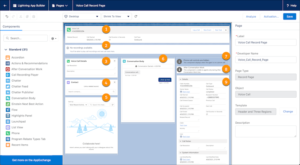
Lightning App Builder showing the Conversation component dragged onto the VoiceCall layout
Step 6: Validate the End-to-End Flow
-
- Test inbound routing: Dial the test number and confirm the IVR routes accurately based on agent state.
- Validate data: Check that the VoiceCall record successfully attaches to the relevant Contact or Case.
- Confirm that the call recording and transcript appear on the Salesforce record after the call is disposed.
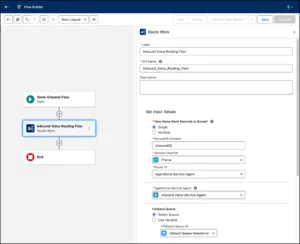
Service Console + Omni-channel + active voice interaction
Customizing Service Cloud Voice for Your Business
Once the initial integration is complete, customize Service Cloud Voice around your actual service workflows and agent experience.
Service Console
Display customer history, cases, call information, and relevant records in one workspace.
Agent Scripts
Guide agents through common scenarios and complex conversations with consistent workflows.
Data Capture
Capture call disposition, customer sentiment, outcomes, and other business-specific information.
Call Recording
Configure recording and storage according to business, security, and compliance requirements.
Need Help Optimizing Service Cloud Voice?
Get help with Salesforce integrations, Service Cloud optimization, voice workflows, and ongoing support.
Testing and Training
Testing and training are critical before moving Service Cloud Voice into production. A controlled pilot helps identify routing, integration, usability, and AI-related issues before they affect customers.
Run Pilot Tests
Start with a small group of agents and test routing, transcription, integrations, and overall usability.
Scenario-Based Testing
Simulate different customer scenarios to validate call flows, routing rules, data capture, and AI recommendations.
Train Agents & Supervisors
Provide role-specific training covering calls, transcription, workflows, dashboards, and data security.
Gather Feedback
Use agent and supervisor feedback to refine the experience before the production launch.
Case Study: Migrating from Legacy CTI to Native SCV
One of the main benefits of working with an implementation partner is avoiding architectural pitfalls. Here is a genuine Service Cloud Voice scenario we recently resolved for a client looking to modernize their call center.
The Problem
A client previously managed their call center using a standalone Amazon Connect setup linked to Salesforce via a standard Open CTI adapter. While agents could receive calls, the data was heavily fragmented. Call recordings, transcripts, and duration metrics were siloed in Amazon Connect, requiring supervisors to leave Salesforce to run reports. Furthermore, agents were experiencing duplicate screen pops because the legacy CTI and Salesforce Omni-Channel were competing for the interaction.
Our Investigation
- Call Center Definitions: We checked the Salesforce Call Centers setup and found the legacy Open CTI adapter was still active and intercepting the payload.
- Data Architecture: We investigated how calls were logged. The legacy setup was logging basic Task records instead of native VoiceCall records, meaning Salesforce couldn’t attach rich transcription data.
The Fix & Validation
We completely decoupled the old Open CTI configuration. We then provisioned the native Service Cloud Voice with Amazon Connect environment. We mapped the AWS Lambda functions so that Amazon Connect dynamically generated a native VoiceCall object inside Salesforce before the call rang.
The Result: Agents now answer calls directly from the native Omni-Channel utility bar. Every interaction automatically pops the relevant Customer record, and all data—including call duration, recordings, and real-time transcripts—is stored natively in Salesforce, allowing the client to run unified CRM dashboards without ever logging into AWS.
Service Cloud Voice Implementation Timeline
“How long does it take?” is the most common question we hear. Based on Kizzy Consulting’s delivery experience, timelines vary based on your existing infrastructure, integrations, and AI requirements.
| Implementation Scope | Typical Timeline | What’s Included |
|---|---|---|
| Basic Deployment | 4 – 6 Weeks | Core telephony connection, user setup, basic queues, screen pops, and standard Omni-Channel routing. |
| Standard (Voice + Routing) | 6 – 10 Weeks | Custom IVR flows, skill-based routing, CRM workflow automations, and supervisor dashboards. |
| Enterprise (Voice + AI) | 12 – 16+ Weeks | Real-time transcription, Einstein Next Best Action, complex third-party system integrations, and multi-region deployments. |
Launching Service Cloud Voice
- Announce the launch: Communicate the rollout timeline, training resources, and support channels to all relevant teams.
- Monitor performance: Track call handling time, customer satisfaction, agent productivity, routing performance, and other relevant KPIs.
- Provide ongoing support: Give agents and supervisors a clear path to report issues and request help during the early rollout.
- Encourage continuous feedback: Use frontline feedback to identify opportunities for workflow, routing, and AI optimization.
Measuring Success and Optimization
Service Cloud Voice optimization doesn’t stop after launch. Regularly review performance data, agent feedback, customer outcomes, and operational requirements.
Customer Satisfaction
Monitor satisfaction trends and identify service workflows that require improvement.
Optimize AI
Refine AI recommendations and next-best actions using agent feedback and performance data.
Scale Gradually
Expand agents, queues, routing options, and digital channels as business requirements grow.
For organizations connecting Service Cloud Voice with other enterprise systems, Salesforce Integration Services can help create secure data flows between Salesforce, telephony platforms, ERP systems, APIs, and other business applications.
Frequently Asked Questions about Salesforce Service Cloud Voice Implementation:
What is Service Cloud Voice?
Service Cloud Voice is a Salesforce product that natively integrates telephony (like Amazon Connect) into the Salesforce Service Console. It unifies voice calls, digital channels, CRM data, and call transcriptions into a single workspace for agents.
Can we use our existing telephony provider with Service Cloud Voice?
Yes. Salesforce offers “Service Cloud Voice with Partner Telephony” (Bring Your Own Telephony), allowing you to integrate existing systems like Five9, Genesys, or Avaya, provided they offer a compatible AppExchange connector.
How long does Service Cloud Voice implementation take?
A basic deployment generally takes 4 to 6 weeks. More advanced deployments involving custom AWS Lambda integrations, complex IVR routing, and Einstein AI transcription usually take 8 to 16 weeks.
Does Service Cloud Voice automatically record and transcribe calls?
Yes, if configured. SCV can securely capture call recordings and generate real-time transcriptions, making it easier for agents to review conversations and triggering AI for Next Best Action recommendations.
Conclusion
Salesforce Service Cloud Voice Implementation helps organizations create a seamless customer service environment by bringing telephony, CRM data, and AI into a unified workflow.
The key to a successful implementation is working with a partner who understands both the Salesforce platform architecture and the underlying telephony infrastructure. Proper planning, correct Omni-Channel mapping, rigorous UAT testing, and dedicated training are what separate a frustrating deployment from a transformative one.
Build a Smarter Customer Service Experience
With the right implementation strategy, Service Cloud Voice becomes a powerful foundation for connected, AI-enabled customer service operations.
Ready to Implement Service Cloud Voice?
Get expert help with Salesforce implementation, Amazon Connect integration, Service Cloud Voice configuration, AI enablement, and ongoing optimization.
Prefer email? Reach us at [email protected]